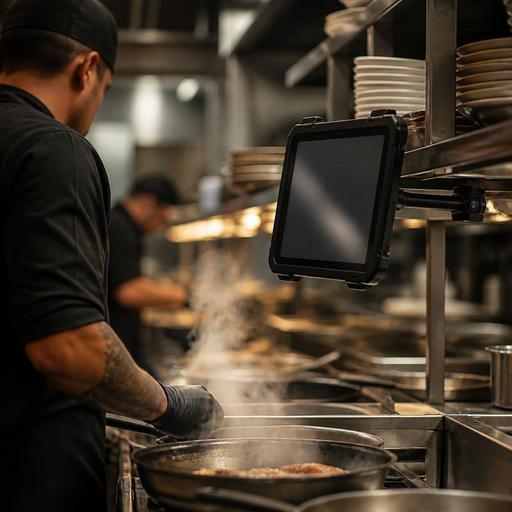
Choosing Kitchen Screens for Hot, Steamy, High-Volume Restaurant Lines
Choosing kitchen screens for hot, steamy, high-volume restaurant lines is not just a hardware decision. It affects speed, ticket visibility, staff confidence, cleaning routines, and how reliably your kitchen display setup performs during the busiest hours. In many restaurants, a screen that looks fine in a showroom fails quickly once it faces fryer heat, steam from the pass, grease in the air, and nonstop touches from a rushed team. That is why restaurant owners need to evaluate kitchen screens in the real conditions of service, not only by price or screen size.
Start with the kitchen environment, not the product brochure
The best screen for a pastry prep station may be completely wrong for a grill line or dish-adjacent expo area. Before comparing models, map where each screen will actually live. Look at nearby heat sources, steam release points, splash zones, cleaning practices, and how often staff will touch the device with dry hands, wet hands, or gloved hands.
For example, a screen mounted near a charbroiler may deal with constant radiant heat, while a screen by a dumpling steamer may struggle more with condensation and visibility. A pizza kitchen may create flour dust and fast repeated taps, while a busy cafe hot line may create milk steam, syrup residue, and frequent menu changes. These are different operational realities, and they should shape your buying criteria.
Walk the line during peak service and ask practical questions:
- Can staff read the screen from their normal working position without leaning in?
- Is the mounting point exposed to direct heat, steam bursts, or splashing oil?
- Will the screen be touched constantly, or mostly viewed from a distance?
- How will it be cleaned between shifts and at close?
- What happens if one screen goes down during service?
This step prevents a common mistake: buying a generic office display and expecting it to survive a production kitchen.
Focus on durability features that matter in real service
Restaurant owners often hear broad claims like commercial grade or built for hospitality. Those phrases are not enough on their own. What matters is whether the screen can tolerate the combination of heat, moisture, grease, vibration, and repeated use that your kitchen creates every day.
Look closely at the following areas:
Heat tolerance and placement flexibility
A screen does not need to sit inside extreme heat to suffer from it. Even indirect exposure can shorten lifespan, dim the display, or trigger random shutdowns. Ask vendors about recommended operating conditions and whether the screen is intended for back-of-house use. Then compare that with your actual line layout. If your only available mounting point is close to a salamander or fryer bank, you may need a different enclosure, a heat shield, or a revised placement plan.
Moisture and grease resistance
Steam and airborne grease are often more damaging than occasional spills. Moisture can fog surfaces, affect touch response, and build up around ports or seams. Grease can make screens harder to clean and reduce visibility over time. Prioritize models and mounts that are easier to wipe down, with fewer exposed gaps where residue collects.
Touch performance under pressure
In a kitchen, touch response has to be predictable. Staff should not need multiple taps to bump an order or open a ticket. If team members wear gloves, move quickly, or use damp hands, test whether the screen still responds accurately. A small touch delay may sound minor, but during a rush it creates frustration and slows the line.
Brightness and readability
Glare from pass lights, changing daylight, or reflective stainless surfaces can make weak displays hard to read. Choose screens with clear brightness and contrast so cooks can scan tickets quickly. If staff must step closer every time they check modifiers, the screen is already costing seconds.
Mounting strength and cable protection
A durable screen still fails if it is mounted poorly. In heavy-use kitchens, vibration, accidental knocks, and constant cleaning can loosen brackets or stress cables. Use sturdy mounts, protect power and network connections, and avoid cable routes that cross active prep zones.
Match screen choice to each station's workflow
Not every kitchen station needs the same screen. One of the most practical ways to improve reliability is to choose based on task, not standardize blindly across the whole kitchen.
Consider these examples:
- Expo station: Needs strong readability, quick ticket scanning, and enough space to manage multiple orders at once.
- Grill or saute station: Needs high durability, simple touch actions, and visibility from a slight distance.
- Prep or dessert station: May need less ruggedness than the hot line, but still benefits from easy cleaning and stable mounting.
- Drink or cafe station: Needs resistance to steam, splashes, and frequent item status changes.
This is where software and hardware planning should meet. If your menu routing sends modifiers, allergy notes, or timing instructions to specific stations, the screen must display that information clearly at the speed your team needs. A good digital workflow is weakened if the hardware makes information harder to act on.
Platforms like Restomas can support this process by helping operators organize digital menus, route orders clearly, and keep item data consistent across service channels. That makes it easier to evaluate what each station truly needs to see on screen, instead of guessing.
Test for cleaning, maintenance, and replacement before you buy
A kitchen screen is not a one-time purchase. It becomes part of your daily operating routine. If it is difficult to clean, awkward to reset, or hard to replace, the problem will show up during service.
Before committing, create a short evaluation checklist:
- Watch the screen during an actual busy period or simulate one.
- Test visibility with steam, glare, and staff movement.
- Have team members tap through common actions wearing normal kitchen gloves.
- Review how the unit will be cleaned without damaging ports, edges, or mounts.
- Confirm whether spare units, mounts, or cables are easy to source.
- Plan what staff should do if the screen freezes or goes offline mid-shift.
Also think about replacement time. If a screen fails on a Friday lunch rush, can you swap it quickly, or will the whole station fall back to verbal calls and paper notes? Restaurants often underestimate the value of standard connectors, accessible mounts, and a simple backup plan.
In multi-unit operations, screen consistency matters too. If each location uses a different setup, training and troubleshooting become harder. Standardizing the parts that truly matter, while still adapting to each kitchen's hot spots, usually creates the best balance.
Make the final decision based on total operational fit
The right kitchen screen is the one that stays readable, responsive, and cleanable through repeated hard service. Cost matters, but the cheapest option becomes expensive if it slows cooks, fails early, or creates avoidable confusion on the line.
As you compare options, weigh the full picture:
- Environment fit: Can it handle your actual heat, steam, and residue conditions?
- Workflow fit: Does the size and touch behavior support the station's task?
- Maintenance fit: Can your team clean and support it easily?
- System fit: Does it work smoothly with your kitchen display and order-routing setup?
- Recovery fit: Do you have a backup plan if it fails during service?
A practical buying process often starts with one pilot station. Test the screen where conditions are toughest, collect staff feedback, and refine the setup before expanding. That approach gives you better answers than relying on catalog language or a quick demo in a quiet room.
Kitchen screens are most valuable when they disappear into the workflow. Cooks should trust them, read them instantly, and move without hesitation. If the hardware holds up under heat, steam, and heavy use, your digital kitchen system has a much stronger chance of improving speed and consistency across service.
If you are reviewing your kitchen workflow, Restomas can help connect digital menus, order flow, and back-of-house operations in a way that supports clearer service decisions.
