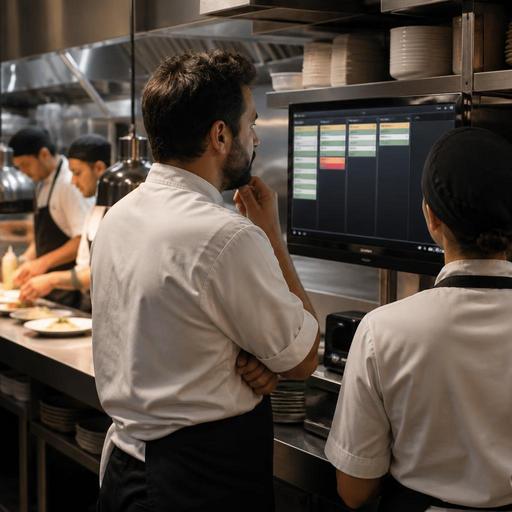
Color-Coded Kitchen Order Tracking to Reduce Restaurant Mistakes
Color-coded kitchen order tracking can turn a chaotic service into a more controlled, readable workflow. In busy restaurants, many mistakes do not come from lack of effort. They come from overloaded screens, rushed verbal updates, unclear ticket priority, and handoff confusion between front of house, kitchen, and delivery stations. A practical color system helps teams recognize order status faster, spot exceptions earlier, and reduce the small communication gaps that lead to remakes, missed modifiers, late dishes, and frustrated guests.
For restaurant owners and operations managers, the value of color coding is not visual decoration. It is operational clarity. When every team member can understand order state at a glance, they spend less time interpreting tickets and more time executing correctly. The result is a smoother line, cleaner station coordination, and a better guest experience without adding unnecessary complexity.
Why kitchen mistakes happen during busy service
Most service errors follow a familiar pattern. Orders arrive from different channels, modifiers are buried in long ticket text, and priorities shift quickly as dine-in, pickup, and delivery compete for attention. If the kitchen display or printed ticket shows everything in the same visual weight, staff must read every line carefully before acting. During a rush, that extra mental load creates avoidable errors.
Common examples include firing an order too early, missing a no-onion request, sending a delivery order to the dine-in pass, or forgetting that one table is waiting on a delayed side dish before the full pickup can leave the kitchen. These are not always training failures. Often, they are visibility failures.
A color-coded tracking system works because it reduces the time needed to answer key questions:
- Is this order new, in progress, delayed, or ready?
- Does this ticket contain an important modifier or allergy note?
- Is the order dine-in, takeaway, or delivery?
- Does this item need immediate attention?
- Is the handoff complete, or is someone still waiting?
When those answers are visible without repeated explanation, mistakes drop because the team can react faster and more consistently.
How to design a color system that actually works
The biggest mistake restaurants make with color coding is using too many colors for too many meanings. A useful system should be simple enough for a new employee to understand quickly and consistent enough that everyone interprets it the same way.
Start with the statuses that matter most in daily operations. For example, a restaurant might use one color for newly received orders, another for orders being prepared, another for orders waiting on a final component, and another for orders ready for pickup or service. A separate highlight color can be reserved only for exception cases such as allergy notes, urgent delays, or manager review.
Here is a practical way to think about it:
- Assign colors to status, not decoration. Every color should signal an operational meaning.
- Keep the palette limited. Too many colors create hesitation instead of clarity.
- Use one rule per color. Avoid making one color mean both delivery and urgent.
- Reserve high-contrast alerts for exceptions. Important warnings should stand out immediately.
- Document the system. Put the meaning in training materials and station guides.
For example, if a burger restaurant receives a ticket with multiple modifiers, the order itself might follow standard status colors while the modifier line is highlighted only when it includes a critical note. This prevents every ticket from looking urgent and helps the team identify the few orders that truly need extra attention.
Restaurants should also consider accessibility. Some staff members may not distinguish certain colors easily, so labels, icons, or text states should support the color system rather than replace clear wording. Good design combines color with readable order details.
Where color-coded tracking reduces errors most
Not every mistake happens at the cooking station. Many occur in transitions. That is why color coding is especially effective at handoff points across the operation.
1. Order intake from multiple channels
If dine-in, QR ordering, takeaway, and delivery all feed into one workflow, colors can separate channel type or service path without requiring staff to read every source field manually. A team can immediately recognize whether an order belongs on a tray for table service or in packaging for courier pickup.
2. Modifier and allergy handling
Long modifier strings are easy to skip when the kitchen is moving fast. A clear alert color for critical notes helps cooks pause and verify details before plating. This is especially useful when a simple item becomes complex because of substitutions, removed ingredients, or guest dietary needs.
3. Course timing and delayed firing
In full-service restaurants, some orders should not be fired immediately. Color cues can distinguish hold states from active prep states so the line does not accidentally send mains while appetizers are still on the table.
4. Expo and packaging checks
At the pass or packing station, color status can show whether an order is complete, still missing one item, or waiting for confirmation. This reduces the classic problem of bags leaving without sauces, sides, or drinks.
5. Manager intervention
When an order is running late or a guest has a special request, a visible exception state helps managers step in early rather than discovering the issue after the complaint reaches the table or review page.
How to implement color-coded order tracking in a real restaurant
Implementation should begin with process mapping, not software settings. First, identify where your team loses time or accuracy today. Is the biggest issue modifier mistakes, late delivery handoff, duplicate firing, or confusion between channels? The answer determines what the colors should represent.
Then test the system in one area before rolling it out across the whole restaurant. A cafe might start by color coding order stages for the bar and pastry station. A casual dining restaurant might begin with expo and packaging. A multi-channel operation may focus first on separating dine-in and off-premise flows.
Use this rollout checklist:
- Define the exact meaning of each color.
- Train staff with real service examples, not only verbal explanation.
- Update station procedures so colors trigger specific actions.
- Review edge cases such as voids, refires, and allergy tickets.
- Watch one busy shift and note where confusion still happens.
- Adjust the rules if staff need to ask what a color means.
For example, if a pizza shop notices that ready orders sit too long because no one knows whether they are waiting for drinks or fully complete, the system can mark assembled-but-incomplete orders differently from packaged-and-ready orders. That small distinction can improve both speed and accuracy.
Digital tools make this easier because statuses can update in real time across kitchen screens, order management views, and service stations. On a platform such as Restomas, restaurants can support clearer order flows by connecting digital ordering, menu control, and operational visibility in one environment instead of relying on verbal updates and disconnected tools.
How owners should measure whether the system is working
A color-coded system is only useful if it changes behavior. Owners should not judge success by whether the screen looks cleaner. They should look for practical improvements in daily service.
Ask supervisors and shift leads to track patterns such as repeated remakes, missed modifiers, delayed handoff, or guest complaints about incomplete orders. Even without complicated reporting, most restaurants can compare pre-implementation and post-implementation service notes, kitchen feedback, and common error categories.
Also pay attention to softer signals. Does expo ask fewer clarification questions? Are new staff learning order flow faster? Do cooks spend less time scanning screens? Does pickup packaging feel more controlled? These operational observations matter because many service gains appear first in reduced friction before they show up elsewhere.
The goal is not to replace good training or kitchen discipline. It is to reinforce them with a visual system that supports faster, more accurate decisions under pressure. In restaurants, mistakes often happen in seconds. A well-designed color cue can save those seconds at exactly the right moment.
If you are refining your restaurant’s digital workflow, Restomas can help you connect order visibility, menu control, and service operations in a more practical way.
