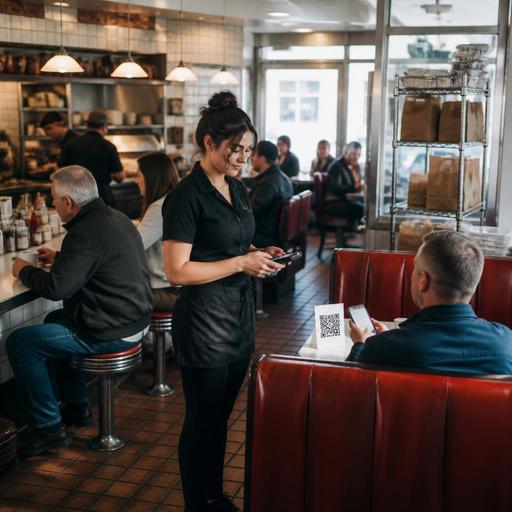
Digital Ordering Setup for U.S. Diners With Booth, Counter, and Takeout Traffic
Digital ordering for U.S. diners with booth, counter, and takeout traffic works best when it supports the way a real diner operates during breakfast rush, lunch turnover, and late-night takeout. A neighborhood diner may have servers managing booths, a cashier handling counter stools, and a steady line of guests picking up pancakes, burgers, and coffee to go. The challenge is not just adding online ordering or QR menus. It is building one system that routes every order clearly, protects service speed, and still feels familiar to regulars.
For U.S. diner operators, that usually means connecting direct online ordering, in-house QR access, POS workflows, kitchen display routing, and pickup handoff rules. A suburban breakfast diner, an all-day roadside spot, or a downtown diner near offices can all use digital ordering, but the setup has to match guest behavior. The goal is simple: fewer bottlenecks, fewer missed modifiers, and a smoother check and tab experience across dine-in and takeout.
Map the diner traffic before choosing the ordering flow
Many diners serve three different service models at once. Booth guests expect table service. Counter guests often want speed and a simple check process. Takeout guests want accurate timing and a clean pickup shelf or curbside handoff. If you use the same ordering logic for all three, the front of house can get overwhelmed fast.
Start by mapping how orders enter the business during each daypart. For example, a classic American diner may have:
- Breakfast: heavy booth seating, fast coffee refills, frequent add-ons like bacon, toast choice, and egg temperature.
- Lunch: more solo counter traffic, faster check turns, and office takeout orders.
- Evening: family booths, dessert add-ons, and delivery app orders competing with dine-in tickets.
Once you see the traffic mix, assign a preferred digital path for each guest type. Booth guests may scan a QR menu but still order through a server. Counter guests may order directly at a POS terminal or kiosk-style tablet. Takeout guests may use your direct online ordering page and receive a pickup readiness text. This prevents every guest from being pushed into the same workflow.
In a U.S. diner setting, that matters because guest expectations vary. Some regulars want a paper menu and a server who knows their usual coffee order. Others want to reorder a turkey club from their phone while heading over from work. A good digital setup lets both groups use the restaurant the way they prefer.
Build one menu structure for booths, counter, and takeout
Diners often have large menus with breakfast all day, sides, pie case desserts, kids items, and lots of substitutions. That is where digital ordering can either reduce confusion or create more of it.
Create one master menu structure inside your system, then display it differently by channel. Your in-house QR menu, direct online ordering page, and counter POS should all pull from the same item logic. If hash browns can be loaded, scattered, or substituted for fruit, those choices should appear consistently wherever the guest orders.
Operationally, this helps in several ways:
- It reduces manual re-entry from phone orders.
- It keeps modifiers consistent for the kitchen display system.
- It lowers the risk of offering an item online that the line cannot support during rush periods.
- It makes 86ing items faster across all channels.
A practical example: if your diner sells a breakfast platter with egg style, meat choice, bread choice, and side upgrade options, the modifier flow should be short and clear. The kitchen should see the same language whether the order came from a booth-side QR menu, the cashier at the counter, or a takeout order placed from a phone.
For multi-location diner groups, standardizing this structure also helps franchise or district managers compare item performance and identify where prep bottlenecks happen. If one location calls a side "home fries" and another calls it "breakfast potatoes," reporting and routing can get messy.
If your diner is part of a chain that may be subject to FDA menu labeling requirements, treat digital menu updates as part of your operational review process and verify current obligations with qualified advisors or official guidance. The same goes for alcohol listings, service charges, and local rules affecting what appears on digital ordering screens.
Protect speed of service at the pass, counter, and pickup shelf
Digital ordering should reduce front-counter congestion, not move it somewhere else. In diners, the trouble spot often shifts from the register to the expo line or pickup handoff area. That is why kitchen routing and pickup staging matter as much as the ordering interface.
Separate tickets by fulfillment type whenever possible. Dine-in, takeout, delivery app, and curbside pickup should be easy to identify on the kitchen display system or printed chit. A late-night diner near a highway exit may have booth guests waiting on milkshakes while delivery drivers crowd the host stand. Without clear routing, staff can hand off the wrong bag or delay dine-in plates while sorting third-party orders.
Use operational cues such as:
- Dedicated pickup shelf space for direct takeout orders.
- A separate holding area for delivery app drivers.
- Simple curbside pickup instructions tied to order status.
- Expo screens that flag dine-in versus off-premise orders.
- Prep throttling during peak breakfast or lunch windows.
For example, a diner near a commuter rail station may limit online promised times from 7:30 to 9:00 a.m. to avoid stacking too many pancake and omelet tickets at once. Another diner may pause certain high-labor menu items for delivery during Sunday brunch but keep them available for booth service. That is not about turning away sales. It is about protecting ticket times and guest satisfaction.
Pickup matters too. If takeout bags are stored behind the cashier, staff may get interrupted constantly while ringing checks and pouring coffee. A better setup is a visible pickup shelf near the entrance with staff-only verification for higher-risk orders. This can reduce line friction without sacrificing control.
Keep payment, tipping, and accessibility practical for U.S. guests
U.S. diners need payment workflows that fit both table service and quick takeout. If servers carry handheld devices, booth guests may prefer to pay at the table. Counter guests may close out immediately. Takeout guests may prepay online, then add a tip at checkout or at pickup depending on your setup.
Make sure the flow is consistent for staff. Train servers and cashiers on when a tab is opened, when a check is printed, and how digital orders appear in the POS. If you use tipping prompts, design them in a way that feels appropriate to the service model. Counter coffee and pie orders, family booth service, and bulk takeout catering may each call for a different guest experience. Operators should also coordinate tip reporting and payout workflows with their accountant, payroll provider, or other qualified advisors to match current federal, state, and local requirements.
Accessibility matters as well. QR ordering can be convenient, but not every diner guest wants or can use a phone camera at the table. Keep an ADA-minded approach by offering alternatives such as printed menus, staff-assisted ordering, and clear verbal support. Digital menus should be easy to navigate, with readable item names and straightforward modifier paths. Accessibility obligations can vary by situation, so verify current requirements with qualified advisors or official guidance when reviewing your ordering tools.
On the tax side, remember that sales tax treatment, fees, and service charges can differ by state or city and by order type. The operational takeaway is to configure your POS and online ordering system carefully, review receipts for clarity, and confirm local requirements with a tax professional or official guidance. The same caution applies if your diner adds automatic gratuities for large parties or uses marketplace delivery fees.
Roll out digital ordering without confusing regulars or staff
The best diner technology launches quietly. Guests should feel that ordering got easier, not more complicated. Start with one or two improvements that solve obvious friction. For one diner, that may be a direct online ordering page for takeout. For another, it may be booth-side QR menus that let guests browse specials while waiting for a server.
Recommended rollout plan
- Fix menu data first: item names, modifiers, hours, and out-of-stock controls.
- Choose channel priorities: dine-in QR access, direct takeout ordering, curbside pickup, or delivery app integration.
- Train by daypart: breakfast, lunch, and evening workflows are different in diners.
- Test guest handoff points: host stand, counter, pickup shelf, and curbside parking spots.
- Review reports weekly: voids, remake patterns, missed modifiers, and prep delays.
A practical U.S. example: a family diner outside Columbus might start by routing direct online orders into the same POS and kitchen display used for dine-in, then add a pickup shelf for weekday lunch. A 24-hour diner near a college campus might prioritize late-night mobile takeout and delivery app pacing. A diner inside a hotel may connect room service or lobby pickup orders into the same production queue while preserving separate reporting for the property.
Digital ordering succeeds in diners when it respects the rhythm of booths, counter seats, and takeout traffic instead of forcing one rigid model onto all guests. Restomas helps operators connect menus, ordering, routing, and service workflows in a way that fits real restaurant operations.
