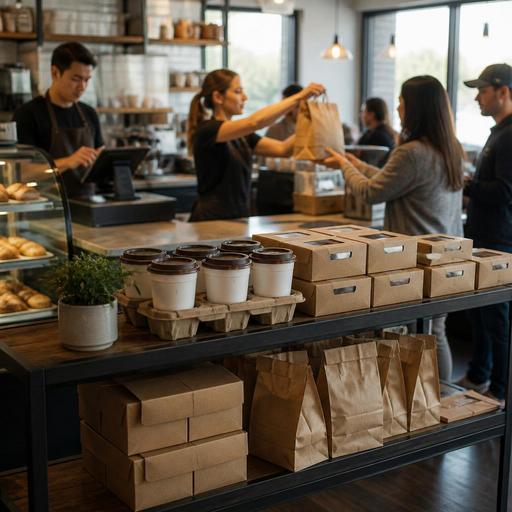
Digital Preorders for U.S. Bakeries, Delis, and Coffee Shops
Digital preorders for U.S. bakeries, delis, and coffee shops can do much more than add online sales. When set up well, they smooth the morning rush, protect production time, reduce register bottlenecks, and give guests a more predictable pickup experience. For operators running a neighborhood bagel shop, a suburban coffee drive-up, a downtown deli, or a multi-location cafe brand, the goal is not just taking orders earlier. It is building a workflow that keeps the front counter, kitchen, and pickup shelf aligned during real U.S. service patterns.
In practice, digital preorders work best when they match how guests already buy. Office workers may want a 7:45 a.m. coffee and breakfast sandwich ready before a commute. Parents may preorder a dozen muffins for school pickup. A deli near a hospital may get heavy lunch orders for entire departments. If your preorder system is disconnected from prep, inventory, and order handoff, the result is usually the same: crowded counters, remakes, and frustrated staff. The better approach is to treat preorders as an operations channel with its own timing rules, menu design, and pickup process.
Build a preorder menu around production reality
The first mistake many operators make is placing the full in-store menu online without adjusting for timing and complexity. A bakery may sell laminated pastries, custom cakes, drip coffee, espresso drinks, breakfast sandwiches, and retail beans, but not every item belongs in the same preorder flow. Start by grouping items by production behavior.
- Ready-to-sell items: croissants, muffins, cookies, bottled drinks, whole bean coffee, bottled juice.
- Fast assembly items: bagel sandwiches, deli wraps, cream cheese tubs, boxed coffee.
- Made-to-order drinks: lattes, cappuccinos, cold brew with modifiers, smoothies.
- Long-lead items: catering trays, cake orders, holiday pies, large pastry boxes.
A New York style bagel shop, for example, may allow same-day preorder for bagels by the dozen and schmear tubs, but require a longer lead time for boxed office breakfast packages. A coffee shop near a commuter rail station may accept immediate preorders for drip coffee and pastries, while limiting espresso drinks to a narrower pickup window so drinks do not sit too long. A neighborhood deli may offer sandwich platters only with advance notice and a manager approval step.
Set prep times by item category, not by guesswork. If turkey clubs slow down the line at noon, give them a different promised time than bottled sodas or chips. If your POS stack supports item-level prep timing or kitchen display routing, use it. This helps the kitchen display system separate now, next, and later orders instead of dumping every preorder into the same queue.
Control pickup windows so the rush stays manageable
Digital preorders fail when every guest chooses the same pickup time and the kitchen cannot pace output. Pickup windows should reflect actual labor and station capacity. A small coffee bar with one espresso machine may need tighter controls than a deli with a long cold line and separate hot station.
For example, a morning coffee shop might offer pickup in five or ten minute windows, but cap the number of espresso-heavy orders in each slot. A busy bakery may allow broad pickup windows for pastry boxes but narrower windows for toasted breakfast sandwiches. A downtown deli serving office lunch may throttle 12:00 to 12:30 p.m. more tightly than 11:15 or 1:45.
Think through the guest handoff too. If your store has a pickup shelf, decide which items are safe to stage there and which should remain behind the counter. Hot paninis, ice-heavy drinks, and high-value catering orders usually need direct handoff. For curbside pickup, assign a clear parking or arrival workflow so staff are not searching for cars during peak service. If you operate in a hotel lobby, airport concession, or campus cafe, pickup instructions should reflect the actual building access pattern, not a generic “ready for pickup” message.
ADA-minded access matters here as well. Make sure digital ordering and pickup instructions are easy to understand, and review whether guests who cannot easily stand in line or reach a pickup shelf have a workable alternative. Accessibility expectations can vary by setup, so operators should verify current requirements with qualified advisors and official guidance where needed.
Protect speed of service at the register and on the line
Preorders should reduce front-counter congestion, not create a second rush. The operational win comes from separating ordering, payment, production, and pickup as cleanly as possible.
- Route orders directly into the POS or kitchen display system. Avoid manual re-entry whenever possible.
- Create a dedicated production view for preorders. Staff should see due times clearly, not hunt through a mixed dine-in and takeout queue.
- Use distinct packaging and labeling rules. A lunch preorder for “Sarah - office pickup” should not be confused with a walk-in turkey sandwich.
- Assign pickup ownership. During peak periods, one team member should monitor the shelf, check tabs, and answer guest questions.
- Stage add-ons carefully. Creamers, utensils, napkins, hot sauce, and retail items often cause last-second delays.
A U.S. coffee shop with a heavy mobile morning business may designate one barista for digital drinks and one for in-person tickets during the 7:00 to 9:00 a.m. rush. A deli with strong corporate lunch demand may print large-format labels for preorder bags and stage chips, bottled drinks, and cookies in advance. A bakery taking holiday pie orders may use cutoff dates, deposits, and pickup day batching to prevent chaos at the register.
Payment workflow also matters. Decide which orders must be prepaid, which can allow pay-at-pickup, and how tips are presented. In many U.S. shops, guests expect a tip prompt for counter service, but operators should be thoughtful about how tipping appears in preorder checkout versus in-store pickup. Tips, tip pooling, and tip reporting can involve federal, state, or local rules, so keep the setup operational and confirm current requirements with payroll providers, accountants, or legal advisors.
Use preorder data to improve labor, inventory, and menu decisions
The biggest long-term benefit of digital preorders is better visibility. If you know by 8:00 a.m. that thirty breakfast sandwiches and twelve traveler coffee boxes are already committed, you can schedule and prep differently than if you are guessing from past averages.
Look for patterns such as:
- Which pickup windows fill first
- Which items create line slowdowns or remake risk
- Which modifiers are most common on drinks and sandwiches
- Which locations get more office catering versus individual orders
- Which products sell best for next-day preorder versus same-day takeout
A three-location cafe group in Chicago, for example, may discover that one store thrives on commuter coffee preorders, another on hospital lunch runs, and a third on weekend pastry boxes. That should affect labor scheduling, par levels, and menu emphasis by location. A food truck that parks near office towers on weekdays might use preorders to reduce order clustering before lunch breaks. A hotel coffee counter may use preorder demand to plan early staffing when convention guests need quick pickup before sessions begin.
Inventory visibility matters too. If your preorder channel still sells out-of-stock muffins or allows catering trays after deli meat is already allocated, staff will spend the day making apology calls. Syncing online availability with inventory counts or simple item cutoffs can prevent many of these issues. Even basic controls, like marking seasonal pastries unavailable after a certain hour, can reduce refunds and guest disappointment.
Set policies that guests and staff can actually follow
Clear policies keep preorders from becoming a customer service burden. Guests should know when orders can be changed, how late they can place same-day requests, where to pick up, and what happens if they arrive early or late. Staff should know who handles substitutions, refunds, missed pickup orders, and delivery app conflicts if you also run third-party channels.
For U.S. operators, it is helpful to distinguish direct online ordering from marketplace delivery. A deli may prefer direct pickup preorders for office lunches because margins are cleaner and packaging control is better. A coffee shop may use delivery apps for afternoon demand but push direct preorder for morning commuter pickup. If your concept charges service fees, handles catering gratuities, or applies sales tax differently across product types, build those rules carefully in your systems and verify the latest treatment with qualified tax and legal advisors in your state or city.
The simplest test is this: can a new shift lead explain the preorder process in two minutes, and can a regular guest complete it without calling the store? If not, the setup is probably too complicated.
When digital preorders are tied to your POS, kitchen display workflow, pickup process, and item availability, they become a practical tool for protecting speed and consistency. Restomas helps operators connect those pieces so bakeries, delis, and coffee shops can run a smoother preorder experience without adding unnecessary front-of-house friction.
