Drive-Thru and Pickup Workflow Tips for U.S. QSR Operators
Drive-thru and pickup workflow planning is now a core operating task for U.S. quick-service restaurants. When a lunch rush includes cars in the lane, guests waiting at the pickup shelf, delivery drivers at the counter, and mobile orders firing from multiple channels, small process gaps quickly turn into long ticket times, remakes, and frustrated guests. For QSR operators, the goal is not just speed. It is consistent handoff, clean communication, and a setup that helps the kitchen, front counter, and drive-thru team stay aligned.
A suburban burger shop, a chicken chain with multiple locations, and an airport sandwich counter all face the same basic challenge: too many order sources hitting one kitchen without enough routing discipline. The answer is a practical operating system that defines where each order enters, how it is prioritized, who stages it, and how the guest or driver receives it.
Map every order channel before you change staffing
Many operators try to solve drive-thru slowdowns by adding labor first. Sometimes that helps, but often the bigger issue is that the restaurant has never mapped its order flow. Start by listing every active channel: drive-thru speaker orders, front counter orders, direct online ordering, delivery apps, phone orders, third-party catering, curbside pickup, and kiosk or QR ordering if you use them.
For each channel, document four points:
- Where the order is placed
- How it lands in the POS or order management system
- Where the kitchen sees it, such as a kitchen display system or printed ticket
- Where the finished order is staged for handoff
In a typical U.S. taco QSR, for example, the drive-thru order may enter through the headset POS terminal, while app orders enter automatically and appear on the same kitchen display queue. If both streams hit the grill line with no timing rules, mobile guests promised a 12:15 pickup can collide with a sudden line of cars at 12:10. Mapping the channels makes the conflict visible.
This is also the moment to review naming conventions. If curbside orders, pickup shelf orders, and third-party delivery orders all print with inconsistent labels, staff will waste time asking basic questions. Use simple channel tags that everyone understands at a glance.
Separate production timing from handoff timing
One of the most common QSR mistakes is treating all orders as if they should be cooked and bagged immediately. In reality, the right time to produce an order depends on the pickup method. A drive-thru order should move fast from confirmation to assembly. A scheduled pickup order may need to wait so fries, drinks, and hot sandwiches are not sitting too early. A delivery app order may need a staging buffer because the driver arrival time is less predictable.
Think in two clocks:
- Production clock: when the kitchen should begin preparing the order
- Handoff clock: when the guest, driver, or curbside runner should receive it
For example, a fried chicken QSR in Texas may hold family meal sides until the guest checks in for curbside pickup, while preparing packaged desserts earlier. A coffee drive-thru in Ohio may batch some bakery items but wait on iced drinks until the car reaches the window. A stadium concession stand may prioritize immediate walk-up orders during a halftime rush while temporarily limiting promised pickup times in the app.
These decisions should be built into your workflow, not left to individual guesswork. A kitchen display system, order throttling rules, and clear staging zones can help teams match firing times to real pickup behavior.
Build distinct staging zones for drive-thru, pickup, and delivery
When the expo counter becomes one mixed pile of bags, coordination breaks down. Strong operators create separate, visible staging areas for each handoff type. Even in a small footprint, physical separation reduces errors.
What this can look like in practice
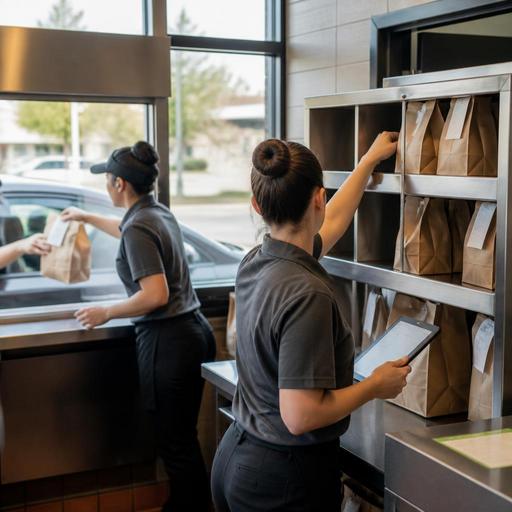
- Drive-thru window staging: limited space for the next one or two orders only, with sauces, straws, and sealed drinks ready
- Pickup shelf: clearly designated area for in-store takeout guests, ideally positioned so they do not block the ordering line
- Curbside station: a runner screen or tablet showing vehicle check-ins, parking spot details, and status updates
- Delivery driver handoff point: a separate counter zone so app drivers are not crowding the front register
A fast-casual bowl concept in Arizona might use a pickup shelf near the entrance for direct online orders, while keeping third-party delivery bags behind the counter until the driver confirms pickup. That reduces theft risk and avoids guests grabbing the wrong order. A breakfast biscuit chain in Georgia may keep drive-thru condiments at the window station while storing takeout add-ons near the pickup shelf to prevent cross-traffic during morning rush.
If you use QR ordering in limited-service dining areas, make sure those orders are routed to the right staging zone too. Guests should not have to ask three employees where their check or order belongs.
Train for exceptions, not just the standard order
Most breakdowns happen on edge cases: split tickets, large family bundles, out-of-stock substitutions, delivery drivers arriving too early, or a guest saying they selected curbside but parked and walked in. Your team needs scripts and fallback actions for these moments.
Create short playbooks for common exceptions:
- What happens when a guest arrives before a scheduled pickup time
- How staff handle missing drinks or desserts before the order leaves the building
- Who approves substitutions when an item is 86'd
- How to move a backed-up drive-thru order to a pull-forward spot
- How to identify and report repeated delivery driver no-shows
In U.S. operations, payment and tipping workflows matter here too. If some digital orders include a tip, some do not, and some are paid at pickup, staff should know exactly what appears in the POS and what still needs a guest-facing prompt. Operators should also make sure receipts, service charges, and tip reporting workflows are configured correctly for their concept and location. Because payment, tax, labor, and wage rules vary by state and local jurisdiction, verify current requirements with your POS provider, accountant, payroll partner, or qualified advisor.
Accessibility matters as well. If you rely on mobile ordering, QR codes, or app-based curbside check-in, provide a practical alternative for guests who need assistance. ADA-related obligations depend on the specific setup and applicable guidance, so operators should review their process with qualified advisors and current official resources. Operationally, the key is simple: guests should have a clear way to order, check in, and receive food without confusion.
Use daily metrics that connect speed to accuracy
Fast service only helps if the order is right. Instead of watching one broad number, track a few operational measures by channel and daypart. A lunch drive-thru pattern may look very different from late-night takeout or weekend delivery volume.
Useful channel-level metrics include:
- Average time from order entry to handoff
- Number of remakes by channel
- Orders held too long before pickup
- Driver wait time at handoff
- Percentage of curbside orders delivered to the correct vehicle on first attempt
- Guest complaints tied to missing items, cold food, or unclear pickup instructions
Review these numbers alongside labor scheduling. If your second drive-thru lane opens at dinner but the bagging station is still staffed for a single-lane setup, service will stall. If Friday app promotions flood the kitchen at 6:00 p.m., consider throttling direct online ordering time slots or adjusting prep assignments. Multi-location operators should compare stores carefully, because one unit may have a better parking lot flow, headset process, or pickup shelf placement than another.
For chains subject to menu labeling or other federal, state, or local requirements, make sure digital menus and ordering channels stay aligned with current operational information. Rules can vary by concept and location, so confirm details with official guidance and qualified advisors rather than relying on old settings.
The strongest QSR systems make the path of each order obvious from the first tap to the final handoff. When drive-thru, takeout, curbside pickup, and delivery are coordinated through clear routing, staging, and communication, the kitchen moves with less friction and guests get a faster, more reliable experience. Restomas helps operators bring those workflows into one digital system without making the process harder for staff.
