Holiday Preorder Windows and QR Menus for U.S. Restaurant Sales
Holiday menu planning for U.S. restaurants using QR menus and preorder windows can do more than boost seasonal sales. It can help operators control production, protect service during rushes, and give guests a smoother ordering experience for Thanksgiving sides, Christmas catering trays, New Year’s party packages, game-day platters, and office lunch bundles. For U.S. restaurants, the real opportunity is not just posting a holiday menu online. It is building a workflow that connects menu timing, prep limits, pickup promises, staff communication, and payment steps across dine-in, takeout, and delivery.
Start with a holiday menu built for production, not just promotion
Many holiday menu problems start when the menu is designed around marketing ideas instead of kitchen capacity. A neighborhood barbecue restaurant may want to sell smoked turkey breasts, mac and cheese trays, and pecan pies for Thanksgiving week. A fast-casual Mediterranean brand may offer family meals for Christmas Eve pickup. A hotel restaurant may push boxed holiday brunch kits for corporate guests. In each case, the best holiday menu is the one your team can prep, package, and hand off without overwhelming the line.
Before you publish anything in your QR menu or online ordering flow, review each item against a few operational questions:
- Can the item be produced in batches? Holiday menus work better when prep can be staged in advance.
- Does it travel well? A roast dinner may plate beautifully in-house but lose quality during takeout.
- Does it need special packaging? Gravy, sauces, and hot-hold items often create avoidable pickup issues.
- Can guests order it with simple modifiers? Too many customizations slow production and create remake risk.
- Is inventory easy to forecast? Holiday specials built around limited ingredients need tighter controls.
For example, a suburban diner offering holiday pie preorders may decide to limit crust options and pickup windows rather than accept all-day ordering. That is not less guest-friendly. It is often what keeps the promise realistic.
Use QR menus to separate dine-in browsing from holiday preorder selling
A QR menu should not become a cluttered catch-all during the holidays. The smarter move is to create a clear path for seasonal ordering. Guests scanning a table tent in your dining room may only need to see a simple holiday feature section, while guests ordering from home need a dedicated preorder menu with lead times, pickup rules, reheating notes, and cutoff times.
For U.S. operators, this matters because holiday demand often comes from several channels at once: direct website orders, delivery apps, phone calls, in-store walk-ins, and QR scans from printed flyers or counter displays. If the holiday offering sits in the same structure as your regular lunch and dinner menu, staff may spend the week answering the same basic questions.
A stronger setup usually includes:
- A dedicated holiday category or menu so guests do not have to search through the full menu.
- Clear pickup and preorder language explaining when items are available and how far ahead orders should be placed.
- Photo-supported item descriptions that reduce confusion around portion size, serving count, or included sides.
- Simple allergen and ingredient communication presented in a way that helps guests ask informed questions. Operators should verify local and brand requirements for disclosures and labeling.
- A fallback path for guests who need assistance so ADA-minded service is not limited to smartphone users alone.
For chains and larger groups, menu labeling and disclosure obligations can vary based on concept size and jurisdiction. If your holiday menu changes nutrition displays, alcohol offerings, or packaged retail items, confirm current requirements with qualified advisors and official guidance before rollout.
Set preorder windows that protect the kitchen and the pickup line
The biggest benefit of preorder windows is operational control. Instead of letting orders arrive randomly, you shape demand into manageable blocks. This is especially valuable for bakeries, food trucks doing holiday tamale sales, airport concession teams handling traveler surges, and multi-location brands balancing commissary prep across stores.
Think of preorder windows in three layers:
1. Order acceptance window
This is when guests are allowed to place the order. For example, a restaurant may open Christmas catering orders two weeks early and close them 48 hours before pickup. That cutoff gives managers time to finalize purchasing and labor scheduling.
2. Production window
This is the kitchen side. If your kitchen display system or prep sheets show 60 mashed potato trays due on Wednesday, production can be staged instead of rushed. The goal is to smooth labor, not stack all prep into one shift.
3. Guest pickup window
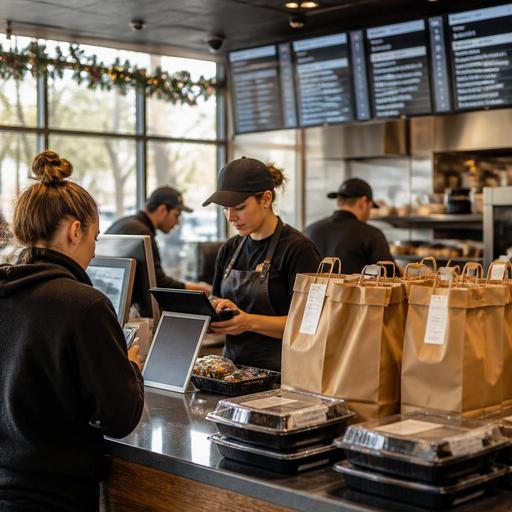
This is where many restaurants either win or lose the holiday experience. A pickup shelf can work for sealed pie boxes or cookie tins, but large catering orders may need a staffed handoff, curbside pickup, or a separate holiday table near the host stand. A sports bar selling Super Bowl wing bundles may assign 15-minute collection windows to prevent a packed lobby. A hotel restaurant handling office party orders may route pickups through valet or a side entrance.
When setting windows, build for real bottlenecks: parking, expo space, bagging, payment verification, and guest questions. If your operation uses tips on digital orders, make sure the tip workflow is clear and consistent for guests and staff. Also keep service charges separate from tips in your internal communication and reporting, and verify current federal, state, and local guidance with your payroll, tax, or legal advisors.
Coordinate POS, payments, and staff communication before launch
Holiday menus fail when the front end looks polished but the back end is disconnected. If the POS item names do not match the QR menu, if the kitchen display system shows unclear modifiers, or if staff are unsure whether an order is paid, the holiday rush gets messy fast.
Before launch, test the full path from guest order to handoff:
- POS mapping: Make sure holiday items, bundles, and modifiers route correctly to kitchen printers or displays.
- Inventory visibility: If prime rib dinners cap at 40 orders, stop selling at the limit instead of apologizing later.
- Payment timing: Decide whether preorders are paid upfront, partially paid, or paid at pickup.
- Sales tax handling: Confirm how your system treats taxable items, packaged goods, and any fees based on current local rules.
- Pickup identification: Use order names, phone numbers, or confirmation codes that staff can verify quickly.
- Staff scripts: Give hosts, cashiers, and phone staff one consistent answer for cutoff times, reheating, substitutions, and late pickups.
A good example is a three-unit fast-casual chicken brand offering holiday catering packs. If one store accepts same-day changes, another asks guests to call, and the third has different packaging counts, the brand creates friction for both guests and staff. Multi-location operators should standardize the preorder process, then allow only limited store-level exceptions where necessary.
Measure the holiday program after service, not just during sales
It is easy to judge a holiday menu by gross sales alone. A better review looks at whether the preorder system reduced chaos and protected regular service. After the holiday push, gather managers and review what happened.
Useful questions include:
- Which items sold well but created too many guest questions?
- Which pickup windows caused lobby backups or curbside delays?
- How many orders needed remakes because of packaging, modifiers, or missing sides?
- Did direct online ordering outperform phone orders or third-party delivery for holiday items?
- Were dine-in guests affected because the kitchen was overloaded with preorders?
- Did staff understand the difference between holiday bundles, regular menu items, and catering orders?
A cafe that sells holiday cookie boxes may learn that Friday pickups crushed normal espresso service. A family-style Italian restaurant may find that preorder lasagna pans were profitable, but garlic bread add-ons caused bagging errors. These are the details that improve next season’s setup.
Holiday menu planning works best when QR menus, preorder windows, POS routing, and pickup operations are treated as one system instead of separate tasks. Restomas helps operators connect those pieces so seasonal promotions stay easier to manage across service channels.
