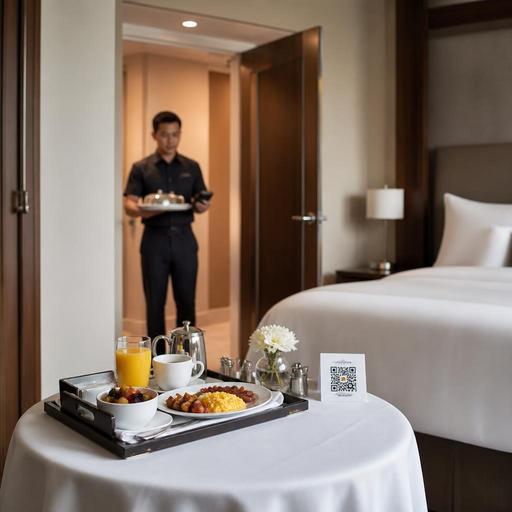
Hotel Room-Service QR Ordering and Kitchen Routing for U.S. Restaurants
Hotel room-service QR ordering and kitchen routing can help U.S. hotel restaurants handle in-room dining with fewer phone errors, cleaner handoffs, and better visibility from guest order to delivery. For hotel operators, the goal is not just adding a QR menu to a guest room. It is building a workflow that connects the menu, POS, kitchen display system, payment flow, and delivery steps so the right check reaches the right room at the right time.
In the United States, hotel food service often has to balance restaurant standards with lodging operations. A boutique hotel may run a small overnight menu from the bar kitchen. A convention hotel may push breakfast trays to hundreds of rooms before 9 a.m. An airport hotel may see late-night demand after delayed flights. In each case, QR ordering works best when it is tied to practical routing rules, staffing plans, and guest communication.
Why QR room-service ordering works in U.S. hotel operations
Traditional room service by phone creates predictable problems: misheard modifiers, unclear room numbers, long hold times, and handwritten tickets that slow the kitchen. A QR menu gives guests a direct path to browse, customize, and submit an order from their phone without waiting for a server to answer.
For a full-service hotel restaurant in Chicago, that might mean a guest scans a QR card on the nightstand, orders a turkey club, sparkling water, and cheesecake, then receives an estimated delivery window. For a resort property in Florida, the same setup can separate poolside ordering from room-service ordering so the kitchen and runners know whether the order goes to a cabana, a guest room, or a pickup shelf near the lobby market.
Operationally, QR ordering can help with:
- Reducing order-entry mistakes on modifiers and allergy notes
- Sending tickets directly to the right prep station or kitchen display screen
- Showing limited dayparts such as breakfast, all-day dining, and late-night menus
- Supporting direct payment, room-charge requests, or pay-on-delivery workflows
- Capturing order history by room, outlet, and shift for better staffing decisions
The menu itself should stay tight and production-friendly. Room service is not the place for every item on the dining room menu if plating, travel time, or packaging will hurt quality. Fries that die in five minutes, towering burgers that collapse under cloches, and ice cream desserts with long elevator rides need special handling or replacement.
How to set up kitchen routing without creating bottlenecks
The biggest win is not the QR code. It is the routing logic behind it. If room-service orders land in the same queue as dine-in, takeout, delivery apps, and banquet tickets without clear labels, the kitchen can lose control fast.
Start by separating orders by channel, daypart, and destination. A hotel restaurant in Dallas might route QR room-service breakfast to one kitchen display queue, lobby bar orders to another, and third-party delivery app tickets to a separate printer or screen. That gives the expo team a clearer picture of what must be plated for in-room dining versus boxed for takeout.
Routing rules that matter in practice
- Tag every order with a destination. Room number, tower, floor, and delivery point should be easy to read. For larger properties, include building or wing.
- Route by prep station. Hot line, pantry, bar, and dessert should each see the items they own.
- Use daypart menus. Breakfast, lunch, dinner, and overnight menus reduce unavailable-item issues.
- Create expo checks for runners. The final handoff should show room details, guest name if appropriate, utensils, condiments, and any special instructions.
- Build hold-and-fire options carefully. Guests may want coffee now and an omelet in 20 minutes. If your system cannot support staggered timing cleanly, keep the workflow simple.
A common U.S. hotel mistake is allowing too many customizations on items that already move through several hands. If a late-night quesadilla can be ordered with five protein choices, three sauces, and multiple side swaps, the kitchen display becomes noisy and runners spend extra time checking the tray. Limit modifiers to what your line can execute consistently.
Payments, tips, room charges, and check accuracy
Payment design matters because hotel room service sits between restaurant and lodging systems. Some properties want guests to pay by card at order time. Others prefer a room-charge workflow. Some still collect at delivery. The best option depends on your PMS, POS stack, and accounting process.
For U.S. operators, be careful about how gratuities, service charges, and taxes appear on the guest check. Those items can be treated differently operationally and may have different reporting implications. Make sure the digital ordering flow clearly labels charges so guests are not surprised at delivery or checkout. Operators should verify current federal, state, and local tax, labor, tip reporting, and service charge requirements with qualified advisors and official guidance.
From an operations standpoint, keep these details tight:
- Show whether the order is immediate, scheduled, or subject to a delivery window
- Clarify if the guest is authorizing a room charge or paying directly
- Make tipping options understandable for guests and easy to reconcile for managers
- Ensure the final check closes correctly in the POS and maps to the right revenue center
- Train staff on exceptions such as declined cards, disputed room numbers, or duplicate submissions
If your hotel serves alcohol with room service, age verification and local alcohol rules need a defined handoff process. Keep the article flow and staff training operational, and confirm current state and local requirements before launch.
Guest experience, ADA-minded access, and menu design
QR ordering should reduce friction, not create it. Some hotel guests are arriving from long flights, some are traveling internationally, and some may have accessibility needs that make a small mobile menu frustrating. An ADA-minded approach means thinking beyond the code itself.
Make the menu mobile-friendly, high-contrast, and simple to navigate. Keep category names obvious: Breakfast, Kids, Late Night, Drinks, Desserts. Use clear item descriptions and practical allergy notes. If your property is part of a larger chain, menu labeling requirements may apply in certain cases, especially for operators that fall under federal chain menu labeling rules. Confirm current FDA guidance and any related obligations before publishing nutrition details or claims.
Also provide a backup ordering path. In many U.S. hotels, that means a front desk or in-room dining phone option remains available for guests who do not want to scan a QR code. The best systems support both without forcing staff to rekey complex orders from scratch.
For example, a business traveler at a downtown hotel may prefer scanning and paying in under a minute. A family in a resort suite may call with questions about kids' meals, split portions, or timing. Your workflow should support both guest types cleanly.
Staffing, delivery handoff, and multi-outlet coordination
Room service fails when the kitchen is ready but the handoff is not. In many U.S. hotels, delays happen at the elevator, tray assembly station, or runner dispatch point rather than on the line. That is why staffing and routing need to connect.
Assign clear ownership for each step:
- Kitchen: prepare and mark items accurately
- Expo: verify completeness, packaging, and room details
- Runner: deliver, confirm handoff, and close the loop
- Manager: monitor ticket times, guest complaints, and exceptions
If the hotel has multiple outlets, decide which kitchen owns which menu. A sports bar on the lobby level may handle wings and sandwiches until midnight, while the main restaurant covers breakfast and dinner. A hotel with banquet operations should also protect room-service capacity during conferences, weddings, and game-day overflow.
Look closely at peak periods: 7 to 9 a.m., weather disruptions, convention breaks, and late-night arrivals. These windows often need tighter menus, extra runners, and stronger kitchen display visibility. In some properties, a small pickup shelf for app-based guest pickup near the lobby market can reduce runner load for guests who do not want delivery to the room.
The most effective operators review room-service tickets weekly. Look for voids, remakes, long delivery times, and items that travel poorly. Then adjust the menu, routing rules, and labor schedule. QR ordering is not a one-time setup. It is an operating system that gets better when the hotel restaurant, front desk, and kitchen work from the same playbook.
Restomas helps hotel food-service teams connect QR menus, order flow, and kitchen routing in a way that fits real U.S. operations.
