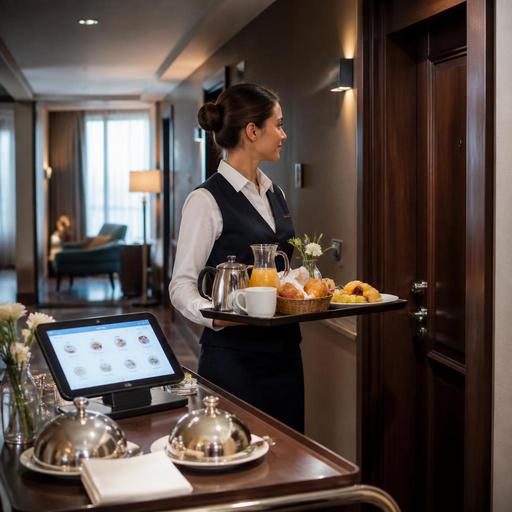
Hotel Room Service QR Ordering and Kitchen Routing for U.S. Restaurants
Hotel room service QR ordering and kitchen routing can help U.S. hotel restaurants reduce phone bottlenecks, route orders more accurately, and give guests a faster in-room dining experience. For operators, the real value is not just replacing the room-service phone line. It is building a workflow that connects the guest-facing menu, the POS, the kitchen display system, payment flow, and delivery handoff so breakfast, late-night snacks, and premium amenity orders move cleanly from room to kitchen to guest.
Why hotel room-service ordering needs a different setup
A hotel restaurant is not the same as a neighborhood diner or a fast-casual pickup counter. Orders may come from guestrooms, the lobby bar, pool seating, meeting rooms, and sometimes VIP suites with special handling. A guest may want breakfast delivered at 7:15 a.m., a family may need kids' meals sent to a connecting room, and a business traveler may want a salad, sparkling water, and a printed or digital folio charge after the kitchen is winding down.
In many U.S. hotels, room-service calls still tie up hosts, front desk staff, or servers who must repeat menu items, confirm room numbers, explain modifiers, and handwrite notes. That creates avoidable errors. A QR menu placed in the room, on the desk, or inside the guest compendium can move those choices to a structured ordering flow. Instead of hearing, "No onions, dressing on the side, gluten-free toast if available," the kitchen receives standardized modifiers and timing instructions.
For example, a select-service hotel with a compact kitchen may route all room-service breakfast orders to one prep station and all evening bar bites to another. A full-service downtown hotel may need different routing for in-room dining, banquet overflow, and lobby dining. The ordering system should reflect those realities rather than treating every order like standard takeout.
Build the QR menu around hotel-specific guest behavior
The best QR room-service menu is short, clear, and designed for guests who are ordering from bed, between meetings, or while managing kids in the room. That means fewer clicks, strong item photos only when helpful, and obvious categories such as breakfast, all-day dining, desserts, beer and wine where permitted, and overnight options if offered.
For U.S. operators, practical menu structure matters more than novelty. Include:
- Clear service windows for breakfast, all-day, late night, and minibar replacement items if relevant
- Modifier groups that match actual kitchen capability, such as egg temperature, side choice, dressing choice, and allergy notes
- Room number and guest last name verification steps to reduce misdelivery
- Estimated delivery timing ranges that change by daypart
- Upsells that fit hotel use, such as coffee carafes, dessert add-ons, kids' beverages, or a bottle of wine where legally allowed
A resort property might feature pool-friendly lunch items and family bundles. An airport hotel may focus on quick solo traveler meals, grab-and-go breakfast packs, and late-arrival sandwiches. A boutique hotel with higher check averages may highlight chef specials, local desserts, or a date-night in-room package.
Accessibility also matters. QR ordering should not be the only path if a guest cannot comfortably scan or navigate a phone-based menu. Operators should maintain an alternate ordering option, such as phone ordering or staff assistance, and review digital accessibility with qualified guidance. If your property serves a wide age range, test the menu on both newer and older phones and make sure item names, contrast, and button sizes are easy to use.
Route orders correctly from room to POS to kitchen display
The biggest operational win comes from kitchen routing. If the QR menu sends every room-service order into one generic ticket queue, you may simply replace phone confusion with screen confusion. Instead, map menu categories and dayparts to prep stations and service rules.
A practical routing setup often includes:
- Order source tagging. Mark orders as in-room dining, lobby seating, pool, meeting room, or takeout so staff immediately know the fulfillment path.
- Daypart rules. Breakfast orders may print or display differently from dinner orders, especially if your AM team is separate from your PM line cooks.
- Prep station routing. Send hot line items, garde manger items, desserts, and bar beverages to the right stations automatically.
- Delivery staging. Create a final expo step for tray setup, utensils, condiments, guest notes, and room verification.
- Status updates. Let staff mark received, firing, ready for runner, and delivered so the front desk or guest services team is not guessing.
Consider a 220-room business hotel in Chicago. Morning room service may spike from 6:30 to 8:30 a.m. with coffee, omelets, fruit, and oatmeal. If coffee tickets go to the bar printer, eggs go to the hot line, and fruit goes to cold prep, expo can assemble the tray once each station marks ready. That is much cleaner than one long handwritten ticket clipped to a rail.
For a resort in Florida, routing may need an additional split between guestroom delivery and pool cabana delivery. For a casino hotel or stadium-adjacent property, late-night surges after events may require a simplified after-hours menu that routes to a reduced crew without breaking service times.
Handle payment, tips, service charges, and reporting carefully
U.S. hotel operators need a clean workflow for payment because room-service checks can be paid in different ways: charged to the room, paid by card at checkout in the ordering flow, or closed by staff on a mobile device at delivery. The operational goal is to avoid duplicate charges, missing tips, and reconciliation problems between the restaurant POS and the hotel property-management system.
If you allow room charges, make sure the order flow clearly confirms room number and guest identity in a way that fits your property's standards. If you collect payment online, the guest should see a clear breakdown of menu price, taxes where applicable, delivery or service fees if used, and tipping options where appropriate. Operators should be careful not to confuse a voluntary tip with a mandatory service charge, because the accounting and payroll treatment can differ. Tip reporting, service charge handling, and tax treatment vary by situation, so confirm your setup with qualified accounting, payroll, and legal advisors and with current official guidance in your jurisdiction.
Alcohol orders deserve extra attention. If your hotel restaurant offers beer, wine, or cocktails for in-room dining where permitted, build an ID and age-verification workflow that matches local and state requirements. Rules can vary widely, so the system should support manager review or delivery-stage confirmation rather than assuming a standard process everywhere.
Train runners, front desk teams, and managers on the handoff
Even the best digital menu fails if the delivery handoff is loose. In hotels, room-service success depends on coordination between kitchen staff, servers or runners, and sometimes the front desk or guest services desk. Create a simple handoff checklist so every order leaves the kitchen complete.
- Confirm room number, guest name, and any timing request
- Check tray setup, flatware, napkins, condiments, and allergy notes
- Verify beverages, especially coffee add-ons, bottled water, and bar items
- Mark the order as out for delivery and then delivered
- Define what happens if the guest does not answer the door
This matters even more in larger properties. A full-service hotel in Las Vegas may need runner zones by tower or floor bank. A hotel restaurant in an airport property may need extra speed for crews leaving early flights. A convention hotel may face a wave of simultaneous breakfast preorders before keynote sessions. In each case, labor scheduling should reflect likely order peaks, not just dining room covers.
Managers should also review menu availability in real time. If the kitchen runs out of salmon at 8:45 p.m., the QR menu should update quickly so guests do not order unavailable items from their rooms. The same goes for overnight menus, limited staffing periods, and special event menus.
Start small, measure friction, then expand
If your hotel restaurant is moving from phone orders to QR ordering, start with one daypart or one menu, usually breakfast or late night. Track where friction appears: room number errors, delayed tray assembly, poor modifier design, or payment confusion. Then refine routing rules, menu wording, and staffing.
For many U.S. properties, the best early win is simple: fewer phone calls, cleaner tickets, and better visibility into in-room dining demand by hour. Once that foundation works, operators can expand to pool service, meeting-room ordering, lobby QR ordering, or even guest preordering for morning pickup shelves near the front desk when that fits the brand.
Restomas can help hotel restaurant operators connect QR menus, order flow, and kitchen routing into a more organized in-room dining operation.
