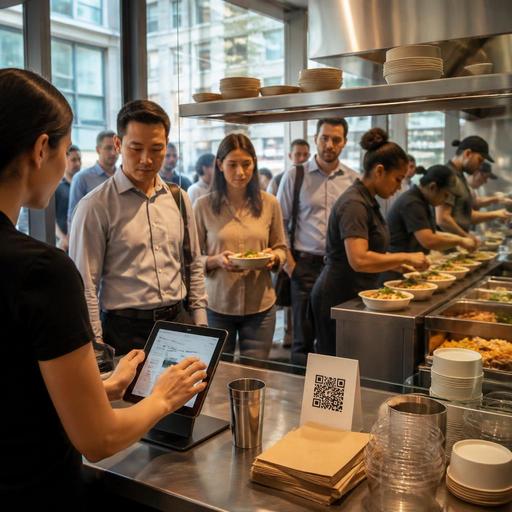
How Fast-Casual Digital Menus Cut Lunch Rush Bottlenecks in the U.S.
For U.S. operators, fast-casual digital menus during lunch rushes are not just a guest convenience. They are a practical tool for moving a long line faster, reducing ordering mistakes, and keeping the kitchen focused when dine-in, takeout, and delivery app tickets all hit at once. Whether you run a downtown salad shop, a burrito line near office towers, a college-area sandwich counter, or a multi-location bowl concept in the suburbs, the menu guests see on a phone, kiosk, or counter screen can shape throughput more than most owners expect.
The lunch rush in the United States is usually compressed into a short window. Guests want speed, clear pricing, easy modifiers, and fast payment. Staff need fewer repeated questions, better order accuracy, and a cleaner handoff to the POS and kitchen display system. A digital menu helps when it is built around the rush itself, not just around design.
Build the menu for speed, not for browsing
Many fast-casual menus are written like full websites, but lunch guests do not browse the way dinner guests do. In a line out the door, decision time matters. A digital menu should make the most common orders obvious within a few seconds.
Lead with the highest-volume lunch choices
A build-your-own grain bowl concept in Chicago may know that most weekday guests order one of four protein combinations. A sandwich shop near a hospital in Dallas may sell the same turkey, tuna, and chicken picks every day between 11:30 a.m. and 1:30 p.m. Put those items first. Keep names familiar, descriptions short, and photos limited to high-conversion items instead of every single SKU.
Use modifier logic that matches the line
If a guest orders a burrito bowl, the digital menu should guide them through protein, rice, beans, salsa, and add-ons in the same order staff would ask at the counter. That consistency reduces confusion and improves kitchen prep flow. It also helps when orders come from QR ordering, a self-order station, and direct online ordering at the same time.
Operationally, this matters because unclear modifier trees slow both the guest and the expo line. For example, if extra avocado appears in one section and side guacamole appears in another, staff may have to stop and clarify. During lunch, every clarification steals time from production.
- Feature best-sellers first
- Limit long descriptions
- Group modifiers in kitchen order
- Make add-ons easy to find but hard to duplicate by mistake
- Show sold-out items or 86s immediately across all ordering channels
Reduce front-counter pressure with better ordering paths
Lunch rush bottlenecks often start before the kitchen. Guests hesitate at the menu board, ask several questions, then reach the cashier unprepared. Digital menus can shift that decision-making earlier.
Use QR ordering where it fits the format
In a fast-casual restaurant with indoor seating and a pickup shelf, table QR ordering can help late-arriving office workers skip the line and still place an accurate order. In a busy urban location, a QR code near the entrance can let repeat guests start their order while they wait. In a food hall stall, a simple mobile menu can reduce crowding around the counter.
That said, QR should not become the only path. Some guests still prefer a staffed register, and operators should think about ADA-minded access, screen readability, and practical alternatives for guests who do not want to order by phone. Keep the counter workflow available and make sure digital menu design is readable, high contrast, and straightforward. Accessibility expectations can vary by context, so operators should review current requirements and official guidance for their locations when making changes.
Support takeout and pickup without clogging the line
A strong lunch setup separates ordering from pickup. If your digital menu feeds direct online orders into the same POS stack and kitchen display workflow as in-store orders, you can route guests to a pickup shelf or curbside pickup process without forcing them back into the cashier line.
For example, a fast-casual Mediterranean concept in Atlanta might mark shelves by order status in the back-of-house view while guests simply receive a ready notification. A suburban chicken bowl shop might reserve a short pickup lane near the entrance so delivery drivers and takeout guests do not block dine-in traffic. The digital menu is the front end of that workflow, but the real win is operational separation.
Keep pricing, tips, taxes, and charges clear
Lunch speed falls apart when guests are surprised at checkout. Your digital menu should prepare them for the final total as clearly as possible.
Show what the guest needs before payment
If your fast-casual concept accepts tips at the counter or through QR checkout, present tip options in a way that feels consistent with your service model. If you use service charges for certain formats or events, make that distinction clear to avoid confusion with tips. If sales tax applies, the guest should not feel misled by a last-second total jump.
Because tax treatment, service charge handling, and tip reporting rules can differ by state, city, and business structure, operators should treat digital menu and checkout setup as an operational workflow issue and verify current requirements with their accountant, payroll provider, attorney, or official government guidance. The goal is simple: fewer disputes at the register and cleaner records in the POS.
Keep third-party pricing decisions intentional
Many U.S. fast-casual brands juggle delivery apps, first-party online ordering, and in-store menus. If your digital menu strategy includes different pricing or item availability by channel, document it carefully. A lunch combo that works at the counter may not travel well for delivery, while a direct ordering offer may make sense for pickup to protect margin and guest data.
Consistency matters across locations too. Franchise groups and multi-unit operators should decide which pricing, naming, and modifier rules are controlled centrally and which can be adjusted by store-level demand.
Connect the menu to the kitchen and staffing plan
A digital menu only improves lunch if it reduces friction for the team. If it creates more ticket complexity than the line can produce, it will hurt speed instead of helping.
Match menu choices to station capacity
If your salad line can handle five proteins smoothly but slows down when guests add hot special items with separate packaging, do not bury that complexity in the menu. Make prep-heavy items available only when the station can support them, or limit them to direct ordering windows outside the heaviest rush.
A noodle bowl concept with one wok station may decide that lunch digital menus show fewer custom sauce combinations than dinner. A coffee-and-sandwich cafe may pause toasted specialty melts for fifteen minutes when mobile orders spike. These are not marketing decisions alone; they are labor scheduling and production decisions tied directly to throughput.
Use live updates and daypart control
The best digital menus let operators switch lunch items, hide low-inventory products, and adjust prep-time expectations quickly. That matters if the avocado runs out at 12:10 p.m., the soup kettle is empty, or a catering pickup is about to consume the grill. Real-time menu control prevents staff from apologizing for orders that should never have been placed.
- Review your top 20 lunch items by volume
- Map each item to its prep station and packaging needs
- Simplify modifier paths for the busiest daypart
- Separate dine-in, takeout, and delivery handoff points
- Train cashiers and expo staff on how the digital menu behaves
- Monitor where guests abandon or stall in the ordering flow
What to fix first this week
If your lunch line feels chaotic, start with one practical audit. Open your digital menu as if you were a first-time guest ordering on a phone during a 30-minute lunch break. Count how many taps it takes to place your most common order. Then ask whether the wording matches what the cashier says, whether the POS receives a clean ticket, and whether the kitchen display shows the item in a production-friendly format.
For a New York fast-casual bowl shop, that may mean moving best-sellers above custom builds. For a Phoenix taco counter, it may mean simplifying modifier buttons so the grill team stops seeing duplicate add-ons. For a multi-location brand in Florida, it may mean syncing out-of-stock visibility across stores before the noon rush starts.
Digital menus work best when they remove decisions, not add them. During lunch, the winning setup is usually the one that helps guests order faster, helps staff answer fewer questions, and helps the kitchen produce cleaner tickets under pressure. Restomas can support that kind of connected menu, ordering, and operational flow for U.S. restaurant teams.
