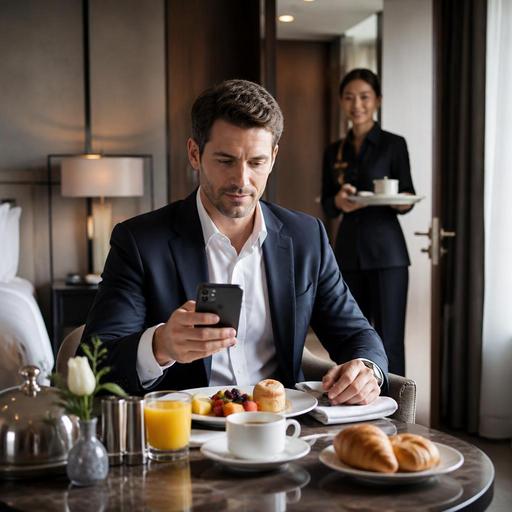
How Hotel Restaurants Can Digitize Room Service Without Losing Hospitality
Digitizing room service for hotel restaurants is no longer just a convenience project. It is a practical way to reduce order errors, speed up delivery coordination, keep menus accurate, and give guests a smoother in-room dining experience. For hotel restaurants, the challenge is not simply putting a menu online. The real goal is to build a room service workflow that feels easy for guests and manageable for kitchen, service, and front desk teams at the same time.
When room service runs on printed menus, phone calls, handwritten notes, and manual follow-ups, small mistakes can multiply quickly. A guest may order from an outdated menu left in the room, a server may mishear a modification over the phone, or the kitchen may not know whether the tray is for immediate delivery or a scheduled breakfast. Digitization helps remove these friction points by connecting the menu, ordering flow, and internal communication into one clearer process.
Why room service needs a different digital setup than regular restaurant ordering
Hotel room service looks similar to restaurant delivery on the surface, but the operating reality is different. Orders are going to specific rooms, often with timing requests, privacy expectations, and special instructions. Guests may be traveling internationally, arriving late, or ordering while multitasking. That means the digital experience must be simple, clear, and designed for low-effort decisions.
A good room service system should answer the guest's main questions before they need to call anyone: What is available right now? How long will it take? Can breakfast be scheduled? Are allergens clearly marked? Can I request cutlery, baby items, or a no-knock delivery? The more clearly these choices are presented, the less pressure falls on the front desk and restaurant team.
For operators, room service digitization also requires tighter coordination than standard table service. The kitchen needs visibility into room numbers and timing. Service staff need a structured handoff for tray preparation and delivery. Management needs confidence that menu prices, availability, and item descriptions are always current. A digital menu connected to order management supports all of these needs better than a static paper menu in a drawer.
Build the room service menu around guest decisions, not kitchen categories
One of the most common room service mistakes is publishing the restaurant menu as-is and assuming it will work in the room. In many cases, it does not. Guests ordering from a bed, desk, or family room do not browse the same way as guests seated in a dining room. They often want quick reassurance, familiar choices, and a short path to checkout.
Instead of structuring the menu only around kitchen stations, organize it around the guest context. For example, morning travelers may want a clear breakfast section with coffee, bakery items, eggs, and light options. Late arrivals may need a concise late-night menu with a few reliable hot dishes, snacks, and drinks. Families may benefit from a simple kids' section and easy side additions.
Useful room service menu elements include:
- Time-based availability so guests only see items that can actually be ordered at that moment
- Clear modifiers for eggs, bread choice, sides, sauces, and doneness where relevant
- Allergen and dietary labels for gluten-free, vegetarian, vegan, or dairy-free options
- Delivery notes such as estimated preparation time or tray collection instructions
- Add-on prompts like juice with breakfast, dessert after dinner, or extra water for the room
Consider a practical example: a business traveler orders a grilled chicken sandwich and sparkling water at 10:30 p.m. In a printed-menu system, the guest may call, learn the sandwich is unavailable, and restart the order. In a digital room service menu, unavailable items can be hidden automatically, alternatives can be suggested, and the kitchen receives the exact modifier notes without repetition.
Reduce internal friction with clear order routing and delivery steps
The guest-facing menu is only half of the job. The operational side matters just as much. Many room service delays happen after the order is placed, not before. If the order reaches the wrong station, if staff are unclear about tray setup, or if no one owns the final delivery handoff, digitization will not create the expected improvement.
Hotel restaurants should map the full room service journey from menu view to tray pickup. This often reveals avoidable gaps. For example, who confirms that a breakfast scheduled for 7:00 a.m. is visible to the morning shift? Who checks whether the room requested extra napkins or no ice? Who marks the order as delivered so the team is not chasing open tickets?
A practical room service workflow can include:
- Guest opens a QR menu or digital room service link
- Guest selects room number or verifies identity through the hotel flow
- Guest places an order with modifiers, notes, and optional delivery time
- Order is routed to the appropriate kitchen or bar station
- Service team sees room number, timing, and tray requirements
- Order status is updated internally from received to preparing to out for delivery
- Completed delivery is marked so managers can review service patterns later
This structure is especially useful when multiple departments touch the same order. A cappuccino and fruit bowl for a breakfast order may involve one prep area, while an evening order with wine and hot dishes may involve both kitchen and bar. Digital routing reduces the need for repeated phone calls between teams and creates a cleaner record of what was requested.
Train staff to use digitization as a service tool, not just a control tool
Some operators introduce digital room service tools but treat them only as a way to push guests away from phone ordering. That approach can backfire. Hospitality still matters, especially in hotels where comfort and convenience are central to the guest experience. The best digital systems support staff rather than replacing human judgment.
For example, front desk staff should know how to guide a guest to the digital menu if needed, but they should also know what to do when a tired guest prefers help. Restaurant staff should understand how to update item availability quickly instead of waiting for complaints. Supervisors should review common modification patterns and use them to simplify the menu over time.
Training should focus on a few practical habits:
- Checking that shift teams know which items are unavailable before service starts
- Using consistent modifier language so kitchen prep is unambiguous
- Reviewing delayed orders to find whether the issue was prep, routing, or delivery
- Confirming that premium add-ons feel helpful rather than intrusive
- Making sure staff can assist guests who are less comfortable with digital ordering
When staff see the system as a support layer, adoption improves. They spend less time decoding orders and more time handling exceptions well.
Use digital room service to improve revenue carefully and naturally
Room service digitization can also support better average order value, but only when done with restraint. Hotel guests usually respond better to relevant suggestions than aggressive upselling. A breakfast order can offer fresh juice, extra espresso, or a pastry. A late dinner can suggest dessert or sparkling water. A family order can prompt an extra side or child-friendly drink.
The key is context. Suggestions should match the time of day, the main item, and the likely guest need. If every screen pushes too many extras, the experience starts to feel transactional. If prompts are concise and useful, they can feel like thoughtful service.
Digitization also helps protect revenue by keeping pricing and item availability current. This matters in hotels because outdated room folders often remain in circulation longer than restaurant table menus. A digital menu lets operators update prices, remove sold-out items, adjust breakfast cutoffs, or test seasonal dishes without reprinting materials across every room.
For hotel restaurants looking to modernize room service, the most effective starting point is simple: clean digital menus, clear order routing, and staff training built around guest convenience. Once that foundation is in place, it becomes much easier to refine delivery timing, improve menu performance, and create a more reliable in-room dining experience. Platforms like Restomas can support that shift by helping teams manage QR menus, order flow, and operational clarity in one place.
