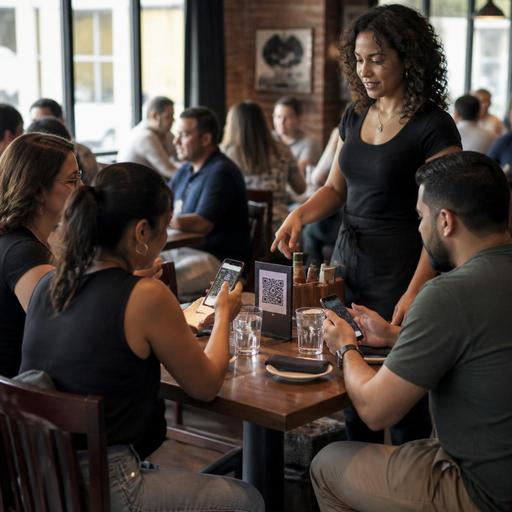
How Multilingual QR Menus Help U.S. Restaurants Serve Tourist Areas
Multilingual QR menus can help U.S. restaurants serve guests more clearly in tourist districts and diverse neighborhoods without slowing down the floor or overloading the counter. If you run a cafe near a convention center in Orlando, a taco shop in Los Angeles, a seafood spot by Miami Beach, or a diner near Times Square, language friction can affect check averages, order accuracy, line speed, and guest confidence. A well-built QR menu gives operators a practical way to present menu items, modifiers, allergen notes, and ordering steps in more than one language while keeping one operational source of truth.
Why multilingual QR menus matter in U.S. service environments
In many U.S. markets, guests may understand basic English but still hesitate when ordering complex items, add-ons, spice levels, sides, or dietary requests. That hesitation shows up differently by concept. In a fast-casual bowl shop, it can stall the line. In a full-service restaurant, it can lengthen table turns because servers spend extra time explaining menu sections. In a food truck, it can create a backup at the pickup window. In a hotel restaurant, it can lead to repeated questions from travelers who just want a fast, confident order.
Multilingual QR menus are especially useful when the menu changes often. A printed translated menu can become outdated quickly when prices, seasonal dishes, or item availability shift. With a digital menu, operators can update one item, modifier, or photo and reflect that change across service periods and locations. That matters for U.S. operators juggling breakfast, lunch, happy hour, late-night, takeout, and delivery app menus at the same time.
For example, a neighborhood ramen shop in Seattle may want English, Spanish, and simplified Chinese versions of the same QR menu. A Cuban cafe in Miami may prioritize English and Spanish. A Chicago deep-dish restaurant near major attractions may need clear versions for international tourists who are unfamiliar with portion sizes, wait times, and topping choices. The goal is not perfect translation for every possible guest. The goal is smoother ordering and fewer preventable mistakes.
What to translate and what to keep consistent
The most effective multilingual QR menus do not translate everything blindly. They translate the parts that reduce ordering friction while keeping operational structure consistent across languages. Your kitchen display system, POS categories, and prep workflow should still map cleanly to the same item set.
- Translate item names with context: Guests need more than a literal translation. Add short descriptions that explain preparation style, portion format, and key ingredients.
- Translate modifiers carefully: Size, protein choice, side selection, doneness, spice level, milk options, and add-ons should be easy to compare.
- Keep allergen and dietary notes clear: Use plain language and review phrasing carefully. If you communicate allergen information, keep your back-of-house workflow aligned and verify claims before publishing.
- Keep brand terms consistent: Signature dish names, house sauces, or combo names may stay in English if that supports recognition, but explain them in the guest’s selected language.
- Show service-format instructions: Make pickup, dine-in, curbside pickup, or counter-order steps easy to understand.
A practical example: a fast-casual Mediterranean restaurant in Washington, D.C. can keep dish names like shawarma or falafel, but the selected language should explain whether the item is a wrap, bowl, platter, or family meal and what sides are included. That reduces back-and-forth at the register and helps guests order correctly on the first try.
Operational setup for smoother ordering and fewer mistakes
A multilingual QR menu works best when it connects to actual service workflows, not just marketing. Operators should think through the full path from scan to kitchen to pickup shelf.
1. Start with your top guest journeys
Map the most common ordering situations first. A sports bar in a tourist zone may need a dine-in QR menu for tabs at the table, plus a simplified takeout menu for pickup. An airport concession may need a fast mobile flow for travelers in a hurry. A food hall stall may need a menu that helps guests choose quickly before they reach the counter.
2. Build language versions from one master menu
A single source of truth helps prevent mismatches between the English menu, the Spanish menu, and the POS. If the lunch combo includes fries in one language but chips in another, your line team pays the price. Central menu management is especially important for franchise groups and multi-location operators that want consistent pricing, naming, and modifier logic.
3. Train staff on menu-switch support
Your staff does not need to speak every language, but they should know how to help guests switch languages on the QR menu, restart an order, and confirm modifiers before sending the check or firing the ticket. In a busy New York bagel shop, that small bit of training can keep the line moving during the breakfast rush.
4. Connect QR ordering to fulfillment points
If guests order from the QR menu, make sure the order destination is obvious. Dine-in orders should route cleanly to the kitchen display system or printer. Takeout orders should land in a clear pickup workflow with shelf labeling or handoff procedures. For curbside pickup, the guest should know where to park and how to notify staff. For bars, the workflow should still support age-verification steps where applicable, and operators should verify current state and local alcohol rules before relying on digital ordering flows.
Accessibility, compliance, and payment details to think through
U.S. operators should also consider accessibility and compliance in practical terms. A multilingual QR menu should not become the only path to seeing the menu if that creates barriers for some guests. Consider keeping printed backup menus, staff-assisted ordering, or accessible digital alternatives available. ADA-related expectations can depend on the situation, so it is wise to review current guidance and verify local requirements with qualified advisors.
If you display calories or other nutrition information because your concept falls under chain-menu rules, make sure your digital menu presentation supports that workflow consistently. FDA-related menu labeling obligations depend on the operator type and footprint, so confirm what applies to your business through official guidance.
On the payment side, think operationally about tipping, service charges, and taxes. If the QR flow includes pay-at-table or mobile checkout, guests should understand what they are being charged for. In full-service settings, be careful that tips, automatic gratuities where allowed, service charges, and sales tax are presented clearly and mapped correctly in your POS and reporting workflow. Requirements differ by state and city, so confirm setup details with your accountant, payroll provider, POS partner, and legal or tax advisors as needed.
Best practices for U.S. tourist districts and diverse neighborhoods
- Choose languages based on guest mix, not guesswork. Look at who actually orders in your store, on delivery apps, and by neighborhood pattern.
- Prioritize high-friction categories. Combos, modifiers, family meals, and dietary notes usually need the most clarity.
- Use photos carefully. Strong item photos help across languages, especially for unfamiliar dishes, but keep them accurate to portion and plating.
- Separate dine-in and takeout logic when needed. A lobster roll shop in Boston may have different packaging notes, sides, and prep times for dine-in versus takeout.
- Review translations during menu changes. Seasonal items, limited-time offers, and 86 updates should stay synchronized.
- Test on real devices. Scan the QR code on older phones, weak Wi-Fi, and different screen sizes before rollout.
For multi-location brands, create a review process at the corporate level but allow store-level notes where needed. A Southern California taco chain may keep core translations centralized while letting beach-area stores highlight pickup instructions and inland stores emphasize family bundles. A hotel restaurant group may use one template across properties while adjusting breakfast hours, room-service notes, and local menu items by site.
When multilingual QR menus are done well, they do more than translate words. They reduce confusion, support faster service, improve order accuracy, and help guests feel comfortable spending more confidently. For operators, the real win is consistency: one menu structure, clearer ordering, and fewer preventable service breakdowns across dine-in, takeout, and direct digital ordering. Restomas can support that kind of menu control by helping operators manage QR menus, ordering flows, and location-level updates in one place.
