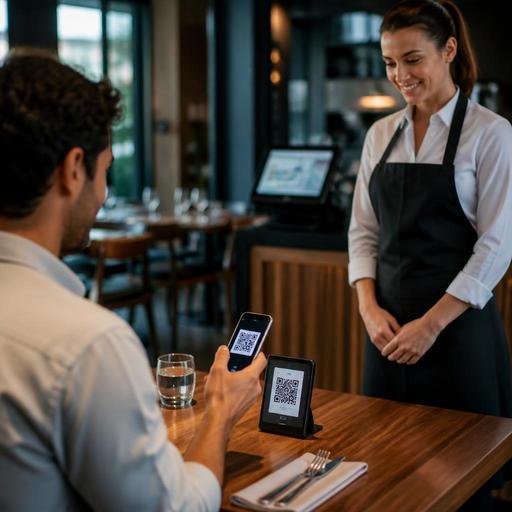
How Restaurants Implement QR Payments With a Virtual POS
Why Virtual POS and QR Payments Matter in Restaurant Operations
Virtual POS and QR payment integration for restaurants is no longer just a convenience feature. It has become a practical way to reduce payment friction, speed up table turnover, and give guests more control over how they browse, order, and pay. For restaurant owners, the real value is not the QR code itself. It is the way payment, menu management, and order flow work together in one operational system.
In a traditional service model, the payment moment often creates avoidable delays. A guest asks for the bill, a server prints it, the card terminal is brought to the table, the payment is processed, and the receipt is handled. In busy periods, this sequence can slow down service even when the kitchen is performing well. With a virtual POS connected to a digital menu and QR payment flow, guests can review the check and complete payment from their phone, while staff stay focused on service and upselling instead of chasing terminals.
This does not mean every restaurant should remove assisted payment. Fine dining, large family tables, and older guest segments may still prefer traditional card-present service. The goal is to add flexibility. A strong setup gives guests options while giving managers better visibility into orders, payments, and exceptions.
What a Good QR Payment Flow Looks Like in Practice
The best QR payment experiences are simple enough that guests understand them without explanation. They scan a code, open the live menu, select items or review an existing order, and move to a secure payment page connected to the restaurant’s virtual POS. If the system is well designed, the guest never feels like they are moving across disconnected tools.
Consider a casual dining restaurant with lunch peaks. A guest sits down, scans the table QR code, sees the live menu, and places an order. The order is routed to the correct station. Later, instead of waiting for the bill, the guest opens the same interface, confirms the table check, adds a tip if the market expects it, and pays through the virtual POS. Staff receive payment confirmation immediately, and the table can be closed without a separate manual step.
In a cafe, the flow may be slightly different. A guest scans the QR code at the table, orders coffee and pastry, and pays upfront. The barista receives the order, prepares it, and the guest stays seated. In this case, QR payment reduces line pressure at the counter and helps staff manage more orders with fewer interruptions.
A practical setup usually includes:
- Table-specific QR codes so orders and payments attach to the correct table
- Live menu syncing so guests only see available items and current prices
- Secure virtual POS checkout that supports common card payment methods
- Instant payment status updates for front-of-house staff
- Clear fallback options when a guest prefers to pay by cash or physical terminal
Restaurants often fail here when they treat QR payment as a separate layer instead of part of the service journey. If the menu, order management, and payment page feel disconnected, guests hesitate and staff must step in too often.
Operational Decisions to Make Before You Go Live
Before enabling QR payments, restaurant owners should map the real service flow, not the ideal one. Start with a few practical questions. Will guests order and pay in one session, or order first and pay later? Will split bills be allowed? How will discounts, voids, and complimentary items be handled? Who can intervene if a payment is pending but the guest needs to leave quickly?
These decisions affect setup, staff training, and guest communication. For example, a full-service restaurant that often hosts groups should think carefully about split checks. If the digital flow makes group payment difficult, staff will end up solving the problem manually at the worst possible time. Likewise, if happy hour pricing changes by time, the menu and payment logic must reflect that accurately to avoid disputes.
It is also important to define what happens when an item sells out after a guest has opened the menu. A live menu system should remove unavailable items or clearly mark them. That protects the guest experience and prevents payment issues tied to unavailable products.
Owners should review these areas before launch:
- Menu accuracy: names, modifiers, prices, taxes, and availability must be current
- Order routing: kitchen and bar stations should receive clean, readable tickets
- Payment rules: decide when payment is captured and how refunds are handled
- Table logic: ensure QR codes match the floor plan and service zones
- Exception handling: create a process for failed payments, duplicate attempts, and guest disputes
This is where platforms that combine QR menus, order management, and payment-friendly workflows become useful. Instead of maintaining separate tools for menus, table management, and digital ordering, operators can manage the guest journey more consistently.
Staff Training: The Difference Between Smooth Adoption and Daily Friction
Even the best payment flow can fail if the team is unsure how to support it. Staff do not need technical theory. They need clear scripts and decision rules. A server should know how to explain the QR option in one sentence, how to verify a paid table, and what to do if a guest says the payment page is not loading.
Training should focus on the moments where confusion is most likely:
- How to introduce QR ordering and payment without sounding pushy
- How to help guests who are unfamiliar with scanning codes
- How to check payment status before clearing a table
- How to switch to manual payment immediately when needed
- How to report recurring guest issues to management
For example, if a guest at a busy brunch service says, “I already paid on my phone,” the server should be able to confirm that payment in the system instantly, not walk to another terminal or ask the guest to wait. Small delays like this can weaken trust, especially at the end of the meal.
Managers should also monitor team behavior after rollout. If staff avoid mentioning the QR option because they think it slows them down, there may be a workflow problem rather than a training problem. If guests keep asking whether the payment page is secure, the restaurant may need clearer wording or a simpler checkout design.
Common Integration Mistakes and How to Avoid Them
The most common mistake is launching QR payments with an outdated menu. If guests see old prices or unavailable dishes, trust drops immediately. The second mistake is poor reconciliation between orders and payments. If managers cannot quickly match what was ordered, what was paid, and what was voided, end-of-day control becomes harder than before.
Another issue is weak placement of QR codes. Codes should be easy to find, clean, and tied to the correct table or zone. A code hidden under condiments or printed too small creates unnecessary friction. Presentation matters too. A brief line such as scan to view the menu and pay when ready is more helpful than a code with no context.
Restaurants should also test real guest scenarios before full deployment:
- A table that wants to split the bill
- A guest who changes an order after submission
- A refunded item due to stockout
- A weak internet moment during payment
- A server-assisted payment on a table that also used QR ordering
These tests reveal whether the virtual POS setup fits actual operations. In many cases, the technology works fine, but the process around it is incomplete.
How to Measure Success Beyond Faster Payments
It is tempting to judge QR payment only by speed, but restaurant owners should look at broader operational signals. Are fewer staff minutes spent on bill settlement? Are table-close times more predictable during peaks? Are payment disputes easier to resolve because the digital flow is clearer? Are guests using the menu more confidently because ordering and payment happen in one place?
Qualitative feedback matters as much as reports. Ask servers where guests hesitate. Review which tables still request manual payment. Watch whether managers are spending less time solving small checkout issues. If a cafe sees smoother counter flow or a restaurant sees fewer end-of-shift payment mismatches, that is a meaningful operational gain.
The strongest results usually come when QR payments are treated as part of restaurant digitization, not as an isolated feature. When digital menus, order routing, reservations, and payment workflows support each other, the guest experience feels more seamless and the team spends less energy on avoidable manual steps.
For restaurants exploring this shift, Restomas can help connect QR menus, ordering workflows, and table-friendly digital operations in a way that is easier for both guests and staff to use.
