How to Design Branded QR Codes for Restaurant Tables That Guests Actually Scan
Branded QR code design for restaurant tables is not just a visual detail. It directly affects whether guests notice the code, trust it, and complete the next step without asking staff for help. A QR code that blends into the table, looks unofficial, or sits in the wrong place can quietly reduce scans and create unnecessary friction. For restaurants, cafes, and bars, the goal is simple: make the code easy to see, easy to understand, and easy to use in the real conditions of service.
Many operators focus on the digital menu itself but overlook the physical moment that starts the experience. Guests do not scan because a QR code exists. They scan because the code is presented clearly, matches the brand, and answers an immediate need such as viewing the menu, ordering, or calling for service. That is why logo use, color choices, and table display strategy should be planned together rather than treated as separate tasks.
Start with function before decoration
The best branded QR codes still behave like working tools. Before adjusting colors or adding a logo, confirm that the code scans quickly on different phones, under different lighting, and from typical guest angles. A beautiful code that fails when the dining room is dim or when a phone camera is older will frustrate guests and increase staff interruptions.
Begin with a standard high-contrast code, test it, and only then add brand elements carefully. If you place a logo in the center, keep it small enough that the code remains readable. If you use brand colors, maintain clear contrast between the dark and light areas. Deep green on cream may fit a cafe identity, for example, but pale beige on light wood often disappears under natural light.
Think about the surface too. A matte table tent usually performs better than a glossy laminated card because it reduces glare. Outdoor tables need even more caution because direct sunlight changes how the code appears on camera. In a rooftop bar, a black code on a white or very light background is usually safer than a more subtle palette.
Practical design checks before launch
- Test scans on both iPhone and Android devices.
- Check readability in daylight, evening lighting, and under warm interior bulbs.
- Print at actual size before approving the final version.
- Make sure the code still works when viewed from a seated angle.
- Avoid overcrowding the card with too much text, icons, or decorative borders.
Use logo and brand color to build trust, not confusion
Guests are more likely to scan when the QR code looks like part of the restaurant rather than a random sticker added later. A small logo, consistent typography around the code, and recognizable brand colors can signal that the code is official. This matters because many guests have become more cautious about scanning unfamiliar codes.
However, branding should support clarity. If your restaurant identity uses dark burgundy, brass, and textured backgrounds, do not force all of those elements into the QR area. Instead, use the brand style around the code. For example, a steakhouse might place a clean black QR code on an ivory card, then frame it with subtle burgundy accents and a small logo above the instruction line. The code stays highly scannable while the overall piece still feels premium.
The instruction text matters as much as the visuals. “Scan to view menu” is clear, but restaurants can be more helpful when the digital experience offers more than a PDF. Phrases such as Scan to view menu and order or Scan for menu, allergens, and table service explain the benefit immediately. This reduces hesitation and sets the right expectation before the guest uses their phone.
If your operation has multilingual guests, consider one short line that is universally understandable rather than a crowded block of translated text. Pairing a direct phrase with a familiar icon can keep the display simple.
Choose the right table display format for your service style
Not every table setup needs the same QR display. The right format depends on table size, turnover speed, cleaning routines, and how guests interact with the menu during service.
Common display options and when they work best
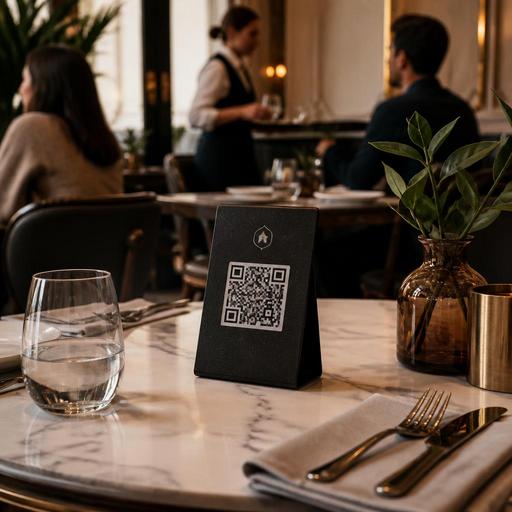
- Table tents: Useful for full-service restaurants where guests need a visible prompt from the moment they sit down. They are easy to spot but should be stable and easy to clean.
- Flat table stickers: Better for quick-service or high-turnover environments where fewer objects on the table means faster resetting. They must resist wear and moisture.
- Bill holders or check presenters: Helpful when the QR code supports payment, feedback, or loyalty sign-up later in the visit rather than menu access first.
- Wall or counter displays: Good for cafes, bakeries, and pickup points where guests order before sitting.
A brunch cafe may benefit from a small upright stand because guests often arrive, sit, and look around before engaging. A busy burger concept with compact tables may prefer a durable corner sticker that stays visible without occupying space. In a fine-casual restaurant, a discreet but elegant metal stand with a printed insert can preserve the atmosphere better than a plastic tent.
Placement on the table is also critical. The code should be reachable from multiple seats, not hidden behind condiments, flowers, or promotional items. If you place one code per table, make sure guests on larger tables can still access it comfortably. On larger communal tables, more than one code may be necessary.
Write the scan prompt like a service instruction
Many QR displays underperform because they assume guests already know what to do and why. A code without context creates uncertainty. A short prompt removes that friction and can reduce the number of routine questions staff answer each shift.
Good prompts are specific, benefit-led, and aligned with the digital flow behind the code. If the code opens a live menu with item photos, modifiers, and availability updates, say so in plain language. If guests can request service, include that benefit only if the feature is active and easy to use.
- Tell guests what the code does.
- Explain the immediate benefit.
- Keep the instruction short enough to read in two seconds.
- Match the wording to your service model.
For example, a pizzeria could use: Scan to view today’s menu and order from your table. A specialty coffee bar might say: Scan for the menu, seasonal drinks, and allergen info. A hotel restaurant could say: Scan to browse the menu in multiple languages.
This is where digital menu management becomes important. If your menu changes often, the QR code should point to a system that updates instantly rather than to a static file that becomes outdated. That way, the physical display can stay consistent while the menu content evolves by time of day, season, or stock availability.
Maintain QR displays as part of daily operations
Even a well-designed QR code loses value if it becomes scratched, greasy, faded, or linked to outdated content. Restaurant teams should treat QR displays like any other guest-facing service tool. Include them in opening checks, table resets, and periodic brand reviews.
Create a simple checklist for managers or shift leads. Confirm that every table has the correct display, the code scans quickly, and the linked menu reflects current items and prices. If one display style consistently goes missing or gets damaged, adjust the material or placement instead of repeatedly replacing it with the same weak setup.
Staff training also matters. Servers and hosts should know how to introduce the QR option naturally without forcing it. For example, a host might say, You can scan the table code to browse the menu right away, and I’m happy to help if you prefer. That approach keeps the experience flexible and guest-friendly.
Restaurants using platforms like Restomas can support this workflow more effectively because the QR code is connected to a live digital menu, ordering flow, and operational tools rather than acting as a dead-end link. That makes branded QR design more valuable: the guest sees a polished table display, scans with confidence, and reaches an experience that is current, functional, and easier for staff to support.
Turn the table scan into a stronger brand moment
A QR code should feel like an extension of hospitality, not a shortcut that removes it. When the design is clear, branded, and placed intelligently, the code does more than open a menu. It helps guests trust the process, reduces confusion at the table, and supports smoother service across the shift.
For restaurant owners, the practical takeaway is to review QR codes as both a design asset and an operational tool. Test readability, simplify the message, choose the right display format, and connect the code to a menu system that is easy to maintain. Small improvements in these details can make the digital experience feel more natural from the first scan.
If you are refining your table QR experience, Restomas can help you connect branded menu access with flexible digital menu and ordering workflows.
