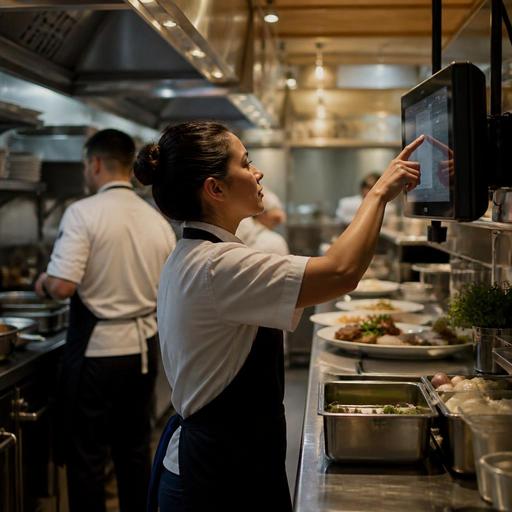
How to Set Up a Kitchen Display System for Faster Restaurant Service
A kitchen display system setup can improve restaurant speed, accuracy, and communication, but only if it matches the way your kitchen actually works. Many restaurants install screens and expect instant results, then discover that orders still bottleneck at the pass, modifiers confuse the line, or staff revert to verbal call-outs during rush periods. The practical goal is not simply to replace paper tickets. It is to build a clear digital order flow from guest order to production, handoff, and completion.
For restaurant owners and operators, the most effective approach is to treat setup as an operations project rather than a hardware purchase. That means mapping stations, defining routing rules, cleaning up menu items, and training staff on what the screen should mean in real time. Whether you run a cafe, quick-service restaurant, casual dining room, or multi-channel takeaway operation, a strong setup reduces friction and gives the kitchen one shared source of truth.
Start with workflow before hardware
Before mounting any screen, document how an order moves through your business. A dine-in burger with fries and a bottled drink does not follow the same path as a delivery family meal or a coffee order with milk changes. If you skip this workflow step, the display may show orders digitally while still creating confusion operationally.
Begin with a simple service map:
- Where orders originate: QR menu, waiter device, cashier POS, online ordering, or delivery integrations
- Who receives them first: expo, hot line, cold prep, bar, dessert, or pickup counter
- Which items must fire immediately and which should be delayed
- How completed items are marked and handed off
- Who resolves exceptions such as out-of-stock items, substitutions, or guest changes
For example, a brunch cafe may need coffee tickets to appear instantly at the beverage station while egg dishes route to the hot line and pastries to the front counter. A pizza restaurant may need all orders visible centrally, but only oven items should drive kitchen timing. The right setup depends on production logic, not on a default software template.
Choose screen placement by station responsibility
Screen placement should support the way staff physically move, not just where power outlets exist. A badly placed monitor forces cooks to turn away from the line, blocks sightlines, or becomes unreadable in heat and glare. In a practical setup, each station sees only what it needs, at the moment it needs it.
Common station layouts
- Single-screen kitchen: best for small cafes, kiosks, and compact menus where one team handles all production
- Hot and cold split: useful when salads, desserts, or sandwiches are made separately from grilled or fried items
- Kitchen plus expo screen: ideal for full-service restaurants that need plating control and final order checks
- Kitchen plus pickup screen: helpful for takeaway-heavy operations where front-of-house needs visibility into readiness
If your menu includes long-cook and fast-serve items together, think carefully about visibility. A fryer cook does not need to scan dessert notes, and a barista should not lose time reading steak modifiers. Keep each screen relevant. Less clutter usually means faster action.
Also test readability under real conditions. Steam, reflections, and distance matter. During setup, stand where the employee works, not where the installer stands. If a line cook must squint, step forward, or wipe the screen constantly, the setup is not finished.
Clean up menu structure and modifiers before launch
Many KDS problems are actually menu management problems. If item names are inconsistent, modifiers are duplicated, or special requests appear as long free-text notes, the kitchen screen will amplify that mess. A digital system only performs as well as the menu data feeding it.
Review the menu with kitchen and service staff together. Focus on the items that create the most confusion during peak hours. Then standardize how they appear.
- Shorten item names so they are readable at a glance
- Group modifiers in a logical sequence, such as protein, temperature, side, sauce, then allergy notes
- Separate optional add-ons from required choices
- Use consistent naming for the same ingredient across all channels
- Reduce free-text requests when a structured modifier can do the job
For example, instead of allowing multiple ways to request no onion, remove onion, onion allergy note, or custom note, create one clear modifier where appropriate and reserve notes for true exceptions. Likewise, if a combo meal includes timing dependencies, define whether all components should fire together or whether drinks can be prepared immediately while food remains in queue.
This is also where digital tools connected to menu management become valuable. When your ordering channels and kitchen flow share the same menu logic, you reduce the risk of one version of the menu promising something the kitchen cannot prepare consistently.
Set routing, timing, and status rules for real service
A kitchen display should do more than show incoming orders. It should reflect production priorities. That requires operators to define routing rules, timing behavior, and status labels that match service reality.
Ask these practical questions during setup:
- Should delivery orders appear instantly or closer to pickup time?
- Do appetizers and mains need separate firing logic?
- Should bar items appear on a different screen from kitchen food items?
- Who can bump completed tickets, and at what stage?
- What status should front-of-house see: received, in progress, ready, or handed off?
Consider a casual dining restaurant with table service. If every course fires immediately, the kitchen may produce mains before guests finish starters. In that case, expo or service staff may need a hold-and-fire step. In a fast-casual bowl concept, by contrast, immediate production may be exactly right because speed matters more than course pacing.
Clear status definitions are equally important. If one cook marks an order ready when it is plated but another does it when the pickup bag is sealed, reporting and handoff become unreliable. Define each status in plain language and train every shift to use it the same way.
Train staff with peak-hour scenarios, not just button demos
Restaurants often undertrain KDS usage because the interface seems simple. But the real challenge is not tapping the screen. It is knowing what to do when five channels send orders at once, a guest changes a side, and one item is eighty-sixed mid-service.
Run short scenario-based training before full launch. Use realistic examples from your own menu and rush periods:
- A dine-in order needs to be held until the table is seated
- A delivery platform order arrives with allergy-related modifications
- A cashier enters a wrong side and front-of-house requests a correction
- An item becomes unavailable and the kitchen must communicate back quickly
- Two stations finish at different times and expo must coordinate final handoff
Give each role a specific expectation. Cooks should know how to read and clear items. Expo should know how to verify completeness. Managers should know how to override, re-route, or pause channels if the kitchen is overloaded. Front-of-house should understand what the statuses mean so they do not interrupt the line for updates the system already provides.
For the first week after launch, assign one shift leader to observe friction points. Watch for repeated issues such as unread modifiers, delayed bumping, duplicate production, or verbal workarounds. These are signs that the setup needs adjustment, not proof that digital systems do not work.
Review performance weekly and refine the setup
No kitchen display system setup is perfect on day one. The best operators treat launch as the start of refinement. After a week or two, review where tickets pile up, which modifiers cause hesitation, and whether routing matches actual prep responsibilities.
Useful review questions include:
- Which station gets overloaded first during the rush?
- Which items generate the most clarification questions?
- Are ticket times inflated because orders arrive too early?
- Do front-of-house and kitchen interpret statuses the same way?
- Have any menu items become operationally too complex for the current flow?
Sometimes the fix is simple: rename a modifier, move a screen, or split one production queue into two. Sometimes the issue reveals a larger need, such as better POS integration, cleaner digital menu control, or clearer handoff between channels. Platforms like Restomas can help restaurants align QR ordering, menu updates, and order flow so kitchen operations are not disconnected from the guest-facing experience.
A well-planned kitchen display system does not just digitize tickets. It creates cleaner communication, more predictable service, and better control during busy hours. If you are reviewing your restaurant's digital workflow, Restomas can support a more connected setup across menus, ordering, and operations.
