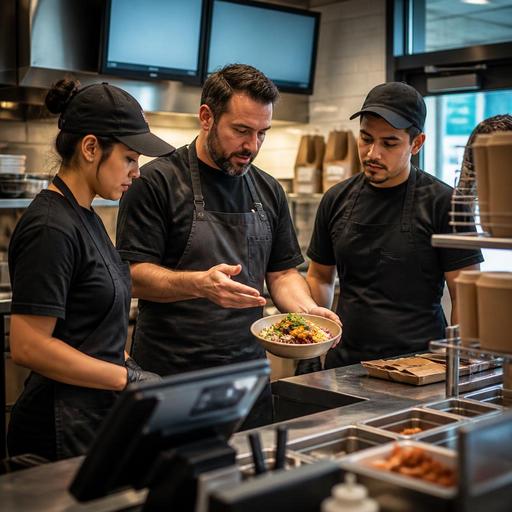
How to Train Kitchen Staff Fast When Restaurant Menus Change Often
Training kitchen staff when restaurant menus change often is not just a culinary issue. In U.S. operations, it affects ticket times, food cost control, remake rates, delivery app accuracy, direct online ordering, and how confidently your expo line handles a Friday night rush. Whether you run a neighborhood brunch spot, a fast-casual bowl concept, a hotel restaurant, or a food truck rotating weekly specials, frequent menu changes need a repeatable training system, not last-minute verbal updates.
Why frequent menu changes create kitchen risk
Menu flexibility can drive sales, help move seasonal product, and keep repeat guests interested. But every new sandwich build, limited-time sauce, or revised garnish introduces operational friction. In an American restaurant, that friction usually shows up in familiar ways: a line cook misses a modifier on a takeout check, the fryer station portions a new side incorrectly, the pickup shelf fills with remakes, or a delivery app order comes through with an outdated item description.
Think about a few common U.S. examples:
- A fast-casual salad shop adds a rotating protein every Monday, but the grill station and digital ordering menus are not updated at the same time.
- A suburban diner launches weekend specials, yet the overnight prep cook and morning line team are using different recipe notes.
- A sports bar adds a game-day appetizer sampler, but the kitchen display system abbreviates the item in a way new cooks do not recognize.
- A hotel restaurant updates banquet and all-day dining menus in the same week, creating confusion between plated service and à la carte prep.
The lesson is simple: if the menu changes faster than the training process, execution breaks down. That affects guest satisfaction, labor efficiency, and the confidence of your back-of-house team.
Build one source of truth for recipes and station steps
The fastest way to train kitchen staff is to reduce interpretation. Every changing item should have one clear operational version of the truth that covers recipe, portion, plating, allergens or ingredient flags where relevant, packaging notes for takeout, and any channel-specific differences. If your in-house check, QR ordering menu, direct online ordering page, and delivery apps all describe the item differently, the kitchen is being asked to guess.
For U.S. operators, a practical training packet for each new item should include:
- Item name exactly as it appears in the POS and kitchen display system.
- Build sequence by station. For example: bun toast at grill, sauce at cold station, pickles added at expo.
- Portion standards. Use ounces, scoops, slices, ladles, or count-based portions that match your actual tools.
- Photo reference. A simple plating or packaging image helps reduce inconsistent finishes.
- Modifier rules. Clarify what happens when guests remove cheese, swap a side, or request sauce on the side.
- Off-premise instructions. Note vented packaging, labeling, and whether fries or sauces are packed separately for delivery.
A taco truck in Austin, for example, may only have three people working a rush, so the training document needs to be extremely short and visual. A multi-location fast-casual brand in Illinois may need the same item guide pushed to every store so each line builds the item the same way. Different formats, same principle: one source of truth.
Digital systems help here because they reduce version confusion. When recipe notes, menu descriptions, and order channels are updated together, the kitchen spends less time decoding changes and more time executing them accurately.
Train by station, shift, and sales channel
Many operators train new items in a single pre-shift huddle and assume the job is done. That usually fails because menu changes affect different roles in different ways. The sauté cook needs timing guidance. The prep cook needs yield expectations. Expo needs final presentation and packaging rules. Cashiers or counter staff need language that matches what the kitchen can actually produce during a rush.
A stronger approach is to train in layers:
Station-level training
Teach only what each station controls. If a new Nashville hot chicken sandwich touches prep, fry, cold line, and expo, each station should know its own responsibilities and handoff points. This prevents the common problem where everyone understands the whole dish generally, but no one owns the exact step that keeps execution consistent.
Shift-specific training
The Friday dinner crew, Sunday brunch crew, and late-night bar menu crew may need different emphasis. A brunch item in a Phoenix diner may require fast egg timing, while the same kitchen at night is focused on burgers and apps. Train when the item will actually sell.
Channel-specific training
Dine-in, takeout, curbside pickup, and delivery apps can require different handling. A ramen bowl that looks great in-house may need broth packed separately for delivery. A milkshake sold through direct online ordering may need a hold-time rule for pickup. If your kitchen team does not understand those differences, frequent menu changes will increase remakes and refunds.
If you use QR ordering or direct online ordering, review how modifiers display on the kitchen side. Staff should practice reading the actual ticket language they will see during service, not just the idealized recipe card.
Create a 48-hour rollout routine for every new item
When menus change often, training has to become a standard operating rhythm. A simple 48-hour rollout routine works well for many U.S. restaurants:
- 48 hours before launch: finalize recipe, costing, prep list changes, and POS item naming.
- 24 hours before launch: update digital menus, QR menus, direct ordering channels, and delivery app listings so the kitchen is not surprised by live orders.
- Pre-shift before launch: run a live build, taste, and packaging check with the actual tools and containers.
- First service window: assign one lead cook or chef to watch ticket flow, answer questions, and correct errors in real time.
- Post-shift review: document remakes, guest complaints, 86 issues, and prep misses, then revise the station notes.
For example, a fast-casual rice bowl brand launching a Korean barbecue special should not stop at recipe training. The team should verify that the POS button name matches the kitchen display text, that extra sauce modifiers print clearly, and that takeout lids fit the final build. A New York hotel restaurant adding a seasonal flatbread should test whether room service packaging preserves quality differently than dining room service.
Frequent menu changes also affect labor scheduling. If a complicated special requires extra prep or slower line assembly, managers may need to adjust opening prep hours or assign a stronger expo during launch days. Operators should handle scheduling and wage-rule questions based on their state and local requirements and confirm current rules with qualified advisors.
Measure training success with operational signals, not guesswork
You do not need complicated analytics to know whether kitchen training is working. Start with a few practical signals:
- Remakes on new or recently changed items
- Average ticket time during the item’s peak daypart
- Modifier errors from online orders
- Prep shortages and unexpected 86s
- Guest complaints about missing components or packaging quality
If a Chicago burger shop sees repeated mistakes on a limited-time mushroom Swiss burger, the problem may not be the recipe itself. It could be that the mushrooms are prepped at the wrong station, the KDS abbreviation is unclear, or the direct ordering menu allows a modifier the line is not trained to handle. Looking at the workflow instead of blaming staff usually leads to a faster fix.
For chains and larger groups, consistency matters even more. Multi-location operators should avoid letting each store create its own version of a new item guide. Standardized digital updates, shared recipe visuals, and documented launch checklists help reduce variation between stores. If menu labeling, allergen communication, accessibility, alcohol service, or employment rules are implicated by a menu change, treat those as operational review points and verify current federal, state, and local requirements through official guidance or qualified advisors.
When training becomes a system instead of a scramble, frequent menu updates stop feeling disruptive. They become a controlled process that supports better checks, smoother kitchen display workflows, and more reliable execution across dine-in, takeout, and delivery. Restomas helps operators keep menus, ordering channels, and service workflows aligned so kitchen teams can adapt to change with less confusion.
