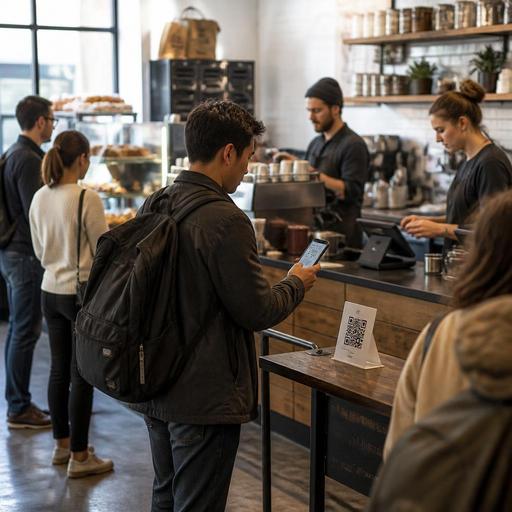
How U.S. Coffee Shops Can Use QR Menus Without Slowing the Line
For many operators, a QR menu for coffee shops sounds like a simple upgrade until the morning rush hits and the line stalls. In the United States, coffee shops need digital menu workflows that work for commuters ordering drip coffee, parents grabbing breakfast sandwiches, students splitting tabs, and delivery drivers waiting at the pickup shelf. A QR menu should reduce friction, not create it. The goal is not to force every guest onto a phone. The goal is to give guests faster access to menu details, modifiers, and ordering options while keeping the counter moving.
Start with the real line problem, not the technology
Most U.S. coffee shops do not lose speed because customers cannot see a menu. They lose speed because guests reach the register unprepared. They are still deciding between hot or iced, 12-ounce or 16-ounce, oat milk or whole milk, one breakfast taco or two, and whether the seasonal latte is available decaf. A QR menu helps when it answers those questions before the guest reaches the cashier.
Think about a neighborhood coffee shop in Chicago with a weekday line out the door from 7:15 to 8:30 a.m. If the printed overhead board only shows drink names and base prices, the register becomes the place where every modifier gets explained. A better setup is a QR code at the entrance, on the door, and near the queue rail that opens a mobile menu with sizes, milk options, add-ons, food availability, and sold-out items. Guests can decide while waiting, and the cashier can confirm instead of educate.
That same principle applies in airport concessions, hotel lobby cafes, and college-area coffee bars where many guests are in a hurry. The QR menu should handle menu discovery. Your staff should handle hospitality and exceptions.
Design the QR menu for fast decisions at the counter
A coffee shop QR menu should be shorter and clearer than a full website menu. Mobile guests in line are not browsing for fun. They are trying to order fast.
- Lead with high-volume categories such as brewed coffee, espresso drinks, cold brew, tea, breakfast, and bakery.
- Show common modifiers early including size, milk choice, flavor add-ons, and hot or iced.
- Mark stock changes in real time so guests do not order a pastry that sold out 20 minutes ago.
- Use clear item names that match what staff say at the register and what prints to the kitchen display system.
- Keep photos limited if they slow page loading on cellular data.
For example, a fast-casual coffee bar in Austin may sell breakfast tacos, matcha, and signature cold foam drinks. If the QR menu buries breakfast under a long drinks list, guests still ask basic questions at the register. If breakfast appears first before 10:30 a.m., with simple modifier paths and accurate availability, line speed improves.
Operators should also decide what the QR menu is supposed to do. In some shops, it is a digital browse-only menu. In others, it connects to direct online ordering for order-ahead, curbside pickup, or a dedicated pickup shelf. Both models can work, but they should be operationally distinct. If in-store guests are expected to order at the counter, do not make the mobile flow feel like they must complete a full online checkout just to learn what pastries are available.
Build separate workflows for browse, order-ahead, and pickup
One reason QR menus slow the line is that operators mix too many use cases into one screen. A guest standing inside the cafe has different needs than a commuter ordering ahead from the train platform.
Use a simple in-store browse flow
The in-store QR should open quickly and answer three questions: what is available, how much does it cost, and what choices can I make? It should not require account creation, app downloads, or too many taps.
Use a separate order-ahead flow for off-premise sales
If your shop offers takeout, curbside pickup, or delivery app integration, make that path clear but separate. A busy downtown shop in Seattle might place one QR code near the door for menu browsing and another near the window or pickup shelf for direct online ordering. That prevents guests in line from getting stuck in a checkout flow while people behind them wait.
Match digital promises to station capacity
If the QR menu offers order-ahead for drinks and food, your bar, warming station, and expo area must support it. A two-person morning team cannot promise five-minute pickup if one barista is also taking checks and handing out bakery bags. Use realistic prep times, throttle order volume when needed, and route tickets clearly to the POS and kitchen display system. If you also accept delivery apps, decide how those tickets rank against in-store and direct digital orders so your regular line does not get punished by marketplace demand.
Protect accessibility, payment clarity, and guest trust
In U.S. coffee shops, QR menus should expand access, not become the only path. Keep a visible printed menu, a counter menu board, or a staff-assisted option for guests who do not want to scan a code, do not have a smartphone, or use assistive technology. Accessibility expectations can vary by situation, and operators should review current ADA-related guidance and local requirements with qualified advisors when needed. Operationally, the safest move is simple: do not make the QR code the only way to understand the menu.
Payment clarity matters too. If the QR experience connects to ordering, show charges clearly before checkout, including any service charges, delivery fees, or pickup instructions where applicable. In the United States, service charges and tips are not the same thing operationally, and tax treatment can differ by jurisdiction and setup. Coffee shop owners should confirm current federal, state, and local requirements with their accountant, payroll provider, POS partner, or legal advisor. The practical takeaway is to label charges clearly so guests and staff are not explaining surprises during the rush.
Tipping workflows also deserve attention. If guests order at the counter but browse on their phone first, make sure the POS handoff still feels smooth. For example, a guest who scans the menu, decides on a latte and muffin, and then pays at the register should not face a confusing duplicate prompt sequence. Keep tipping prompts intentional, train staff on how digital and in-person steps connect, and make sure tip reporting and payroll workflows match your actual service model.
Train staff and test the line like an operator
The best QR menu rollout is not a design project. It is a line-management project. Before launch, walk through the guest journey during a real U.S. coffee rush.
- Stand at the entrance and check whether first-time guests notice the QR code immediately.
- Time the scan-to-menu experience on both iPhone and Android over cellular service and guest Wi-Fi.
- Watch where guests hesitate on sizes, modifiers, breakfast combos, and sold-out bakery items.
- Test the register script so cashiers confirm choices quickly instead of repeating the whole menu.
- Review ticket flow from POS to bar printer or kitchen display system to pickup shelf handoff.
- Adjust signage placement at the door, queue, patio, and curbside pickup spots.
A practical example: a suburban drive-thru coffee stand with walk-up traffic may use QR codes on the walk-up rail so waiting guests can review syrups and food options before they reach the window. A hotel coffee counter can use table tents in the lobby seating area so guests place a second order without rejoining the main line. A multi-location cafe group can centralize menu updates across stores while still hiding items that are unavailable at one specific shop.
For operators with multiple units, standardize the structure of the QR menu across all locations, but allow store-level controls for pricing, daypart menus, and inventory-based item visibility. That keeps the brand consistent while respecting local realities like commuter-heavy weekday traffic, weekend brunch demand, or limited staffing at a kiosk format.
When QR menus are built around line speed, they help guests arrive prepared, reduce repetitive cashier conversations, and support cleaner ordering across dine-in, takeout, and pickup. Restomas can help coffee shop operators connect QR menus with ordering, POS workflows, and real-time menu management in a way that fits daily service.
