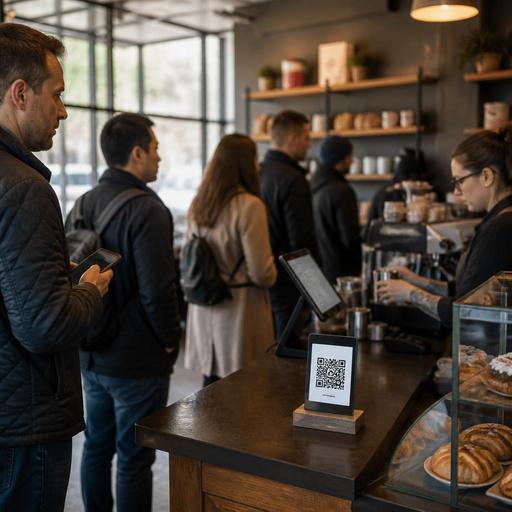
How U.S. Coffee Shops Use QR Menus Without Slowing the Line
For many operators, QR menus in U.S. coffee shops sound like a smart upgrade until the morning rush hits and the line stalls. The issue usually is not the QR code itself. It is how the menu, ordering flow, POS setup, and in-store traffic pattern work together. In a busy neighborhood cafe, campus coffee bar, hotel lobby coffee counter, or airport concession, a QR menu should reduce friction, not create a new decision bottleneck at the register.
The most effective approach is to treat the QR menu as one part of a speed-of-service system. Guests need to understand the drink lineup before they reach the cashier, know what customizations are available, and move smoothly from browsing to ordering, payment, and pickup. That matters whether you run a single indie coffee shop with a pastry case or a multi-location fast-casual cafe balancing espresso drinks, mobile orders, delivery apps, and a pickup shelf.
Design the QR menu for line speed, not just digital convenience
A coffee shop menu that works on the wall does not always work on a phone. During the morning commute, customers are often one-handed, distracted, and in a hurry. If they scan a code and land on a long menu with too many categories, they may still arrive at the counter undecided.
Start with the decisions guests make most often in U.S. cafes:
- Hot or iced
- Drink size
- Espresso, brewed coffee, tea, or blended beverage
- Milk choice and common add-ons
- Breakfast sandwich, pastry, or grab-and-go snack
Put those choices near the top of the QR menu and keep category names plain. A commuter in Chicago or a suburban drive-up pickup customer should not have to decode creative labels before ordering. If your shop offers seasonal drinks, place them in a limited feature section rather than letting them push core items too far down the page.
For example, a downtown cafe serving office workers can use a QR menu landing page with three immediate paths: coffee and espresso, breakfast and bakery, and order ahead pickup. A college-town coffee shop might add a quick section for energy drinks and cold brew. The goal is to shorten decision time before the guest reaches the POS.
Match the QR flow to the way guests actually order
Not every coffee shop should use QR menus the same way. Some stores need QR for browse-only use, while others benefit from direct ordering and payment. The right setup depends on your line pattern, staffing model, and POS stack.
Browse-first QR menus
This model works well when most guests still order with a cashier. The QR menu helps people review sizes, flavors, dairy alternatives, and food options while they wait. In a busy morning line, that can reduce back-and-forth at the register and make it easier for new cashiers to move faster.
A neighborhood cafe with a single espresso machine may prefer this setup because it keeps drink production paced by the register while still reducing indecision.
Order-and-pay QR menus
This model can work well in hotel coffee bars, food halls, airport concessions, and larger cafes with separate production and pickup areas. Guests scan, order, pay, and then wait at a pickup shelf or digital order board. This removes some pressure from the front counter and can support shorter labor peaks.
However, it only works if the handoff is clear. If guests who ordered by phone, guests using delivery apps, and in-store QR customers all crowd the same counter, the line may feel slower even if ticket times improve.
Operators should map the full path:
- Where the guest sees the QR code
- Whether the menu is for browsing or ordering
- How the order reaches the POS or kitchen display system
- Where the guest waits
- Where completed drinks and food are staged
That workflow matters just as much as the menu itself.
Reduce register friction with better modifiers and smarter defaults
Many coffee lines slow down because of customization confusion. Guests often ask for oat milk, extra shots, syrup changes, no whip, light ice, warmed pastries, or sandwich modifications. If the QR menu does not present those options clearly, the cashier still has to translate everything verbally.
Use digital modifiers to standardize common requests. Keep the most-used options visible and limit open-ended notes when possible. A concise modifier structure helps the cashier, the barista, and the kitchen display system read the same order the same way.
For example, a fast-casual cafe in Austin might build a latte flow with size first, then temperature, then milk, then flavor, then shot add-ons. A high-volume Manhattan coffee bar may place house coffee and cold brew with only a few quick add-ons to avoid slowing down the queue. A food truck serving coffee outside an office park might strip the menu down even further so guests can order in seconds.
Defaults also matter. If most drip coffee is served hot and black unless changed, build the menu that way. If breakfast sandwiches come on one standard bread unless guests select another option, make that clear. Good defaults reduce taps and speed ordering without limiting choice.
Make sure prices, sales tax treatment, service charges if used, and tipping prompts are configured consistently across channels. U.S. operators should keep front-of-house wording clear so guests understand what they are paying at checkout, and they should confirm local tax, payment, and tip reporting requirements with qualified advisors and current official guidance.
Support accessibility, pickup, and multi-channel traffic
QR menus should not become the only path to ordering. In U.S. coffee shops, some guests will prefer a printed menu board, verbal assistance, or a cashier-led order. Operators should think about ADA-minded access in practical terms: readable layouts, simple category structure, clear contrast in digital design, and a non-phone option for guests who need it. Accessibility expectations can vary by situation, so review current official guidance and verify local requirements when needed.
This matters even more in mixed-channel environments. Consider a suburban coffee shop that handles dine-in, direct online ordering, third-party delivery apps, and curbside pickup before 9 a.m. If QR customers are sent to the same pickup shelf as app orders, staff need a clean handoff process. Drinks should be labeled consistently, pickup names should be easy to confirm, and staff should know which orders need verbal callout versus shelf staging.
For U.S. chains and larger cafe groups, menu governance is also important. If you operate enough locations to trigger menu labeling obligations or other disclosure requirements, digital menus need the same operational review as printed boards. Verify current federal, state, and local requirements with qualified advisors before rollout.
Train staff around the line, not around the technology
The best QR menu launch fails if staff treat it like a side project. Your team needs a simple script for when to point guests to the QR code and when to keep the line moving with direct ordering.
Train for real scenarios:
- A first-time guest is studying the menu at the register
- A regular wants to reorder quickly from their phone
- A delivery driver walks in during the breakfast rush
- A guest asks whether the QR menu includes allergen or milk alternative details
- A cashier sees that the pastry case is nearly sold out
In practice, this means the front-of-house team should know how to guide guests to browse while waiting, how to explain pickup flow, and how to flag item outages fast so the digital menu stays accurate. If blueberry muffins are gone by 8:30 a.m., the QR menu should reflect that before three more guests try to order them. Real-time menu updates help prevent refunds, remakes, and line frustration.
Labor scheduling should reflect the channel mix too. If QR ordering increases drink volume without increasing cashier time, you may need more bar support or stronger expo coverage near the pickup shelf. In a hotel coffee bar, that may mean shifting one team member from register support to handoff during the breakfast wave. In an airport location, it may mean assigning one person to direct guests between ordering, payment, and pickup so the queue stays clear.
Used well, QR menus can help U.S. coffee shops move faster by improving decision-making before the register, simplifying modifiers, and organizing pickup across channels. The key is to build the workflow around the rush, the POS, and the guest path rather than assuming the code alone will speed service. Restomas can help operators connect QR menus, ordering, POS workflows, and pickup management into one cleaner cafe system.
