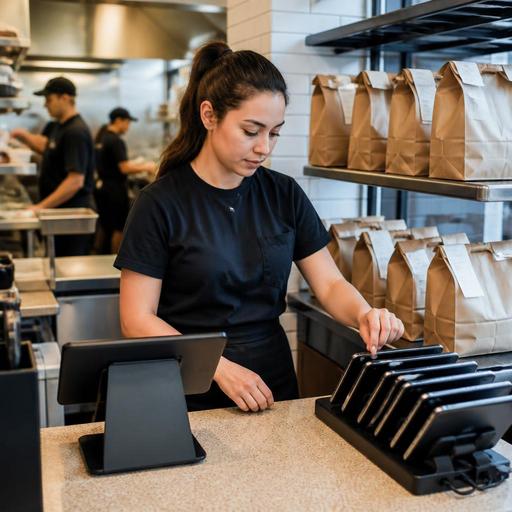
How U.S. Restaurants Can Manage Delivery App Orders Without Tablet Chaos
Managing delivery app orders without tablet chaos is now a core operating skill for U.S. restaurants. If your host stand, takeout counter, or expo station is juggling tablets from multiple delivery apps, the problem is not just clutter. It affects ticket times, order accuracy, guest communication, labor flow, and margin control. Whether you run a neighborhood burger spot, a fast-casual salad chain, a hotel restaurant, or a food truck with limited prep space, a cleaner delivery marketplace order flow can reduce mistakes and help your team stay focused during rushes.
In the U.S., many operators depend on third-party delivery marketplaces for visibility, especially during lunch, late night, or rainy-day traffic. But each marketplace may have its own tablet, alert sound, menu controls, and order acceptance workflow. Add a separate POS, a kitchen display system, direct online ordering, curbside pickup, and a pickup shelf, and the front-of-house can turn into a bottleneck fast.
Where multi-tablet delivery workflows break down
The first issue is simple: orders arrive in too many places. A server may hear one tablet ring, a cashier may miss another alert while closing a dine-in check, and the kitchen may not see the order until someone manually re-enters it into the POS. In a busy U.S. diner during the breakfast rush, that can mean a delivery order lands behind a stack of in-person tickets and goes cold before the driver arrives.
The second issue is menu inconsistency. A wing concept might have one price on its in-house menu, another on a delivery app, and a different modifier setup in its POS. If ranch, extra sauce, or combo drink options are not mapped consistently, staff end up making judgment calls at the line. That creates remakes, refund requests, and frustrated guests who call the store directly.
Third, tablets create labor drag. A quick-service restaurant near a suburban high school may have one employee assigned to register, pickup handoff, and app monitoring during the afternoon. If that person has to accept orders manually, print tickets, and answer calls from drivers, throughput suffers. The same problem shows up in airport concessions and stadium venues, where transaction speed matters and counter space is tight.
There is also a guest communication problem. Delivery customers expect accurate ready times, clear substitutions, and fast status updates. If your team does not have a consistent order flow, they may mark items ready too early, delay driver pickup, or forget to pause a marketplace when the kitchen is slammed.
Build one order flow from marketplace to kitchen to handoff
The goal is not to eliminate delivery marketplaces. The goal is to make them behave like part of one operating system. Start by mapping your current order path from the moment a guest places the order to the moment it leaves the store.
- Identify every order source. List each marketplace, your direct online ordering channel, phone takeout, QR ordering if you use it, and in-person counter orders.
- Define one intake point. If possible, route marketplace orders into your POS or an order management layer so the kitchen sees one ticket flow instead of multiple tablet screens.
- Standardize ticket routing. Delivery burgers should hit the same grill station logic every time, while drinks, desserts, or sealed grab-and-go items route correctly to the right station.
- Set a handoff zone. Use a dedicated shelf, warming area, or expo spot for courier pickup so drivers are not crowding dine-in guests or blocking the register.
- Assign ownership by shift. One role, not three people, should own marketplace monitoring, pause decisions, and driver issue escalation during each daypart.
For example, a three-location fast-casual Mexican concept in Texas might route all delivery app orders into the POS, send hot line items to the kitchen display system, print cold-side labels for salads and drinks, and stage completed bags on a pickup shelf near a separate courier entrance. That is much easier to manage than having a cashier watch three tablets while also handling walk-in takeout.
Practical setup changes that reduce errors and delays
1. Simplify the delivery menu
Your delivery menu should not always match the dining room menu item for item. Some dishes travel poorly, slow down the line, or create packaging issues. A brunch restaurant in Chicago may serve delicate plated pancakes in-house but limit delivery to items that hold up in transit. Keep modifier trees tight and remove options that regularly cause confusion.
2. Match prep times to reality
If marketplaces let you adjust prep times, use realistic settings by daypart. A Friday night pizza shop may need longer prep times than a Tuesday afternoon. Review actual kitchen capacity instead of relying on default settings. If your system supports throttling or temporary pauses, train managers on when to use them. Be careful not to overpromise speed just to win more orders.
3. Create packaging standards
Write a simple packaging checklist for each order type. Include utensils only when needed, sauce cup placement, drink sealing, item count verification, and bag labeling. In U.S. operations, this matters for both guest satisfaction and driver handoff speed. If your area has local rules affecting takeout items or fees, verify current requirements with official local guidance.
4. Separate courier traffic from guest traffic
If space allows, give delivery drivers a dedicated pickup zone. This is especially helpful in urban coffee shops, hotel lobby restaurants, and high-volume lunch spots. A clear handoff pattern reduces crowding at the host stand and keeps dine-in service from feeling secondary.
5. Keep accessibility in mind
If you rely on QR ordering, digital menus, or pickup shelves, make sure guests still have an accessible path to order and receive help. ADA-related expectations can depend on your setup, so operators should review current guidance and confirm requirements with qualified advisors when needed. Operationally, the key is simple: do not make digital ordering the only path for a guest who needs assistance.
Train for exceptions, not just normal orders
Most delivery breakdowns happen during exceptions: missing items, out-of-stocks, late drivers, duplicate tickets, and refund requests. Your team needs a playbook for these moments.
- Out-of-stock items: Decide who updates availability across marketplaces and how quickly that happens.
- Driver delays: Set a rule for when hot food should be re-fired, held, or remade.
- Guest complaints: Train staff on when to direct issues to the marketplace and when the store should step in directly.
- Order disputes: Keep timestamps, item-level notes, and packaging checks so managers can review what happened.
- Large order spikes: Know when to pause one channel, extend prep times, or shift labor to the takeout station.
A sports bar on game day, for example, may choose to pause one marketplace during halftime rush while keeping direct online ordering open for regulars. A food truck may cap delivery radius during peak lunch so in-person lines do not stall. A multi-location brand may centralize menu updates and item availability so one store does not keep selling a sold-out special.
Payment, tipping, service charges, and tax handling can also differ across channels. In the U.S., those workflows may affect reporting, reconciliations, and guest expectations. Operators should make sure managers understand how each order source appears in reports and should verify current accounting, payroll, sales tax, and service charge treatment with qualified advisors and official guidance.
Use reporting to decide what stays on marketplaces
Not every marketplace order is a good order. Review item mix, average ticket, remake rates, driver wait time, and peak-hour strain by channel. If fried items arrive soggy, combo builds create constant errors, or one app sends orders during your busiest dine-in window with low profitability, adjust the menu or timing strategy.
Also compare marketplace demand with direct ordering demand. Many U.S. restaurants use delivery apps for discovery while encouraging repeat guests to order directly for takeout or curbside pickup. That can give you better control over menu presentation, guest communication, and order timing. Even small changes, like clearer pickup instructions or a faster reorder flow, can shift behavior over time.
For multi-location operators, consistency matters even more. Standardize naming, modifiers, packaging, and prep-time logic across stores, but allow local managers to make limited daypart adjustments. That balance helps franchise teams and regional operators maintain brand standards without ignoring real store conditions.
A calmer delivery workflow usually comes from fewer screens, clearer ownership, tighter menus, and better routing between order channels, POS, and the kitchen. Restomas helps U.S. restaurant teams bring ordering, menu control, and service flow into one cleaner operating system.
