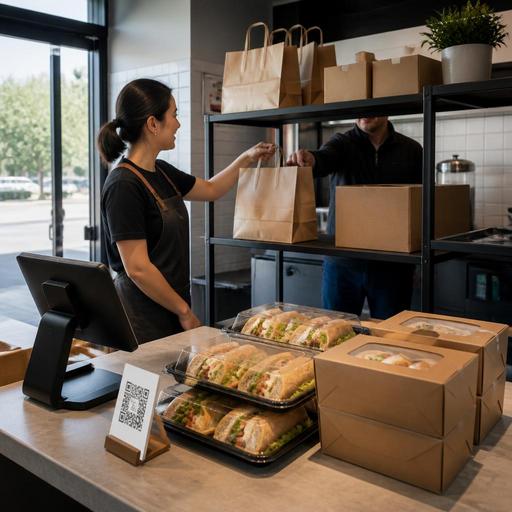
How U.S. Restaurants Can Market Catering Menus With Digital Ordering
Digital ordering for restaurant catering gives U.S. operators a practical way to win larger checks, simplify order intake, and make office lunches, family gatherings, and team events easier to book. Whether you run a neighborhood cafe, fast-casual salad shop, barbecue spot, hotel restaurant, or multi-unit brand, the goal is the same: make your catering menu easy to find, easy to understand, and easy to order without tying up the phone line.
In many U.S. markets, catering demand comes from nearby offices, schools, medical offices, churches, youth sports, real estate teams, and family events. A strong digital setup helps those buyers place larger takeout orders with confidence, choose pickup or delivery, review package details, and get clear timing before your kitchen gets slammed. The most effective operators do not treat catering as a hidden PDF; they build a dedicated digital path with menu structure, ordering rules, and fulfillment workflows that match real service conditions.
Build a catering menu that is easy to shop online
A catering menu should not look like your dine-in menu pasted into a web page. Group items the way U.S. customers actually order for events: boxed lunches, sandwich platters, taco bars, breakfast trays, coffee service, salads by the bowl, desserts, and beverage bundles. A food truck that does weekday office catering may highlight per-person packages, while an Italian restaurant may lead with half pans, full pans, and add-on garlic knots.
Keep each item page operationally clear. Buyers should be able to see portion guidance, lead times, packaging format, allergen notes where appropriate, utensil options, and whether heating instructions are included. If your concept serves groups with different needs, such as vegetarian, gluten-aware, or kid-friendly options, make those paths obvious so the customer does not have to call for every question.
Useful menu elements include:
- Minimum order size for delivery or staffed setup
- Lead time windows for same-day, next-day, or large-event orders
- Pickup and curbside pickup instructions for offices and families
- Add-ons like drinks, desserts, disposable chafers, or extra sauces
- Clear serving formats such as individual boxes, trays, or buffet pans
If you operate multiple locations, do not assume every store can fulfill the same catering menu. A suburban unit with parking may handle curbside pickup and large trays, while an airport concession or stadium venue may have tighter rules and limited prep space. Use location-specific availability so guests only see what that unit can actually execute.
Make ordering friction-free for high-value group checks
Catering buyers often place orders quickly between meetings. If the ordering flow is clunky, they will move on to another option or default to a delivery marketplace. Your direct ordering experience should reduce back-and-forth, especially for repeat office customers.
Start with a dedicated catering landing page linked from your main navigation, Google Business Profile posts where appropriate, email campaigns, and QR materials inside the restaurant. A fast-casual bowl concept, for example, can place a table tent near the register inviting guests to book office lunches online. A neighborhood bakery can add a QR code to cake boxes and coffee sleeves promoting breakfast catering trays for local offices.
Your digital order form should capture the information your team needs to execute the order cleanly:
- Event date and requested pickup or delivery time
- Guest count or serving estimate
- Delivery address and arrival instructions
- Contact name, phone, and email
- Packaging preference and utensil needs
- Any pickup shelf, curbside, or loading dock notes
For larger checks, give customers confidence with confirmation steps. An automated order summary, a review screen before payment, and a clear confirmation message reduce errors. If you accept tips on catering orders, service charges, or delivery fees, present them transparently in the checkout flow. U.S. operators should keep service charges and tips clearly separated in their systems and verify handling, reporting, and tax treatment with their POS provider, accountant, and current state or local guidance.
Payment flexibility also matters. Some buyers want to pay by card instantly, while others need an invoice workflow for office managers or school administrators. Even if you do not offer full invoicing online, you can still route those requests into a standardized approval process instead of relying on voicemail.
Promote the menu where U.S. catering demand actually starts
Many catering orders come from local discovery, not broad awareness. That means promotion should focus on the channels people use when they need food for a group this week, not someday. A Dallas barbecue restaurant might target nearby construction offices and real estate brokerages. A Boston cafe might target hospital admin teams and university departments. A suburban pizza shop might focus on youth sports leagues and school events.
Practical promotion channels include:
- Google Business Profile updates featuring catering trays, boxed lunches, or holiday packages
- Email outreach to past guests, office managers, and loyalty members
- Direct online ordering links on social profiles and website headers
- In-store prompts on receipts, packaging inserts, and QR table tents
- Sales follow-up with repeat buyers after successful orders
Do not overlook your existing dine-in and takeout guests. A family that orders Sunday brunch may also need graduation catering. A law office that sends staff for weekday pickup may become a recurring boxed-lunch customer. Train servers, cashiers, and hosts to mention catering naturally when guests order large takeout checks or ask about party trays.
For chains and multi-location brands, keep core menu presentation consistent while allowing local merchandising. One location near office parks may push weekday lunch bundles, while another near suburban schools may emphasize teacher appreciation breakfasts. If your brand is large enough to fall under federal menu labeling rules or other food-service regulations, confirm how your catering menu content should be handled with qualified advisors and official guidance.
Align kitchen, staffing, and delivery workflows before scaling demand
Promoting catering too aggressively before operations are ready can hurt both catering and regular service. A strong workflow starts in the back of house. Your POS, kitchen display system, and prep lists should separate future catering from live line traffic so a 30-person taco bar does not surprise the lunch crew at 11:15.
For example, a QSR chicken concept may route same-day catering into a dedicated prep queue and assign one lead cook to tray assembly. A full-service restaurant may block large catering pickups away from Friday dinner rush. A hotel restaurant may coordinate banquet crossover labor and loading access with front desk or valet teams.
Focus on these operational checkpoints:
- Prep cutoffs for large orders and special requests
- Labor scheduling for assembly, packing, and delivery handoff
- Inventory visibility on high-volume catering items
- Packaging standards to protect food quality in transit
- Dispatch rules for in-house drivers or third-party delivery partners
If you use delivery apps for exposure, decide which orders should remain on marketplaces and which should be steered toward direct catering ordering. Marketplaces can help discovery, but direct channels usually give you more control over customer data, timing, modifications, and repeat business. Many operators use marketplaces for standard takeout while promoting catering through their own site for larger, scheduled orders.
Accessibility matters too. Make sure your digital ordering path is easy to read, mobile-friendly, and usable for a wide range of guests. If you rely heavily on QR access in-store, provide a clear alternative path for customers who prefer a direct web link or staff assistance. Operators should review ADA-related accessibility expectations with qualified professionals and current official guidance when evaluating websites and ordering flows.
Track what turns first-time buyers into repeat catering accounts
The best catering marketing system is not just about getting one order. It is about building repeatable local demand. Track which channels bring in high-quality orders, which menu packages are easiest to execute, and which customers reorder monthly. A simple dashboard can show location, order size, lead time, pickup versus delivery, and common add-ons.
Watch for patterns. If office breakfast orders usually include coffee totes and fruit trays, bundle them by default. If school events often call with tax-exempt paperwork questions, create a standard internal process and verify current documentation requirements with your accountant or advisor. If your busiest pickup window creates lobby congestion, add a dedicated pickup shelf or curbside handoff procedure for catering customers.
After each successful order, follow up with a short thank-you email and a direct reorder link. That one step can turn a one-time holiday platter order into a recurring Friday lunch account.
Restomas helps restaurants organize digital menus, direct ordering, and operational workflows so catering demand is easier to capture and fulfill.
