How U.S. Restaurants Can Speed Up Checkout With QR Pay
Why payment friction still slows down U.S. restaurants
Reducing payment friction in U.S. restaurants with mobile wallets and QR checkout is not just about adding another payment option. It is about shortening the time between the guest deciding to pay and the restaurant actually closing the check, turning the table, and moving the order into the next step without confusion. In a busy lunch rush at a fast-casual spot, a full dining room at a neighborhood diner, or a packed sports bar after a game, slow checkout creates backup at the server station, the host stand, and the pickup counter.
Many U.S. operators still lose time to familiar bottlenecks: guests waiting for the check presenter, cards being left on the table, servers making extra trips, tabs staying open too long at the bar, and takeout guests crowding the register when they only need to grab a bag from the pickup shelf. Mobile wallets and QR checkout can remove several of those steps when the workflow is designed well.
The goal is not to replace hospitality. It is to give guests a faster option when they want it, while keeping traditional card-present and cash paths available. That matters in U.S. restaurants where guest preferences vary widely by format, age group, and occasion. A hotel restaurant serving business travelers may see strong mobile wallet adoption, while a family diner may need both QR pay and a printed check for guests who prefer a familiar process.
Where QR checkout and mobile wallets work best
Operators get the best results when they match payment tools to specific service moments instead of forcing one method everywhere.
Dine-in full service
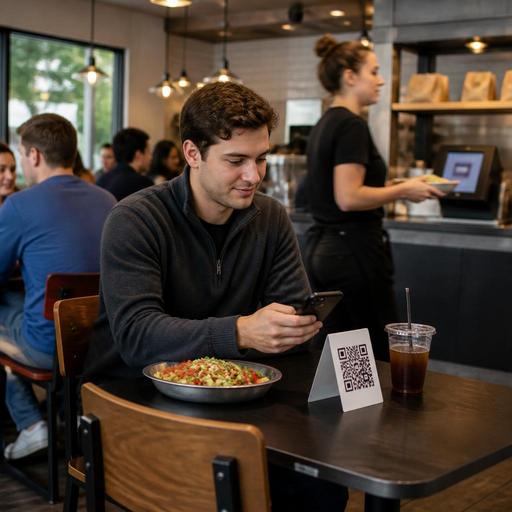
In a casual dining restaurant, QR checkout works best when the guest can scan from the table, review the itemized check, add a tip, and pay without waiting for the server to return. This is especially helpful during peak periods when servers are juggling multiple tables. The server can still answer questions, fix an item, or close out manually if needed.
Bars and taprooms
At a bar, payment friction often comes from open tabs and end-of-night congestion. A QR checkout option tied to the tab can help guests settle faster, especially when they are moving between the bar rail and a patio area. If you use handhelds or a POS stack with tab management, make sure the payment status updates in real time so staff do not accidentally chase a paid tab.
Fast-casual, QSR, and coffee shops
For counter service, mobile wallets at the POS reduce the slowdown of card insert errors, signature prompts, and wallet searching. QR ordering can also move some orders off the line entirely. A guest scans at a table or waiting area, places the order, pays with a phone, and the kitchen display system receives the ticket directly. That can help a lunch concept with limited labor keep the front counter from getting jammed.
Takeout, curbside pickup, and food trucks
For takeout, the best use case is prepayment through direct online ordering, then a fast handoff at the pickup shelf or curbside spot. A food truck can use a visible QR code near the order window so repeat guests can reorder quickly without creating a long line. In all cases, make sure staff know how to identify paid orders clearly before handing over food.
How to build a smoother checkout workflow
Technology alone does not reduce friction. The operational design around it does.
- Start with one service scenario. Pick a high-friction moment such as lunch dine-in, bar closeout, or takeout pickup. Map the current steps from check request to payment confirmation.
- Connect payment to your POS and kitchen workflows. If QR pay, online ordering, and mobile wallets do not sync cleanly with the POS, staff may end up checking multiple systems. That creates more friction, not less.
- Keep tipping simple. In the U.S., guests expect a clear tip flow. Make sure the tip screen is easy to understand on dine-in checks, bar tabs, and pickup orders. Train staff on how digital tips are reported in your system, and verify current federal, state, and local requirements with your payroll provider, accountant, or other qualified advisor.
- Separate sales tax from service charges correctly in the workflow. If your restaurant uses automatic gratuities, service charges, resort fees, or delivery-related fees, the guest-facing checkout should show them clearly. The exact treatment can vary by jurisdiction and setup, so confirm configuration and disclosure requirements with qualified tax and legal advisors.
- Give guests a fallback option. Some guests will still want to pay with a physical card or cash. A smooth system offers both without making either group feel awkward.
- Train for exception handling. Staff should know what to do when a guest scans the code but needs a split check, a comp, a void, a tax-exempt transaction where applicable, or an item correction.
A practical example: a suburban brunch restaurant might place a QR table tent on every table, but only introduce pay-at-table on weekends first. Servers mention it during the greet: If you are in a hurry after brunch, you can scan to pay anytime, or I can bring the check as usual. That one line preserves hospitality while reducing end-of-meal delays.
Operational details U.S. operators should not skip
- ADA-minded access: Do not make QR the only path. Some guests may not use smartphones comfortably or may need a different format. Keep a staff-assisted payment option available and review accessibility expectations with qualified advisors when updating service procedures.
- Receipt preferences: Offer digital receipts, but be ready to provide printed receipts when requested. This matters in business travel, hotel dining, and airport concessions where guests often need documentation.
- Delivery marketplace overlap: If you use third-party delivery apps and direct online ordering, align payment status, menu availability, and order throttling so the kitchen is not surprised by orders from multiple channels at once.
- Pickup shelf security: Prepaid orders move faster, but they also need a clean handoff process. Use order names, pickup notifications, and staff checkpoints so bags do not walk away with the wrong guest.
- Labor scheduling: Faster checkout can change front-of-house staffing needs. You may be able to redeploy labor from repetitive payment runs to guest support, curbside handoff, expo, or table turns during peak periods.
- Chain and multi-location consistency: If you operate multiple stores, standardize where QR codes appear, how staff explain them, and how payment exceptions are handled. That consistency reduces training time and guest confusion.
For larger chains, menu and checkout screens should also stay coordinated with broader compliance needs. For example, if a chain is subject to FDA menu labeling rules, the digital and in-store guest journey should be reviewed carefully so operational changes do not create conflicting menu information. Verify current obligations with official guidance and counsel.
What to measure after launch
Once mobile wallets and QR checkout are live, measure whether they actually improve service. Useful indicators include server trips per table, time from check drop to payment completion, bar tab closeout time, pickup line length, and how often staff have to intervene in a digital payment. You can also compare adoption by daypart. A downtown lunch crowd may use QR checkout heavily, while Friday dinner guests may still prefer the traditional check presenter.
Watch guest comments closely. If people say the process feels unclear, the issue may be signage placement, weak Wi-Fi, too many payment steps, or a tip screen that feels awkward. If staff complain, it may signal poor POS integration or unclear ownership of payment exceptions.
A strong rollout usually starts small, fixes edge cases, and then expands. A food hall stall might begin with mobile wallet acceptance at the counter. A full-service restaurant might start with QR pay in the patio section. A hotel outlet might launch digital receipts first, then add pay-at-table. Each step should make service simpler for guests and staff.
When the payment experience is fast, clear, and connected to the rest of your operation, you reduce friction without sacrificing hospitality. Restomas helps restaurants connect QR menus, ordering, payment flow, and operational visibility in one practical system.
