How U.S. Restaurants Design QR Menus That Build Ordering Confidence
QR menu design for U.S. restaurants is not just about putting a code on the table and hoping guests scan it. In a busy diner, fast-casual dining room, hotel lobby restaurant, or neighborhood cafe, the real goal is ordering confidence: guests should know what to do, trust what they see, and move from browsing to ordering without needing rescue at every table. Good QR menu execution supports service speed, check averages, and staff workflow while still giving guests a comfortable, familiar experience.
For U.S. operators, that means thinking beyond graphics. A QR menu has to fit your service style, your POS stack, your payment flow, your tipping expectations, and the needs of guests who may prefer a printed menu or need accessible alternatives. It also has to work when the lunch rush hits, the Wi-Fi slows down, or a family at table 12 wants to split an order while a solo traveler at the bar just wants to reorder another drink quickly.
Start with table tents that answer the guest's first three questions
Most QR menu friction happens before the menu even opens. Guests are silently asking three questions: What is this, what do I do, and will this be easy? Your table tent should answer all three in seconds.
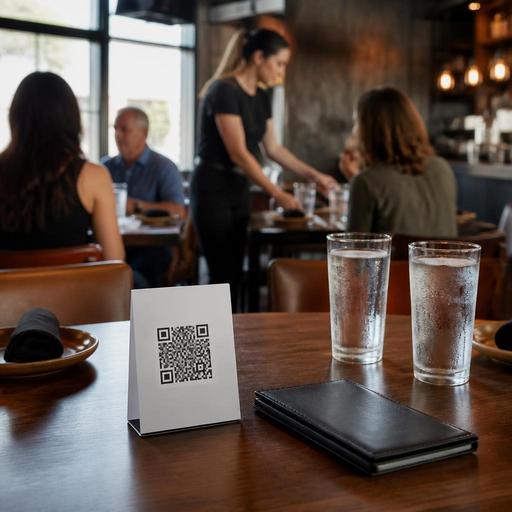
In a U.S. casual restaurant, a strong table tent usually works better than a design-heavy one. Keep the layout clean, keep the code large enough to scan under dim dining room lighting, and place it where a guest can reach it without moving condiments, water glasses, or a basket of fries. At a sports bar, that may mean a durable tabletop stand that stays visible during game-day traffic. At a breakfast diner, it may mean a flat table insert that does not wobble every time a coffee mug lands nearby.
- State the action clearly: “Scan to view menu” or “Scan to order and pay” is better than clever wording.
- Set expectations: Tell guests whether they can browse only, start a tab, order another round, or pay from the phone.
- Offer a backup path: Include a simple note such as “Prefer a printed menu? Ask your server.”
- Keep the code isolated: Do not crowd it with decorative patterns that make scanning harder.
- Match the service model: A full-service steakhouse may use QR for wine lists and dessert ordering, while a fast-casual burger spot may direct guests to full mobile ordering.
Think about placement by venue type. A food hall stall may need counter signage plus pickup shelf instructions. A hotel restaurant may want QR prompts in guest rooms, on host stands, and on bar rails. An airport concession may need larger codes and faster visual cues because travelers are distracted and time-sensitive.
Design the menu for confidence, not just convenience
Once the guest scans, the next job is reducing hesitation. A QR menu that feels cluttered, incomplete, or confusing can slow ordering more than a laminated menu ever did. Confidence comes from clarity.
Start with structure. Group categories in the same order your guests naturally shop them. In an American brunch cafe, that might be coffee, breakfast plates, sandwiches, sides, and bakery. In a fast-casual bowl concept, it might be signatures first, then build-your-own, drinks, and kids' options. Avoid making guests hunt for basics like sides, add-ons, or nonalcoholic beverages.
Descriptions matter more on a phone screen because there is less room for scanning. Write concise menu copy that answers practical questions: portion style, key ingredients, spice level, protein choice, and major add-on opportunities. “House burger” is weaker than “Two smashed patties, American cheese, pickles, shredded lettuce, burger sauce, brioche bun.” Guests order faster when they can picture the plate.
Photos can help, but only when used selectively. A few strong images for signature items can increase confidence in a fast-casual or QSR setting. Too many photos can make the menu feel slow, busy, and less trustworthy. For bars and full-service restaurants, photos may be less important than modifiers, allergy notes, and easy navigation between drinks and food.
Operationally, make sure menu availability is accurate. If your kitchen display system or POS shows the lobster roll as sold out, the QR menu should reflect that quickly. Nothing breaks trust faster than a guest ordering from the phone and hearing, “Sorry, we’re out.” This matters even more for high-volume takeout counters, food trucks with limited prep, and multi-location brands where item availability varies by store.
Build accessibility and choice into the workflow
Not every guest wants to order from a phone, and not every guest can use a QR experience comfortably. U.S. operators should treat accessibility as a real service design issue, not a side note. Keep digital menus readable with strong contrast, legible text, clear buttons, and simple navigation. Avoid forcing guests through tiny links, auto-rotating banners, or long scrolling walls of modifiers.
Also maintain non-digital options. A neighborhood restaurant may keep a small set of printed menus ready for guests who prefer them. A bar may let guests open a tab with a bartender and use QR only for reorders. A family restaurant may use QR for speed while still having servers guide older guests through the check.
Practical accessibility steps include:
- Use plain item names and descriptions so screen readers and guests alike can follow the menu more easily.
- Make prices easy to find so guests are not forced to tap through multiple screens.
- Keep modifier flows simple for items like burger temperature, side choice, dressing, or milk alternatives.
- Provide staff backup so a server or host can step in quickly without making the guest feel awkward.
- Review local and federal guidance with qualified advisors when accessibility, payment, alcohol service, or disclosure rules apply.
If you operate a chain or multi-location concept, also think about menu labeling and disclosures in a consistent way across stores. Requirements can vary depending on concept size, jurisdiction, and service type, so operators should verify current FDA and local guidance with qualified advisors or official sources before rolling out a standard template.
Connect QR ordering to service, payment, and tipping realities
A QR menu should fit the floor, not fight it. In a full-service restaurant, mobile ordering can reduce wait times for a second round of drinks or dessert, but it should not create confusion about who owns the table: the server or the guest’s phone. Define the workflow clearly.
For example, a suburban Mexican restaurant might let guests scan to browse and pay, while servers still take the main entrée order and manage hospitality. A fast-casual salad shop might use QR as a direct path to order, pay, and receive a pickup alert. A brewery taproom might let guests start a tab at the bar, then reorder from their table using the same check.
U.S. operators also need to think carefully about tipping prompts, service charges, and taxes in the guest flow. The ordering screen should present totals clearly and avoid surprising guests at checkout. Service charges and sales tax are not the same thing, and treatment can differ by jurisdiction and business model. Tip handling, tip reporting, and payment workflows also carry operational and compliance implications. Keep the guest experience transparent, and verify current requirements with your accountant, payroll provider, attorney, or official state and local guidance.
On the back end, QR ordering works best when it connects to your POS, kitchen display system, and payment stack. That reduces duplicate entry, speeds fire times, and improves reporting. It also helps staff know whether an order is dine-in, takeout, curbside pickup, or delivery app related. If you run multiple channels, label them cleanly so the expo line does not confuse a table reorder with a pickup shelf order.
Roll out in stages and train staff to support adoption
The best QR menu launch is usually gradual. Test it in one service period, one dining room section, or one location before pushing it across the whole brand. Watch where guests hesitate. Are they unsure whether to scan? Do they abandon the flow at modifiers? Are they waiting for a server anyway because they cannot find kids' drinks or split-check options?
Train staff with practical scripts. Hosts should know how to explain the system in one sentence. Servers should know when to guide and when to step back. Managers should know how to fix table mapping issues, resend tickets, and handle guests who were charged but did not see confirmation. In a hotel restaurant, front desk staff may also need a basic explanation for guests asking about in-room or lobby dining. In a food truck, the crew may need to direct guests from the order window to the QR reorder option during peak periods.
Use a short launch checklist:
- Check scan speed from different seats and lighting conditions.
- Confirm Wi-Fi or cellular reliability in the dining room, patio, and bar area.
- Test sold-out updates from POS or inventory changes.
- Review payment and tip prompts for clarity and guest trust.
- Keep printed backups ready for accessibility and preference.
- Monitor staff feedback during lunch, dinner, and weekend rushes.
When QR menu design supports confidence, guests feel in control without feeling abandoned. That balance is what makes digital ordering work in U.S. restaurants. Restomas can help operators connect QR menus, ordering flows, and day-to-day service tools into a cleaner restaurant workflow.
