How U.S. Restaurants Reduce Payment Friction With QR Checkout and Mobile Wallets
Reducing payment friction in U.S. restaurants with mobile wallets and QR checkout is not just about looking modern. It is about getting guests from order to paid check with fewer delays, fewer handoff errors, and less pressure on servers, cashiers, and line cooks. In a U.S. market where guests split checks, tip on screens, order from delivery apps, and expect fast takeout pickup, payment speed directly affects table turns, labor flow, and guest satisfaction.
For an independent diner, that may mean fewer card handoffs during a busy Sunday brunch. For a fast-casual salad shop, it may mean moving a lunch line faster with tap-to-pay and a pickup shelf that clears on time. For a multi-location burger brand, it may mean using the same payment experience across in-store QR ordering, direct online ordering, and curbside pickup. The goal is simple: remove unnecessary steps without creating confusion for guests or staff.
Where payment friction shows up in U.S. restaurant operations
Most operators do not think of payment friction as one problem. It usually appears as a chain of small delays.
- Table service: A server drops the check, comes back for the card, runs it at the POS, returns for signature or tip confirmation, and then waits for the guest to finish. That workflow can slow turns, especially in casual dining and neighborhood bars.
- Fast-casual counters: Guests pause at the register to decide, tap, tip, and ask questions while the line builds behind them.
- Takeout and pickup: Guests arrive for online orders but still need to pay, confirm identity, or wait while staff search for bags behind the counter instead of using a pickup shelf.
- Food trucks and stadium-style service: Peak demand comes in short bursts, so every payment delay increases the line and can push guests away.
- Hotel restaurants and airport concessions: Travelers often want a fast, familiar payment method and may be less patient with slow card workflows.
In each case, friction affects more than checkout. It impacts labor scheduling, guest flow, and even kitchen pacing if the front of house cannot keep orders moving.
How QR checkout and mobile wallets improve the guest journey
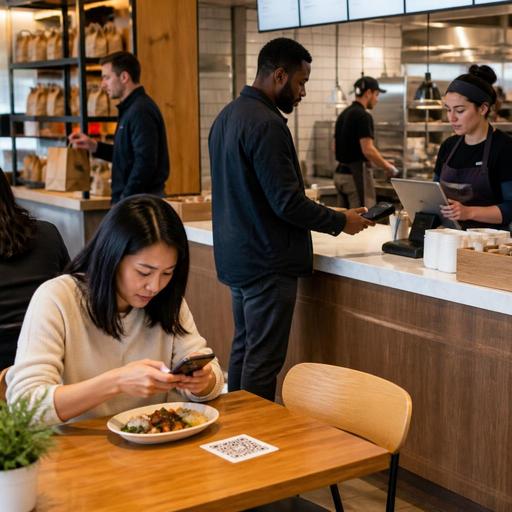
QR checkout works best when it solves a real operational bottleneck. A guest scans a code at the table or on a takeout receipt, reviews the tab, adds a tip if appropriate, and pays from a phone using a card or mobile wallet. Mobile wallets such as Apple Pay or Google Pay can also speed payment at the counter, at a handheld device, or inside a direct online ordering flow.
For U.S. operators, the biggest advantage is not novelty. It is fewer steps between “I’m ready to pay” and “this check is closed.”
Practical use cases by concept type
Neighborhood full-service restaurant: During Friday dinner, servers can spend more time selling desserts and handling guest questions instead of making repeated trips for payment. Guests who are in a hurry can close out as soon as they are ready.
Sports bar: A guest watching a game may want to open a tab, order another round, and leave quickly between quarters. QR checkout can reduce the last-minute rush when many tables want to pay at once.
Fast-casual bowl shop: Tap-to-pay at the counter shortens the lunch rush. Direct online ordering with saved wallet options helps office customers reorder quickly for pickup.
Food truck: A simple QR code near the order window can support online ordering ahead, while wallet payment at the window keeps the line moving when the crowd hits all at once.
Hotel outlet: Poolside or lobby dining can benefit from QR menus and checkout, especially when guests want to pay without waiting for a server to return.
How to implement without hurting service or tipping
The best payment tools fit your service model instead of forcing guests into one path. In U.S. restaurants, that matters because tipping workflows, split checks, bar tabs, and service charges can vary by concept and location.
- Map your current checkout steps. Look at dine-in, bar, takeout, curbside pickup, and direct online ordering separately. Count where staff members touch the payment process and where guests wait.
- Keep multiple payment options. Some guests want QR checkout. Others still prefer to hand over a card or pay cash. ADA-minded access also means not assuming every guest wants to use a smartphone. Offer alternatives clearly and train staff to present them naturally.
- Design tip prompts carefully. For full-service restaurants, make sure digital tipping flows are easy to understand and consistent with your guest experience. For counter service, avoid awkward prompting that slows the line or confuses guests. Operators should also confirm how tips, service charges, and reporting are handled in their POS and payroll workflows, and verify current federal, state, and local requirements with qualified advisors.
- Connect payments to the POS. A disconnected QR tool creates reconciliation headaches. Closed checks, tips, refunds, and order status should flow into the POS and reporting stack as cleanly as possible.
- Test split-check scenarios. U.S. guests often split by seat, item, or equal share. If your QR checkout cannot handle common split patterns, servers will still need to intervene constantly.
- Set up clear takeout handoff rules. If a guest pays online, the order should be easy to find on a pickup shelf or in a labeled staging area. If payment is due at pickup, staff should know exactly where that happens so the handoff does not block the counter.
A common mistake is treating QR checkout as a replacement for hospitality. In practice, it is better used as a relief valve. Let guests choose speed when they want it, while your team stays available for recommendations, upselling, and problem-solving.
Operational details that matter in the U.S.
American restaurant operators need payment workflows that match local realities. That includes taxes, tips, accessibility, and channel mix.
Sales tax, service charges, and guest clarity
Whether a concept is a cafe in Seattle, a diner in Ohio, or a rooftop bar in Miami, guests should be able to see charges clearly before they pay. If your operation uses automatic gratuity, service charges, delivery fees, or other added amounts, present them in a way that is easy to understand. Rules can differ by state and city, so operators should verify current tax and disclosure requirements with their accountant, payroll provider, attorney, or official guidance.
ADA-minded access and inclusive design
QR checkout should not create a barrier for guests with low vision, limited dexterity, or no smartphone. Keep printed checks available, use readable on-screen layouts, and make sure staff can assist without making the guest feel singled out. Accessibility is both a service issue and a compliance consideration, so review current requirements with qualified advisors when needed.
Direct ordering versus marketplace dependency
Many U.S. restaurants already pay marketplace fees for delivery apps. Adding direct online ordering with wallet support can give regular guests a faster reorder path for takeout and curbside pickup. For example, a suburban pizza shop can route direct pickup orders into the same kitchen display system as phone and third-party orders while keeping payment and guest communication in one place.
What owners should do in the next 30 days
- Audit one friction point: Choose dine-in checkout, counter payment, or takeout pickup and fix the slowest step first.
- Train staff on the guest script: Servers and cashiers should know when to offer QR checkout, when to stay hands-on, and how to handle questions about tipping or receipts.
- Review your POS stack: Check whether mobile wallets, QR pay, online ordering, and kitchen display workflows are integrated or still patched together.
- Test during a real rush: Friday dinner, weekday lunch, and game-day bar traffic reveal issues that a quiet afternoon will not.
- Measure practical outcomes: Watch line length, closed-check speed, abandoned orders, pickup wait time, and staff interruptions rather than chasing vanity metrics.
Payment friction is rarely solved by one feature alone. It improves when menu access, ordering, payment, kitchen routing, and pickup handoff work as one system. That is especially true for multi-location operators who need consistency across stores without losing flexibility for each format, from food trucks to hotel restaurants.
Restomas helps U.S. restaurant teams connect QR menus, ordering, payment flow, and operational visibility in one practical digital workflow.
