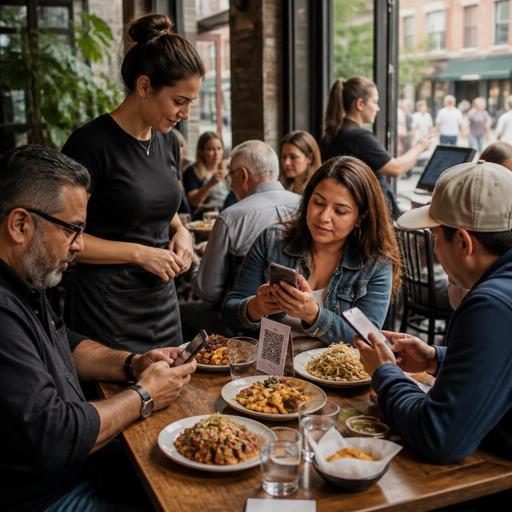
How U.S. Restaurants Use Multilingual QR Menus in Tourist Areas
Multilingual QR menus for U.S. restaurants can do more than translate dish names. In tourist districts, airport concessions, hotel restaurants, beach towns, and diverse city neighborhoods, they help guests order with more confidence, reduce back-and-forth at the table or counter, and give operators tighter control over menu updates across dine-in, takeout, and pickup workflows. The key is to treat translation as an operations tool, not just a marketing feature.
Think about a seafood spot near Fisherman’s Wharf in San Francisco, a Cuban cafe in Miami, a taco shop in San Diego, a diner near Times Square, or a food hall stall in Las Vegas. These businesses often serve international visitors, first-generation immigrant families, and local regulars in the same shift. A printed menu in one language can slow down ordering, create modifier errors, and increase questions during rush periods. A multilingual QR menu gives operators a way to present clear descriptions, item photos, allergy notes, and ordering steps without reprinting menus every time prices, availability, or specials change.
Why multilingual QR menus matter in U.S. service workflows
In many U.S. restaurants, the challenge is not only language. It is speed, accuracy, and guest confidence. A guest who does not fully understand menu wording may hesitate to order appetizers, skip add-ons, or ask a server to explain every item during a packed lunch rush. That affects check averages and table turn times.
For a fast-casual bowl concept in a diverse Houston neighborhood, a multilingual QR menu can explain proteins, sauces, spice levels, and extras before the guest reaches the cashier. For a full-service restaurant in Orlando serving tourists, it can reduce confusion around combo structure, kids’ meals, side choices, and beverage refills. For a food truck in Los Angeles, it can help customers scan while waiting in line, decide faster, and move through the window with fewer custom-order misunderstandings.
Operators should also think about how language support connects to tipping and payment expectations. International visitors may not understand local tipping norms, open tabs at bars, or the difference between a service charge and a voluntary tip. Your ordering and payment flow can present these steps clearly, but owners should verify how any payment disclosures, service charges, and tip language should appear based on current state and local requirements and with qualified advisors when needed.
Choose the right languages and the right menu content
Many operators make the mistake of adding too many languages without prioritizing the guests they actually serve. Start with real traffic patterns. A hotel restaurant in Anaheim might begin with Spanish and Simplified Chinese. A cafe in Queens may need Spanish, Bengali, and Korean. A neighborhood bakery in South Florida may start with Spanish and Haitian Creole. An airport concession may focus on the top visitor groups passing through that terminal plus domestic travelers who prefer a second language at home.
Do not translate only the item title. Translate the information guests need to order correctly:
- Item descriptions with main ingredients
- Modifier options such as cheese, sauce, doneness, sides, and spice level
- Allergen and cross-contact notes where you choose to provide them
- Portion cues such as tacos by the piece, family packs, or shareable platters
- Operational notes like sold out, limited time, breakfast only, or available after 4 p.m.
- Pickup, curbside pickup, and takeout instructions when relevant
For example, a Chicago deep-dish restaurant should not just translate “sausage pie.” It should explain expected bake time, serving size, and whether substitutions affect timing. A poke concept in Honolulu should translate fish types, marinade choices, and topping limits so guests do not accidentally build an order the kitchen cannot execute as expected.
It is smart to keep some culinary words in English if they are part of your brand identity, but pair them with a plain-language explanation. This is especially useful for regional U.S. items like biscuits and gravy, shrimp and grits, Nashville hot chicken, or a New England lobster roll.
Build multilingual menus around ordering accuracy, not just translation
The best multilingual QR menu is structured for the kitchen and POS, not only for the guest. If translations do not match POS buttons, modifiers, and kitchen display system routing, staff still end up correcting orders manually.
Use a simple workflow:
- Create a master menu in your operating language with standardized item names and modifier groups.
- Map every translated item to the exact POS item and modifier structure.
- Limit free-text requests when possible and use controlled modifier choices instead.
- Add photos only where they improve ordering speed or reduce confusion.
- Test the menu with staff and a few real guests before rolling it out widely.
A ramen shop in Seattle, for instance, may want separate translated explanations for broth richness, noodle firmness, and add-on eggs, but the kitchen still needs a clean ticket with the same modifier logic every time. A sports bar near a stadium may offer QR ordering in multiple languages on game day, but the expediter still needs wings, sauce, side, and tab routing to print or display consistently.
This matters even more for chains and multi-location groups. One location in a tourist-heavy downtown may need more language options than a suburban unit, but the core item database should stay consistent. That keeps reporting, inventory visibility, and training cleaner across stores.
Accessibility, compliance context, and guest trust
QR menus should support access, not create a barrier. Some guests prefer printed menus, need larger text, or rely on screen readers. Others may not want to use a phone at the table. A practical U.S. approach is to offer multilingual QR access while keeping a backup printed menu or staff-assisted option available. Operators should review ADA-minded accessibility practices for digital content and verify current expectations with qualified advisors or official guidance.
Menu clarity also overlaps with regulated topics. If you operate a chain subject to menu labeling rules, or you sell alcohol, or you present service charges, taxes, or tip prompts in digital ordering, make sure those details are reviewed for your actual jurisdictions and concept type. This article is about workflow, not legal advice. The operational point is simple: your multilingual menu should not hide important disclosures behind confusing navigation or incomplete translations.
For guest trust, avoid machine-only translation without review. A mistranslated allergy note, protein type, or beverage description can create service problems fast. Have bilingual staff, managers, or professional reviewers check high-risk items and common modifiers. Seasonal specials can move faster, but core items should be quality-controlled.
Practical rollout steps for U.S. restaurants
If you want multilingual QR menus to improve service instead of adding complexity, start small and operational.
1. Pick one service moment to improve first
Choose your biggest pain point: counter ordering, table-side ordering, takeout, hotel in-room dining access, or pickup shelf confusion. A fast-casual brand may start at the cashier line. A full-service restaurant may start with pre-order browsing from the table.
2. Focus on your top 20 items
Translate your highest-volume items, best sellers, and most misunderstood modifiers first. This gets faster results than translating every seasonal beverage and limited dessert on day one.
3. Train staff on when to step in
Servers and cashiers should know how to guide guests from scanning to ordering, how to explain substitutions, and how to handle guests who still want a printed menu or verbal help. In a U.S. full-service setting, good digital flow should support hospitality, not replace it.
4. Connect menu language to takeout and delivery channels
If your direct online ordering site offers multiple languages but your delivery app listings do not match item names or photos, guests can get confused. Keep naming, packaging notes, and pickup instructions aligned across your QR menu, direct ordering, and third-party delivery apps.
5. Review results weekly
Look at voids, modifier errors, average check, server intervention, and guest questions by shift. A bilingual brunch menu in a San Antonio cafe may reduce ordering friction on weekends. A multilingual late-night menu in a Manhattan pizza shop may improve speed after theater crowds arrive. Let the data from your POS and order flow guide the next update.
For U.S. restaurant operators, multilingual QR menus work best when they reflect real neighborhood demand, clear kitchen logic, and accessible guest service. When your menu is easier to understand, guests order with more confidence, staff spend less time translating at the table or counter, and operations become more consistent across dine-in, takeout, and multi-location environments. Restomas can help operators manage those digital menu workflows in a way that stays practical for everyday service.
