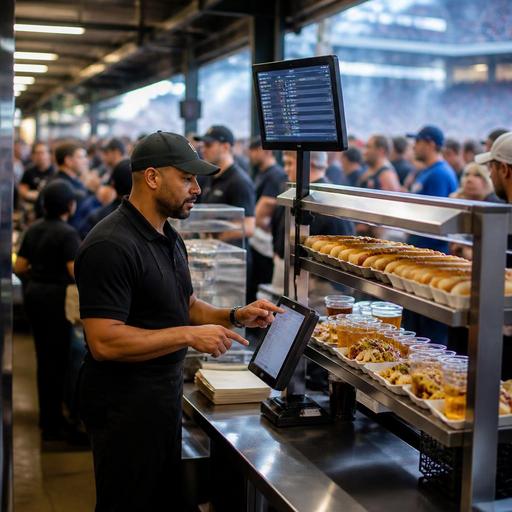
How U.S. Stadium Concessions Can Streamline Order Management on Game Day
Stadium concessions order management is different from a neighborhood restaurant rush because volume spikes hard, demand clusters around halftime and intermission, and guests have almost no patience for delays. For U.S. operators running stands in stadiums, arenas, ballparks, and large event venues, the goal is not just to sell more hot dogs, nachos, beer, and combo meals. The real challenge is moving thousands of checks through a system that stays accurate, fast, and easy for guests, runners, cashiers, cooks, and managers to follow.
A good game-day setup combines menu discipline, clear prep lanes, smart POS and kitchen display workflows, and multiple fulfillment paths such as walk-up ordering, QR ordering, express pickup shelves, and in-seat or suite delivery where the venue supports it. Whether you operate a single concession stand in a minor league park or manage food service across several sections of a major U.S. stadium, tighter order management can protect throughput without turning the guest experience into chaos.
Build the menu for speed before you build the workflow
Many stadium service problems start with the menu, not the technology. If one stand tries to handle made-to-order burgers, loaded fries, specialty cocktails, and kids meals during a packed football game, the kitchen display system will fill up faster than the line can move. In U.S. venues, the most efficient operators match each stand to a narrow production model.
For example, a grab-and-go beer and pretzel kiosk near an upper concourse needs a different order flow than a premium club kitchen serving sandwiches, salads, and bar tabs. A hot dog stand near a baseball outfield section may work best with a limited menu, pre-batched condiment setups, and a separate pickup counter for mobile orders. A stadium bar may need tighter tab controls, ID-check procedures, and a clearer handoff point for alcohol orders, with staff trained on venue and local alcohol rules. Operators should verify current state, city, and venue-specific requirements with qualified advisors and official guidance.
- Limit modifiers on high-volume items during peak windows.
- Create stand-specific menus instead of forcing every location to carry the same items.
- Use combo logic to reduce ordering time at the counter.
- Separate fast pickup items from longer-cook items on the production line.
- Pause low-capacity items when a stand gets slammed.
This matters even more for multi-location venue operators. If section 112 sells chicken tenders and fries but section 134 only has hot dogs and bottled drinks, your digital ordering flow should reflect that exactly. Nothing slows service faster than guests ordering items from the wrong stand and then arguing at pickup.
Set up distinct order lanes for walk-up, QR, and premium delivery
In many U.S. stadiums, guests now expect more than one way to order. Some still want a cashier. Others prefer QR ordering from their seat or from a table in a club area. Premium suites may need runner delivery. The mistake is sending every order type into the same unmanaged queue.
Instead, define separate order lanes and service promises. A walk-up counter can prioritize the fastest menu with immediate payment and handoff. QR orders can route to a pickup shelf or pickup window with clear naming conventions by section, stand, or order number. Suite or club delivery can feed a different expo screen so runners are not competing with concourse pickup guests.
For example, at a basketball arena, a cashier line outside section 101 may process bottled drinks and popcorn in under a minute, while QR orders for burgers route to a nearby production station with a dedicated shelf. At a baseball park, a premium club kitchen may use tablets for server-entered orders while general seating guests use QR ordering for pickup during the seventh-inning stretch. These are different workflows and should be managed that way.
- Define the source of every order: cashier, self-serve QR, server, suite host, or marketplace-style venue app.
- Assign a destination: immediate handoff, pickup shelf, curbside-style exterior gate pickup for special events, or seat delivery where supported.
- Set queue rules so one rush channel does not bury another.
- Train staff on handoff language so guests know exactly where to wait.
If your venue supports pre-orders before gates open, use time-based throttling. That helps avoid a flood of orders hitting the kitchen all at once as soon as fans enter.
Use POS and kitchen display data to control bottlenecks in real time
On game day, managers need live visibility. A POS stack connected to kitchen display screens can show where the problem actually is: too many orders waiting for fryers, too many unpaid carts abandoned in mobile ordering, or too many completed orders sitting unclaimed on a pickup shelf.
In a stadium setting, bottlenecks often shift by the minute. Before kickoff, packaged snacks and bottled beverages may dominate. At halftime, hot food explodes. In the final quarter, the issue may become fast beer pours and short lines rather than full meal production. Managers should watch ticket times, item mix, void patterns, and fulfillment delays by stand.
Practical U.S. examples include moving one employee from a quiet souvenir-adjacent stand to a busy nacho station, temporarily turning off a slow modifier in QR ordering, or changing the kitchen display priority so ready-to-assemble items jump ahead of longer-cook items during intermission. Food trucks parked outside a stadium for overflow traffic can use the same logic: simplify the menu, separate payment from production, and watch ticket times constantly.
If your venue uses delivery apps for off-event days or mixed operations with nearby street-facing restaurants, keep those channels separate from event surges. A stadium kitchen should not let third-party delivery orders disrupt a sold-out concert rush unless staffing and prep capacity have been planned for that blend.
Design pickup, payment, and staffing around the guest flow
Order management is not finished when the kitchen marks an item complete. In U.S. stadiums, the last twenty feet matter: pickup shelf organization, aisle congestion, payment confirmation, and guest communication. A bad pickup area can erase the gains from a fast kitchen.
Use shelves or counters organized by stand and fulfillment type. Keep hot food, packaged drinks, and alcohol handoff points distinct when needed. For card-present and contactless payments, make sure terminals are positioned so the line keeps moving. If your venue still accepts cash at some points of sale, build a separate process so cash handling does not slow every transaction. For tipped staff in premium areas, bars, or suites, make sure tip prompts, service charges, and reporting workflows are configured clearly in the POS and reviewed with payroll and accounting teams. Operators should confirm current federal, state, local, and venue requirements with qualified advisors, especially because service charges and tips are not always treated the same way.
Accessibility also matters. QR ordering should be easy to navigate on a phone, and pickup instructions should be clear for guests who may need assistance. Paths to counters and pickup points should work within venue accessibility planning. Operators should verify current ADA-related obligations and venue standards with qualified professionals and official guidance.
- Stage labor by demand wave instead of keeping the same staffing all event long.
- Assign one expo lead during peak periods to manage completed orders.
- Create backup payment devices in case one terminal fails mid-rush.
- Use runners carefully so they solve congestion rather than create it.
- Audit pickup shelves for abandoned or duplicate orders after each event.
Standardize for multi-stand and multi-venue consistency
If you operate across several concession stands, or across multiple stadiums, standardization becomes a profit tool. You need the same item names, modifier logic, production routing, and manager reporting structure across locations, even if each stand has a slightly different menu. That makes training easier and helps temporary event staff step into the right workflow faster.
A regional concessions group managing a college football stadium, an airport concession, and a downtown arena may use different front-of-house formats, but the back-end principles stay similar: clear menus, integrated POS, kitchen display routing, inventory visibility, and repeatable pickup processes. Chains also need to think about menu labeling context when applicable, especially if they operate at a scale where federal FDA menu labeling rules may come into play. Requirements can depend on the business model and footprint, so operators should verify current obligations with official guidance and qualified advisors.
After each event, run a short postmortem. Which stand had the longest ticket times? Which QR menu had the most abandoned orders? Which items created the most remakes? Which sections had pickup congestion? These answers are more useful than broad revenue totals because they show where the next operational fix should happen.
For operators looking to tighten stadium food-service order management, Restomas can help connect QR menus, POS workflows, kitchen routing, and pickup processes into a system that is easier to run under real U.S. event pressure.
