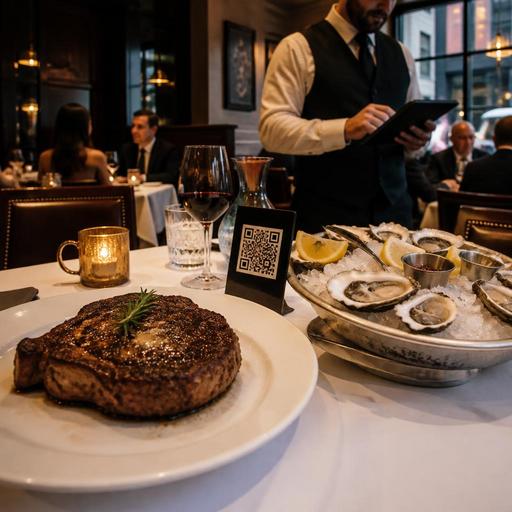
How U.S. Steakhouses and Seafood Restaurants Build Better Digital Menus
Digital menus for seafood and steakhouse restaurants need more than attractive item photos and a simple category list. In the United States, operators often juggle market price items, steak temperatures, side substitutions, raw bar selections, add-ons like lobster tail or shrimp, and service styles that range from white-tablecloth dining to fast-casual takeout. If your digital menu is not structured carefully, the result is usually the same: slower ordering, more cashier or server questions, kitchen mistakes, awkward guest conversations, and missed upsell revenue.
For independent steakhouses, oyster bars, hotel restaurants, casino dining rooms, airport concessions, and multi-location seafood brands, the best digital menu setup is operational first. It should help guests order with confidence while giving the POS, kitchen display system, and staff a clean workflow. Here is how to build that menu in a way that works in real U.S. restaurant operations.
Start with modifier groups that match how your kitchen actually cooks
Many steakhouse and seafood menus fail because the digital structure follows the printed menu layout instead of the line cook workflow. A guest may see a beautiful ribeye listing, but the kitchen needs specific choices: temperature, sauce, side, add protein, and allergy-related notes. The same is true for seafood. A salmon entree may require cooking style, starch, vegetable, sauce, and whether the guest wants blackened seasoning.
Build modifiers in the order the kitchen and expo need to read them on the check or kitchen display:
- Core preparation such as rare, medium rare, medium, medium well, or well done for steaks; grilled, broiled, fried, blackened, or chilled for seafood.
- Included sides such as baked potato, fries, creamed spinach, asparagus, rice pilaf, or coleslaw.
- Premium additions such as crab cake topper, garlic butter shrimp, lobster tail, Oscar style, sauteed mushrooms, or blue cheese crust.
- Sauces and finishing options such as bearnaise, peppercorn, drawn butter, cocktail sauce, mignonette, lemon butter, or Cajun butter.
- Guest notes for practical requests, while training staff to review special instructions before sending to the kitchen.
For example, a Chicago-style steakhouse using QR ordering at lunch can let the guest choose a New York strip, pick medium rare, select mashed potatoes, add sauteed mushrooms, and choose peppercorn sauce in one clean flow. A coastal seafood restaurant can let a guest choose a catch of the day, then select grilled or blackened, choose rice or fries, and add a cup of clam chowder.
This structure also helps with takeout and direct online ordering. Guests ordering from home are less likely to call the restaurant to ask what comes with the entree or whether they can swap the side. That reduces phone interruptions during busy dinner service.
Handle market price items without confusing guests or your staff
Market price is common in seafood and some steakhouse programs, but it can create friction online if the workflow is unclear. Guests do not want to feel surprised at checkout, and staff do not want to manually explain every changing item during service.
A practical approach is to separate market price items into clear operational groups:
- Daily catch or whole fish with rotating availability by location
- Raw bar selections such as oysters by type, count, or region
- Shellfish specials like king crab legs, live lobster, or seasonal soft-shell crab
- Large-format steak cuts such as dry-aged porterhouse for two
For dine-in QR menus, show the item clearly and pair it with a workflow your staff can support. Some operators update the price directly in the menu as inventory changes. Others direct the guest to ask the server before confirming the order. For phone orders or direct online ordering, many restaurants limit certain market price items to staff-assisted ordering so the guest does not place an order that must be repriced later.
The key is consistency across the menu, POS, and front-of-house script. If your oyster selection changes daily, your host stand, server tablets, online menu, and kitchen display should all reflect the same availability. Multi-location brands especially need location-level controls so a Boston seafood unit does not show the same raw bar list as a Dallas airport concession.
If your menu touches nutrition disclosures for chain operations, alcohol listings, or local consumer rules around price display, keep the setup operational and verify current requirements with qualified advisors and official guidance before publishing changes.
Use upsells that feel natural at a steakhouse or seafood restaurant
Upsells work best when they fit the dining occasion instead of looking like pop-up sales prompts. In U.S. steakhouses and seafood restaurants, guests are already used to building a check through enhancements. The digital menu should mirror that behavior in a simple, tasteful way.
High-performing upsells for these concepts
- Protein enhancements: add lobster tail to filet mignon, crab cake to salmon, shrimp skewer to sirloin, or scallops to pasta.
- Premium sides: loaded baked potato, truffle fries, lobster mac and cheese, grilled asparagus, or creamed spinach.
- Sauce additions: bearnaise, chimichurri, Cajun cream, drawn butter, or horseradish cream.
- Course builders: cup of gumbo, Caesar salad, wedge salad, chowder, or raw bar starter.
- Beverage pairing prompts: sparkling water, iced tea, house wine, old fashioned, or a local IPA where appropriate.
A suburban steakhouse doing strong Friday night dine-in sales might prompt guests to add a lobster tail after they select a filet. A Gulf Coast seafood grill can suggest hush puppies, slaw, and key lime pie for takeout orders. A hotel restaurant can use breakfast-to-dinner menu logic to suggest a glass of wine or a crab cake starter when convention guests order from a QR menu at the table.
Keep upsells limited and relevant. Too many prompts slow ordering and reduce trust. One or two thoughtful suggestions per item usually outperform a long list.
Design for dine-in, takeout, and pickup without breaking the experience
Seafood and steakhouse menus often serve multiple channels: full-service dining room, bar seating, private dining, curbside pickup, direct online ordering, and delivery apps. The same item should not always appear the same way in every channel.
For example, a sizzling steak platter may work beautifully in the dining room but travel poorly for delivery. Fried seafood combos may hold better for takeout if sauce is packed on the side. Oyster platters may be dine-in only. Build channel-specific availability and modifier rules so the guest sees what is realistic for that order type.
Useful channel decisions include:
- Marking fragile items as dine-in only
- Offering fewer modifier choices on third-party delivery apps than on direct ordering
- Using pickup shelf timing for cold seafood towers separately from hot entrees
- Adding curbside pickup instructions for larger family packs or catering trays
- Routing bar-only items differently if alcohol ordering is restricted by your local workflow
This is also where ADA-minded access matters. Your digital menu should be easy to navigate on a phone, readable without tiny text, and organized clearly enough that guests can complete an order without guessing. If you operate in regulated areas, including airports, hotels, or stadium venues, confirm your accessibility and payment workflows with your internal team and qualified advisors as needed.
Train the floor and back of house around the menu logic
The best digital menu still fails if staff do not trust it. Before rollout, test your highest-risk items: market price crab legs, steak temperatures, split-plate requests, raw bar counts, combo platters, and family-style seafood boils. Make sure the server, cashier, expo, and line cooks all see the item details in the same order.
Run practical tests with real scenarios:
- A guest orders a ribeye medium rare with asparagus and peppercorn sauce through QR at the table
- A takeout customer wants blackened salmon but swaps fries for rice
- A bar guest orders oysters by the half dozen plus a martini on an open tab
- A curbside pickup order includes a surf-and-turf family meal and extra drawn butter
- A hotel guest orders from the room and wants utensils, condiments, and allergy notes included
Then review the basics that affect U.S. operations: how tips flow in the ordering path, how service charges are labeled if used, how sales tax appears on the final check, and how special requests print to the kitchen. These are operational details, not one-size-fits-all rules, so verify local and brand-specific requirements with your POS provider, accountant, employment counsel, or official guidance when needed.
When the menu, POS, and kitchen display system are aligned, seafood and steakhouse operators can reduce order errors, protect margins on premium items, and make upsells feel like hospitality instead of pressure. Restomas can help restaurants organize digital menus, modifiers, ordering flows, and location-level controls in a way that supports real service.
