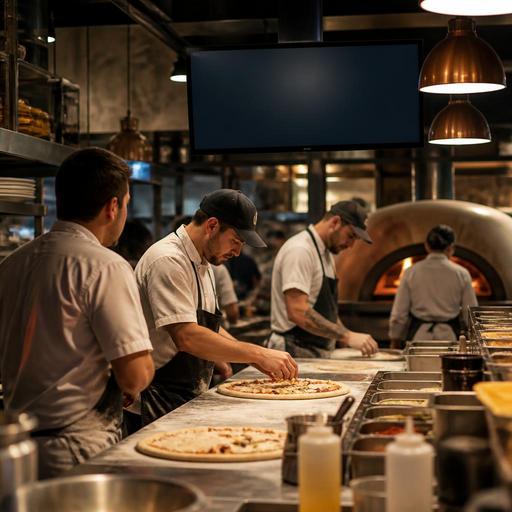
Kitchen Display Systems for Pizza Lines: Better Speed, Flow, and Waste Control
A kitchen display system for pizza lines can do much more than replace printed tickets. In a pizza kitchen, where dough timing, topping accuracy, oven capacity, and delivery promises all depend on coordination, the display becomes a control point for flow. When it is set up well, the team sees what to make now, what to hold, what is delayed, and where waste is starting to build. For restaurant owners and operators, that means fewer remake situations, steadier service during rushes, and better use of labor and ingredients.
Pizza operations are especially sensitive to timing errors. A salad can wait a little. A pizza often cannot. If a pie is stretched too early, topped too soon, or boxed before the rest of an order is ready, quality drops fast. This is why the real value of a digital kitchen screen is not only visibility, but sequencing. The goal is to help every station work at the right pace, not the fastest possible pace.
Why pizza lines need a different KDS setup
Many kitchens can use one simple production queue. Pizza lines usually need something more structured because the product moves through distinct stages: order intake, dough prep, topping, oven loading, cutting, boxing, and handoff for dine-in, pickup, or delivery. If all tickets appear in one undifferentiated list, the line can become crowded at one point while another station waits.
A better setup separates work by station or by production phase. For example, the make line should see item build details clearly, while the oven station should see sequencing and promised completion times. The expo or packing station should see which orders are waiting on sides, drinks, or desserts so completed pizzas are not sitting too long.
Consider a Friday evening example. A family order includes two large pizzas, garlic knots, and soft drinks for pickup. At the same time, three delivery orders arrive with different promised times. If the kitchen display only sorts by order entry time, the team may build pizzas too early and create a bottleneck at the oven. If the display is arranged by firing priority and channel, the kitchen can hold some orders at the right stage, keeping crust quality stronger and handoff smoother.
How timing rules improve flow across the line
The most effective pizza KDS setups use timing rules, whether they are configured directly in the kitchen system or managed through connected order routing. Timing rules help the team answer a simple question: what should be worked on right now?
In practical terms, operators should define how long each step usually takes in their own kitchen. That includes dough stretching, topping, oven time, cut-and-box time, and average handoff time for pickup or dispatch. The system does not need to be perfect to be useful. It needs to reflect the real pace of the kitchen closely enough to prevent early firing and late starts.
Useful timing decisions for pizza operators
- Separate prep start from oven fire time: not every pizza should be built the moment the order appears.
- Group orders by promised handoff time: this helps avoid making delivery orders too early while pickup guests are already waiting.
- Flag large or complex orders: school events, office lunches, and multi-pizza family bundles often need earlier attention.
- Show channel clearly: dine-in, pickup, third-party delivery, and direct delivery should be instantly visible.
- Highlight modifiers: half-and-half toppings, no cheese, extra bake, allergy notes, and crust changes must stand out.
One common mistake is rewarding speed at the wrong point. If the topping station rushes ahead without regard to oven capacity, the result is not faster service. It is clutter, confusion, and declining product quality. A well-configured screen helps the line pace itself to the slowest critical point, which is often the oven.
Using the KDS to reduce remakes and food waste
Waste on a pizza line often comes from small coordination failures rather than dramatic mistakes. A pizza is made on the wrong crust. An order is fired twice because a paper ticket was unclear. A delivery driver is late, so boxed pizzas sit too long and must be remade. A side item is missed, delaying the whole order. These problems are expensive because they waste both ingredients and labor.
A kitchen display system reduces these losses when it gives the team one trusted source of order information. Clear modifier visibility matters here. If the screen makes it easy to miss details such as gluten-free crust, no onion, light sauce, or well-done bake, digital ordering alone will not solve the issue. The display has to present the information in a way the line can read quickly under pressure.
Owners should also review voids, remakes, and delayed orders together. This is where digital systems become especially practical. If Friday night problems repeatedly happen between oven loading and packing, that suggests a line balance issue, not just a training issue. If many remakes come from custom orders placed online, menu structure may need improvement so guests choose options more clearly.
Actions that help control waste
- Audit the top five remake reasons from the last month and map each one to a station.
- Check whether customizations are readable on the kitchen screen in a real rush, not only during setup.
- Use hold or delay logic for orders with later pickup times so pizzas are not built too early.
- Train staff on bumping rules so completed items are not removed from the screen before the full order is actually ready.
- Review menu complexity if certain combinations repeatedly slow the line or cause errors.
Even a simple operational change can make a difference. For example, if the cut-and-box station must confirm sauces, sides, and drinks before clearing an order, incomplete handoffs become easier to catch before they reach the guest.
Staff management and station design matter as much as software
No display system can fix an unclear line structure. Pizza operators need to define who owns each stage of production and what happens when volume spikes. During slower periods, one employee may stretch dough, top pizzas, and box them. During peak hours, those tasks often need to be split. The KDS works best when the station design matches the actual workload.
Cross-training is also important. If only one person understands oven pacing or order prioritization, the kitchen becomes fragile. Managers should teach staff how to read urgency, not just recipes. That includes knowing when to pause production, when to batch similar items, and when to escalate a bottleneck before it affects guest wait times.
For multi-channel pizza businesses, front-of-house communication matters too. If the dining room promises a table that a large order will be out in ten minutes while the screen shows a backed-up oven queue, the guest experience suffers before the pizza arrives. Connected systems help here because order status can be shared more consistently across service points.
This is also where platforms like Restomas fit naturally into operations. When digital menus, order intake, and kitchen routing are connected, the team spends less time translating information between channels and more time managing production quality.
How to evaluate whether your pizza KDS setup is working
Owners do not need complicated analytics to judge whether the setup is improving service. Start with direct operational questions. Are pickup guests waiting for orders that were supposedly finished? Are drivers arriving before orders are packed? Are staff members asking each other for ticket information that should already be visible? Are remakes concentrated on specific shifts or stations?
Walk the line during a rush and observe the screen from each position. The dough station should know what is coming soon. The topping station should know what to build now. The oven station should know what must fire next. The packing station should know whether the full order is complete. If any station has to guess, the system needs refinement.
A practical review checklist can help:
- Screen layout: can each station find the right information in seconds?
- Order priority: are promised times and channels easy to identify?
- Modifier clarity: do special instructions stand out enough to prevent errors?
- Workflow fit: does the display reflect the real sequence of your line?
- Exception handling: is there a clear process for delayed pickups, large orders, and missing items?
Pizza kitchens do not need more noise. They need better timing decisions. A kitchen display system becomes valuable when it helps the line move with control, protects product quality, and reduces waste created by poor coordination. For operators looking to connect digital ordering, menu management, and kitchen flow more cleanly, Restomas can support a more organized service structure without adding unnecessary complexity.
