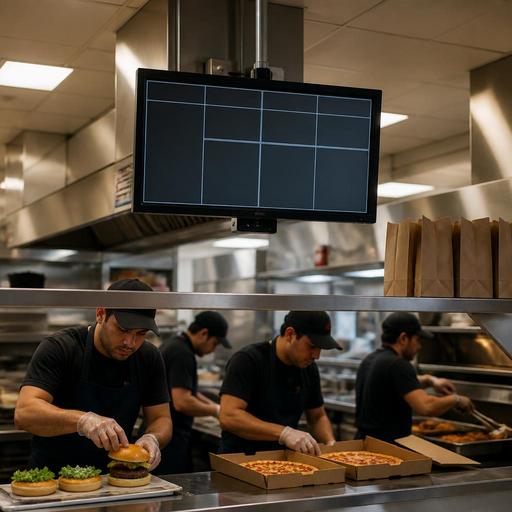
Kitchen Display Systems for U.S. Burger, Pizza, and Wing Shops
A kitchen display system for burger, pizza, and wing shops can do much more than replace paper tickets. In a busy U.S. operation, it becomes the control point for dine-in checks, takeout, pickup shelf orders, curbside pickup, direct online ordering, and delivery apps arriving at the same time. For operators running a neighborhood burger joint, a college-town pizza shop, or a wing concept with heavy game-day demand, the goal is not just digital screens. The goal is a kitchen flow that helps cooks prioritize correctly, reduce remake risk, and keep the front counter, expo line, and delivery handoff in sync.
In the U.S., that matters because order channels are fragmented. A single lunch rush might include a server ringing in a table check, a cashier taking a walk-in tab at the counter, a family placing a direct online order for curbside pickup, and third-party delivery apps sending wing bundles every few minutes. If those tickets land in the kitchen without clear routing and timing, speed drops fast. A well-configured kitchen display system helps operators turn that chaos into a repeatable production line.
Map the kitchen by station, not by screen count
The most common mistake is installing screens without first mapping the production flow. Burger, pizza, and wing operations each have different choke points, so the kitchen display setup should follow the line.
Burger shop example
In a fast-casual burger restaurant, the grill station may handle patties, the fry station handles fries and sides, and expo finishes burgers, checks modifiers, and bags takeout. A useful setup routes burger builds to grill and assembly, fries to fry, and then sends the final order status to expo. If the cashier promises a guest a quick pickup but fries are buried behind dine-in tickets, the kitchen display should make that visible before the handoff area gets backed up.
Pizza shop example
A pizza operation often needs a different flow: make line, oven, cut table, then pickup or delivery staging. If half-and-half toppings, extra bake requests, gluten-sensitive handling procedures, and timed orders are buried in small print, mistakes follow. A kitchen display system should surface those modifiers clearly and keep timed orders from firing too early. For a suburban pizza shop with Friday night delivery volume, that can mean holding an order until dough stretch timing actually matches driver availability.
Wing concept example
Wing kitchens usually live or die by basket timing, sauce application, and packaging accuracy. During football games, a wing shop may have in-store pickup, delivery app orders, and bar guests ordering from servers at once. Separate routing for fryers, sauce station, and expo helps prevent one person from becoming the bottleneck. If the team sees all 20-ticket volume only at expo, they are already too late.
Set ticket priority rules around service promises
American operators do not just manage food production; they manage guest expectations tied to service channels. A kitchen display system works best when ticket priority reflects the promises your restaurant is actually making.
- Dine-in: Guests expect steady pacing and hot food delivered together to the table.
- Counter takeout: Guests are often standing nearby and notice delays immediately.
- Pickup shelf orders: Food can lose quality fast if fired too early.
- Curbside pickup: Timing must match arrival windows and runner availability.
- Delivery apps: Quotes need to be realistic so drivers are not waiting while fries die in the window.
- Direct online ordering: These orders often offer better margin, so they deserve clean, reliable timing.
For example, a wing shop in Dallas might prioritize in-house bar tabs differently during a game than at weekday lunch. A pizza store near a high school may need timed after-practice pickup waves. A burger chain with a downtown location may care more about lunch queue speed and pickup shelf turnover than dining room pacing. The point is that the kitchen display should support the operating model, not force every order into the same lane.
Operators should also align KDS rules with front-of-house communication. If your host stand, cashiers, or servers quote 15 minutes, but the kitchen display is effectively stacking 25 minutes of work before a ticket even hits the line, guests will feel the mismatch. The same applies to direct online ordering and delivery app prep times.
Use modifiers, holds, and combo logic to reduce remake risk
Burger, pizza, and wing menus generate a high volume of modifiers. No onion, extra pickles, sauce on the side, all flats, well done, light cheese, ranch count, side swap, combo drink changes, and allergy-related notes all need to be visible where the work happens. A kitchen display system should simplify those details, not bury them.
In a burger shop, a double cheeseburger with no bun, sauce on the side, and a side salad instead of fries should appear in a way that grill, assembly, and expo all understand instantly. In a pizza kitchen, half pepperoni and half veggie with extra cheese on only one side cannot look like a generic topping note. In a wing operation, a 50-piece order split across multiple sauces needs packaging logic that prevents missed cups and mislabeled boxes.
Here are practical steps that help:
- Standardize modifier names across POS, online ordering, and delivery app menus so the kitchen sees the same language every time.
- Group modifiers by action, such as cook, build, pack, and handoff, rather than listing everything in one long block.
- Flag high-risk items like allergy notes or major substitutions so expo gives them a second check.
- Separate packaging instructions from cooking instructions so line cooks focus on production while expo handles bagging details.
- Audit combo logic to make sure sides, drinks, dips, and add-ons are not disappearing between channels.
This is especially important in U.S. operations where delivery marketplaces, direct web ordering, and in-store POS orders may all describe the same item slightly differently unless menus are maintained carefully.
Connect the kitchen display to labor, handoff, and reporting
A kitchen display system should not be treated as a standalone screen. It works best when it connects to staffing, handoff, and reporting decisions.
Start with labor deployment. If Friday dinner always crushes the fry station in a burger-and-wings concept, the answer may not be another screen. It may be changing station assignments, prep levels, or expo coverage. If a pizza shop has strong oven throughput but slow cut-and-box output, then handoff staging may be the real issue. Screens reveal problems, but operators still need to redesign the workflow.
Then look at handoff. U.S. restaurants increasingly rely on pickup shelves, curbside pickup, and delivery driver staging. If completed orders disappear into a crowded counter, the kitchen display has only solved half the problem. Match status updates to a clear physical handoff zone. For example, a fast-casual burger store might use one area for direct pickup, another for delivery drivers, and a runner workflow for curbside. A hotel restaurant with takeout may need a separate handoff process from room service or lobby guests.
Reporting matters too. Watch where tickets stall: grill, oven, fry, expo, or bagging. If a wing shop sees long ticket times only during large-party bundles, it may need a batch strategy. If a pizza store sees delays tied to third-party tablet entry, POS integration may be the bigger fix. If a multi-location operator finds one store consistently outperforming another on the same menu, compare station routing, prep setup, and screen usage before assuming the issue is staffing alone.
When labor rules, tip workflows, service charges, sales tax handling, ADA-minded guest access, or FDA menu labeling questions come into play, treat the KDS as part of the operating process rather than a compliance shortcut. Chains, full-service groups, and operators in highly regulated local markets should verify current requirements with qualified advisors and official guidance, especially when workflows affect menu presentation, employee tasks, reporting, or guest-facing ordering tools.
How to roll out a KDS without disrupting service
The best rollout is usually phased. Start with one station or one daypart, then expand once the team trusts the system.
- Document the current ticket path from POS or online order to each production station.
- Identify the biggest bottleneck such as fry station overload, pizza cut table backup, or expo confusion.
- Test with real menu edge cases like family bundles, sauce-heavy wing orders, and heavily modified burgers.
- Train by station so each employee knows what must be acknowledged, completed, or escalated.
- Review rush performance daily for the first few weeks and adjust routing, colors, alerts, and prep timing.
For many U.S. operators, the biggest win is not flashy technology. It is fewer verbal callbacks, fewer missed modifiers, better timing for pickup and delivery, and a calmer line during the rush. That is what makes a kitchen display system valuable in burger, pizza, and wing operations.
Restomas helps restaurant teams connect digital ordering, POS workflows, and kitchen operations in a way that is practical for real-world service.
