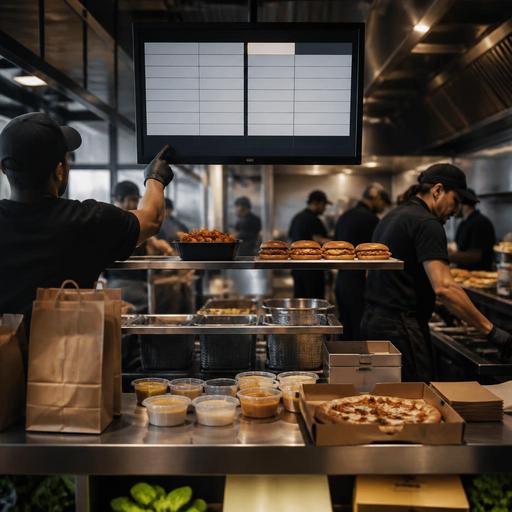
Kitchen Display Systems for U.S. Burger, Pizza, and Wing Shops
A strong kitchen display system for burger, pizza, and wing shops can do more than replace paper tickets. In a busy American operation, it helps the line separate dine-in from takeout, route delivery app orders without confusion, pace fried and baked items together, and keep the pickup shelf from turning into a guessing game. Whether you run a neighborhood burger joint, a college-town wing spot, a delivery-heavy pizza shop, or a multi-location fast-casual brand, the real value comes from how the screen supports your kitchen workflow during lunch rush, game day, and late-night peaks.
Why burger, pizza, and wing kitchens need different KDS logic
These three concepts often share high ticket volume and customization, but the production flow is different. A burger shop may need grill timing, modifier visibility, and fry station coordination. A pizza operation needs make-line sequencing, oven timing, slices versus whole pies, and strong handling for half-and-half toppings. A wing shop has sauce choices, fryer capacity, hold-time sensitivity, and frequent bundles tied to sports traffic and delivery apps.
That means your kitchen display system should not just mirror the POS check. It should show each station what matters most. For example, a fast-casual burger restaurant in Dallas might want the grill screen to highlight patty temps, cheese adds, and no-onion requests, while expo sees the full tray build including fries, drinks, and curbside status. A pizza shop in suburban New Jersey may need separate views for make line, oven, and cut table so a large pepperoni pie, gluten-conscious order note, and side of wings move in the right sequence. A wing concept near a college campus in Ohio may need a fry screen grouped by cook time and sauce toss stage to prevent 40-ticket backlogs before halftime.
The lesson is simple: set up the KDS by station, not just by menu category. If the line cooks still have to mentally sort every order, the screen is only a digital printer.
Build screens around service channels, not just food items
Many U.S. operators now run several channels at once: dine-in, direct online ordering, delivery apps, phone orders, curbside pickup, and third-party pickup drivers. If those orders land in one undifferentiated queue, the kitchen loses time deciding what should fire first.
A better setup tags orders by promise type and handoff method. A burger-and-shake shop in Phoenix, for example, may choose one color or icon pattern for dine-in trays, another for takeout, and another for delivery app orders. A pizza and wings store in Chicago might hold certain delivery orders until the driver arrival window is closer, while dine-in pies fire immediately. A sports bar with heavy wing volume on Sunday may route bar tabs differently from family takeout orders so servers are not waiting behind app tickets.
Useful channel rules often include:
- Dine-in: pace items to the table experience, especially appetizers, kids meals, and refires.
- Takeout: prioritize accurate packaging, condiments, and pickup shelf timing.
- Curbside pickup: include vehicle or arrival notes only where staff can act on them quickly.
- Delivery apps: watch quote times, driver pickup timing, and bag labeling workflows.
- Direct online orders: preserve promised times and upsell modifiers without slowing the line.
This is also where your front-of-house process matters. If a guest opens a tab at the bar, a server adds wings later, and the kitchen never sees course timing, your screen setup is incomplete. The best KDS workflows connect the POS, online ordering, and expo view so all channels feed one operating logic.
Station routing that reduces remake risk and ticket times
In burger, pizza, and wing operations, remakes usually come from missed modifiers, bad handoffs, or poor timing between stations. The KDS should reduce all three.
Burger example
Route burgers to grill, fries to fry station, and shakes or dessert items to the appropriate prep area, but keep expo in control of the final check. If a double cheeseburger order includes no pickles, extra sauce, and a lettuce wrap, that modifier should be impossible to miss on the station screen. If fries are dropped too early, they die in the window while the burger finishes. Use item pacing so the fry drop is tied to grill progress rather than ticket print time alone.
Pizza example
Separate make line, oven, and cut table views. This is especially important for operators handling whole pies, lunch slices, wings, and salads from one kitchen. A Friday-night New York-style pizzeria may have a flood of app orders for two large pies plus knots and wings. The make line needs topping clarity, the oven station needs sequence, and cut table needs packaging notes, dipping sauces, and whether the order goes to a pickup shelf or a delivery driver handoff.
Wing example
Use screens to split fry, toss, and expo. Sauce-heavy menus create easy mistakes: mild versus medium, sauce on side, extra wet, all flats when available, or combo platters with fries and ranch. The KDS should make those modifiers obvious and keep bundles together. If your operation offers alcohol, staff should also verify current local rules on age checks, service workflows, and handoff procedures for applicable orders.
Across all three concepts, build in a clear expo confirmation step. One final screen view that shows the full order, packaging needs, and handoff channel can prevent a lot of bad guest experiences.
What to configure before you judge whether the KDS is working
Operators sometimes install screens and expect instant improvement. In reality, the setup work determines the result. Before deciding whether the system is helping, review these practical items:
- Modifier naming: Short, consistent wording beats cluttered abbreviations that confuse new staff.
- Station ownership: Every item should have a clear station path and expo responsibility.
- Prep timing: Match fire rules to actual cook times for burgers, wings, fries, and pizzas.
- Order throttling: If online demand spikes, control promise times instead of flooding the line.
- Packaging prompts: Add reminders for sauces, napkins, utensils, tamper steps, and bag count.
- Pickup shelf workflow: Decide when an order moves from kitchen-ready to guest-ready or driver-ready.
- Training: Teach cooks what each color, sound, and bump action means during rush periods.
Also think about accessibility and guest communication. If you use QR ordering or digital pickup notices, make sure guests still have a workable path to order and receive help. Operators should verify current ADA-minded access expectations and local requirements with qualified advisors or official guidance when updating service flows.
For chains and larger brands, menu data consistency matters too. If your concept is large enough to face federal menu labeling rules or specific state requirements, confirm that digital menu, POS, and kitchen data stay aligned, and verify current obligations with counsel or official sources. The same goes for sales tax versus service charge handling, tipped staff workflows, and tip reporting processes if your operation mixes counter service, delivery, and full-service checks.
How multi-location operators can standardize without slowing local stores
For franchise groups and multi-unit operators, the challenge is balancing consistency with store reality. A downtown lunch-heavy burger store, an airport pizza concession, and a suburban wing shop near a high school stadium may all need different screen views, even if they share the same menu.
Start with brand-wide standards for item names, modifier logic, routing rules, and readiness statuses. Then allow local adjustments for volume patterns, labor scheduling, and daypart differences. For example, one store may need a dedicated screen for curbside runners, while another relies more on a pickup shelf and third-party drivers. A hotel restaurant serving burgers through room service and lobby pickup may need a different handoff status than a street-side fast-casual unit.
Review the KDS with managers using real tickets from a Friday dinner rush, a football game night, and a slow weekday lunch. Look for where orders stall, where cooks ignore the screen, and where expo still writes notes by hand. Those friction points usually show whether the issue is technology, menu design, staffing, or training.
When connected well, a platform like Restomas can help operators tie together QR menus, direct ordering, POS integrations, kitchen display workflows, and pickup management so the kitchen sees a cleaner, more actionable queue.
