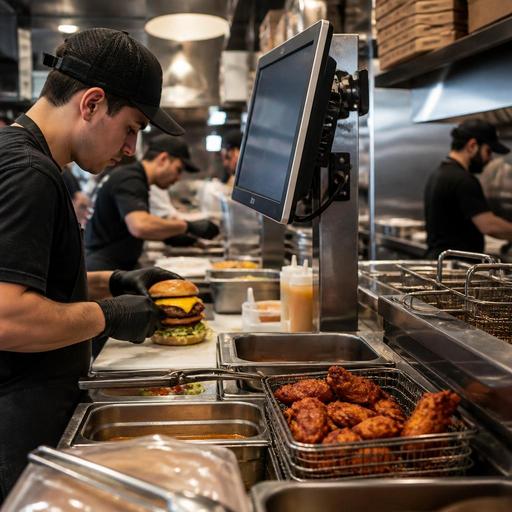
Kitchen Display Systems for U.S. Burger, Pizza, and Wing Shops
A strong kitchen display system for U.S. burger, pizza, and wing shops does more than replace paper tickets. It helps operators manage rushes, route orders by station, reduce remake risk, and keep dine-in, takeout, delivery apps, and curbside pickup moving without the expo line turning into a bottleneck. For American restaurant operators, the value is practical: fewer missed modifiers, clearer handoff timing, better coordination with the POS, and a cleaner workflow for teams handling checks, tabs, tips, and heavy off-premise volume.
Why burger, pizza, and wing operations need station-based screens
These three concepts share a common challenge: they sell high-volume items with lots of modifiers, add-ons, and timing dependencies. A neighborhood burger shop may have medium-well requests, no-pickle notes, combo sides, and shake add-ons. A pizza store may need to coordinate dough, topping, oven, slicing, and pickup shelf timing. A wing concept may juggle sauce choices, fry times, ranch cups, and game-day order spikes from delivery apps.
Paper tickets and verbal calls can work at low volume, but they break down when multiple channels hit at once. A kitchen display system lets operators split work in a way that matches the line:
- Burger station: patties, temps, cheese choices, bun notes, and side pairing
- Fry station: fries, tots, onion rings, and hold times
- Pizza make line: crust type, toppings, half-and-half builds, and allergy-related notes
- Oven station: fire timing, order priority, and batch flow
- Wing station: quantity, cook stage, sauce toss, dry rub, and dipping sauces
- Expo or pack station: bagging, labeling, beverage pairing, and handoff channel
For example, a fast-casual burger spot in Dallas with a lunch rush and heavy office takeout can route kiosk, QR ordering, and cashier orders to the same display while still separating grill and fry production. A New Jersey pizza shop can queue third-party delivery orders without burying dine-in pies. A sports-bar wing kitchen in Ohio can prioritize in-house game traffic while still seeing app orders in a structured order.
Set up the KDS around order channels, not just menu items
Many U.S. operators make the mistake of thinking only about food prep. The better approach is to map the full path from order entry to guest handoff. In most burger, pizza, and wing operations, the kitchen is serving several channels at once:
- dine-in server-entered orders
- counter service and cashier orders
- direct online ordering from the restaurant website
- QR ordering at the table
- delivery marketplace orders
- phone orders entered into the POS
- curbside pickup and takeout
Each channel needs a visible status flow. A useful setup often includes screens or views for new, in progress, ready for expo, and ready for pickup. That matters because the operational problem is not only cooking food; it is preventing handoff confusion.
Consider a Chicago pizza and wings store on a Friday night. A delivery app order for two large pies and 30 wings should not be treated the same way as a dine-in table waiting on a single cheese pizza for kids. The KDS should help the team prioritize by promised time, order source, and production stage. If your POS stack supports it, color-coding by channel or time target can reduce missed deadlines without the manager yelling across the line.
For takeout-heavy shops, the final screen matters as much as the cook screens. Expo should see whether the order is going to a pickup shelf, curbside pickup, a delivery driver handoff, or a server. That reduces the classic problem of hot food dying on the counter while someone hunts for a missing ranch cup or bottled soda.
Build ticket logic that matches real American menu complexity
The best kitchen display systems are only as good as the menu and modifier structure behind them. Burger, pizza, and wing operators should review how orders print or display in real service conditions, not just in a demo.
For burger shops
Make sure patty temperature, cheese, bun choice, sauce changes, side substitutions, and allergy-related notes display clearly. If you run combos, the screen should keep the burger, side, and drink tied together so packout is accurate. If guests can order through QR menus or direct online ordering, test how custom notes appear on the grill and fry stations.
For pizza shops
Half toppings, extra cheese, crust upgrades, bake instructions, and slicing notes need clean formatting. A cluttered pizza ticket slows the make line. If your operation serves by the slice at lunch and whole pies at dinner, create production views that reflect that difference. A Manhattan slice shop, for instance, may need one workflow for reheats and another for made-to-order pies.
For wing concepts
Sauce-on-side, split sauces, dry rubs, boneless versus bone-in, and dipping sauce counts should stand out immediately. Wing kitchens often lose time when the toss station discovers too late that an order needs separate containers for two flavors. A good KDS view reduces those surprises.
If you operate in states or cities with menu disclosure or allergy communication expectations, use the system to support internal clarity, but verify your current local and federal obligations with official guidance and qualified advisors. Chains that may fall under FDA menu labeling rules should treat the KDS as an execution tool, not as a substitute for compliance review.
Use the KDS to improve labor flow, speed, and order accuracy
A kitchen display system should help you make better staffing and training decisions, especially in QSR and fast-casual environments. Start by watching where tickets stall. If grill clears quickly but packout backs up, your issue may be expo labor, not cook speed. If pizza make screens fill up before the oven, your bottleneck may be stretching and topping. If wings are consistently late during televised games, you may need a dedicated sauce and pack station from 6 p.m. to close.
- Measure choke points by station. Review which screen holds orders the longest during lunch, dinner, and late night.
- Train by role. New hires should learn what it means to bump, hold, recall, and reroute an order without losing it.
- Separate production from handoff. The person boxing food should not always be the same person cooking it during peak periods.
- Stage off-premise orders. Use a pickup shelf or dedicated handoff area so delivery drivers and takeout guests do not crowd the expo line.
- Test rush scenarios. Run mock orders for a Friday night pizza rush or a Sunday wing spike and see where the workflow breaks.
This also affects front-of-house coordination. In a full-service burger bar, servers need realistic table timing so guests are not left waiting on entrees while drinks sit. In a fast-casual wing shop, the cashier or host needs clear ready status for takeout. In both settings, tighter kitchen visibility improves the guest experience and can support smoother tipping workflows because service feels more organized. Operators should also keep service charges, automatic gratuities, and tip reporting workflows aligned with their POS and accounting process, while verifying current federal, state, and local requirements with qualified advisors.
What to look for before you roll out a KDS
Before committing, U.S. operators should evaluate the system in the context of their full tech stack. Ask practical questions:
- Does it integrate cleanly with your POS and online ordering tools?
- Can it separate dine-in, delivery apps, and direct takeout orders?
- Will it support multi-location menu consistency for franchise or regional groups?
- Can it handle item 86ing so sold-out sauces or crusts stop appearing across channels?
- Is the display readable in heat, grease, and steam?
- Can managers adjust routing without waiting on a major rebuild?
- Does the handoff flow work for ADA-minded guest access, including pickup areas and digital ordering paths? Verify local accessibility expectations for your layout and ordering process.
For a five-unit wing brand, centralized control may matter most. For an independent burger restaurant, speed of training and easy modifier handling may be the top priority. For a pizza operator with heavy delivery marketplace volume, the biggest win may be managing order pacing so the kitchen does not get buried by simultaneous app demand.
The right kitchen display setup should feel invisible during service. Orders appear where they should, cooks know what to fire, expo knows what is missing, and guests get the right food on time whether they are dining in, grabbing takeout from the pickup shelf, or waiting in a curbside pickup spot. If you are modernizing burger, pizza, or wing operations, Restomas can help connect digital ordering, POS workflows, and kitchen visibility into one cleaner service flow.
