Managing Delivery App Tablets in U.S. Restaurants Without Losing Order Control
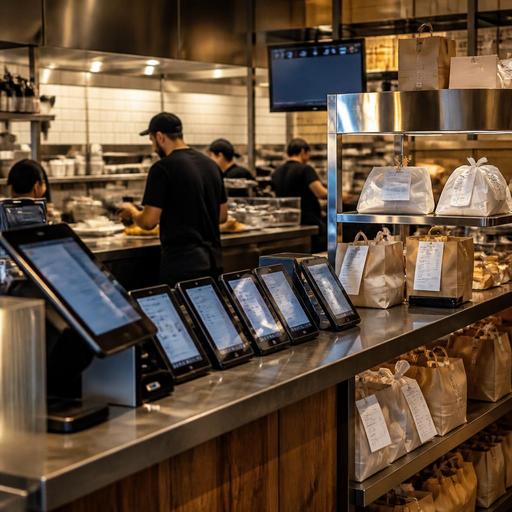
For many operators, delivery marketplace order flow for U.S. restaurants managing multiple tablets is no longer a side issue. It is part of the daily rush. A wing shop with three delivery apps, a neighborhood sushi spot with a pickup shelf, or a fast-casual salad brand running lunch from six locations can all end up juggling incoming orders from separate screens while the kitchen is already buried. The problem is not just tablet clutter. It is missed tickets, delayed prep, menu mismatch, refund friction, and a front counter team that stops serving in-house guests because they are busy re-entering online orders.
If your restaurant is managing multiple marketplace tablets, the goal is simple: build one reliable order flow from guest checkout to kitchen production to handoff. That means fewer manual steps, clearer station communication, and better visibility into what your team can actually produce during peak periods.
Why multiple delivery tablets create operational drag
Most U.S. restaurants add delivery apps one at a time. First comes one marketplace for incremental sales. Then a second because local demand is there. Then a third because nearby competitors are listed. Before long, the host stand, expo station, or takeout shelf area has a stack of tablets making different sounds, each with different modifier logic, prep-time controls, and order acceptance rules.
In practice, this creates several common breakdowns:
- Manual re-entry into the POS. Staff copy orders from the tablet into the POS, which slows the line and introduces mistakes.
- Inconsistent menus. A sandwich is sold out on one app but still live on another, or modifiers do not match the in-store menu.
- Prep timing problems. The kitchen receives five marketplace orders at once even though fryers, grill space, or makeline capacity are already maxed out.
- Chaotic pickup handoff. Drivers arrive before the order is staged, or completed bags sit too long and quality drops.
- Reporting gaps. Management sees total sales but struggles to compare app performance, refunds, voids, and labor impact across channels.
A sports bar in Dallas may be able to absorb a few extra delivery tickets during a slow afternoon. But on game day, if tablets are not coordinated with kitchen capacity, dine-in ticket times can slip and guests at the bar notice. A coffee shop in Chicago doing morning pastries and app-based takeout can face the same problem in a smaller footprint: one employee is pulling espresso shots while also accepting and organizing third-party orders.
Build one order flow from app to kitchen to pickup
The cleanest workflow is to reduce handoffs. If possible, marketplace orders should flow directly into your POS or order management layer, then to the kitchen display system or printer by station. That way, your team is not bouncing between devices or rewriting tickets during the rush.
Start by mapping your current order path
Write down what happens from the moment a guest places a marketplace order to the moment a driver leaves. Include every tap, print, verbal callout, and bagging step. Many operators discover that the real issue is not the tablet itself, but unclear ownership. Who accepts orders? Who updates out-of-stocks? Who stages drinks? Who checks that sauces and utensils are packed? Who marks the order ready?
A practical map often looks like this:
- Guest places order in a delivery app.
- Order enters POS or tablet queue.
- Kitchen receives ticket by station.
- Expo verifies modifiers, packaging, and item count.
- Order moves to pickup shelf or driver handoff zone.
- Staff marks order ready and records exceptions if something changed.
Once you can see the full path, you can remove duplicate steps. For example, a fast-casual burrito shop in Phoenix may discover that the cashier is re-entering app orders even though a POS integration is available. A hotel restaurant handling room service, lobby pickup, and delivery apps may realize that all off-premise orders should route through one production screen so the kitchen can prioritize by promised time.
Set channel-specific prep logic
Not every menu item travels well, and not every daypart can support the same delivery volume. Build prep logic around reality. If your fried chicken loses quality after a long wait, cap delivery radius through your available channels where possible, tighten ready-time estimates, and stage drivers only when the bag is nearly complete. If your diner does a huge Sunday brunch, consider pausing selected third-party menu categories during the peak rather than letting the kitchen drown.
This is also where direct online ordering matters. Many U.S. operators use marketplaces for discovery but try to capture repeat guests through branded ordering for takeout and curbside pickup. That can reduce commission pressure while giving you more control over menu availability, guest communication, and promised pickup times.
Standardize menus, modifiers, and availability across channels
One of the biggest causes of delivery mistakes is menu inconsistency. If your in-store POS says a burger comes with one side choice, but a marketplace shows two side modifiers and an outdated add-on price, the error will hit the kitchen, the guest, or both.
Create one menu governance routine:
- Name one owner for digital menu changes at each location or across the brand.
- Use the same item structure across POS, direct ordering, and delivery apps whenever possible.
- Limit modifier sprawl so the line can execute quickly and accurately.
- Hide sold-out items fast instead of asking staff to call guests after the order is placed.
- Review daypart menus before opening, especially for breakfast, late night, and limited-time items.
A food truck in Austin may only have room to prep three proteins and two sides for lunch service. If one marketplace still shows an old combo option, the operator ends up refunding or substituting on the fly. A multi-location pizza brand in Florida may need tighter central control so every store follows the same modifier logic, while still allowing location-level 86ing during local shortages.
For chains subject to menu labeling requirements or operators handling alcohol, service charges, or location-specific taxes and fees, keep the workflow practical: make sure your digital menus and checkout flows are reviewed carefully and verify current federal, state, and local requirements with qualified advisors or official guidance. The same goes for accessibility. If you use QR ordering or digital menus alongside delivery operations, think about ADA-minded access and readable menu structure rather than assuming one format works for every guest.
Protect the line during peak periods
Marketplace volume is only good business if the kitchen can absorb it without damaging the guest experience in-house. The fix is usually operational discipline, not just more tablets.
Use throttling and realistic promises
If your systems allow it, adjust order pacing based on actual kitchen capacity. A burger shop near a stadium may need different settings before an event, during halftime, and after the crowd clears. An airport concession may face compressed rushes tied to flight banks. A suburban family restaurant may do fine on weeknights but need longer prep estimates on Friday at 7 p.m.
Keep your promised times honest. Short quotes that your kitchen cannot hit lead to driver pileups, cold fries, and angry guests. Longer but accurate quotes are usually easier to manage.
Assign an off-premise captain during rush
Even a small store benefits from one person owning off-premise flow during busy windows. This does not have to be a manager. It can be a lead server, expo, or counter employee responsible for watching order status, checking packaging, organizing the pickup shelf, and coordinating curbside pickup if you offer it. That role keeps drivers from interrupting cooks and keeps the front counter from turning into a traffic jam.
For restaurants with tipped staff, think through who handles takeout and app handoff work so labor expectations are clear. Tip pooling, service charges, reporting, and checkout workflows can vary by concept and jurisdiction, so operators should confirm current rules with payroll providers, accountants, counsel, or official guidance rather than relying on assumptions.
What owners should measure every week
If you want delivery marketplaces to support margins instead of quietly draining them, review a short set of numbers and operational notes every week:
- Orders by channel and average check
- Remakes, refunds, and cancellations
- Out-of-stock incidents by item and daypart
- Quoted time versus actual ready time
- Driver wait patterns and shelf dwell time
- Labor friction points such as re-entry, bagging delays, or phone calls to guests
Then ask one simple question: which problems are process issues, and which are system issues? If your staff keeps re-entering orders, that points to integration. If the kitchen misses modifiers, that points to ticket formatting or menu design. If completed bags pile up, that points to staging and timing.
The best delivery operation is not the one with the most tablets. It is the one where orders move cleanly from channel to kitchen to handoff without stealing attention from dine-in guests. Restomas helps restaurants bring menus, ordering, and operational visibility into a more manageable digital flow.
