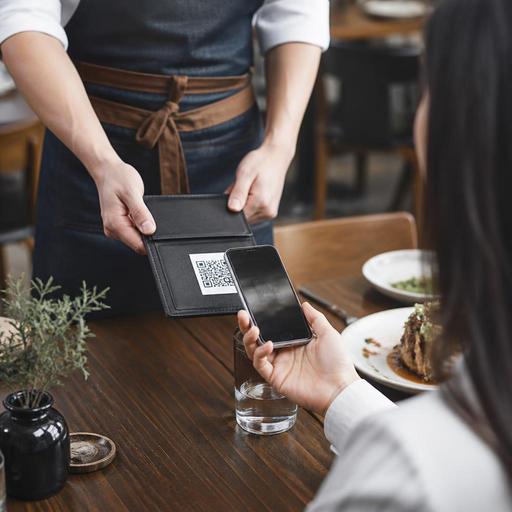
Preparing Your Restaurant for QR Code Contactless Payments
Why QR code contactless payments matter now
QR code contactless payments for restaurants are no longer just a convenience feature. They have become a practical way to reduce payment delays, support faster table turns, and give guests more control over how they close their bill. For many operators, the real value is not novelty. It is smoother service during busy periods, fewer handoffs between guest and staff, and a payment experience that fits modern ordering habits.
In a typical service flow, the payment step is often where momentum slows down. A guest asks for the check, a server brings it, the card is taken away or a terminal is fetched, and the table waits again. With a well-prepared QR payment flow, guests can review their bill and pay from their own phone in seconds. That can be especially useful in cafes during morning rush, in casual dining at lunch, and in restaurants where small service teams handle many tables at once.
Still, QR payments are not plug-and-play. Restaurants need to think carefully about billing accuracy, network reliability, guest communication, refund procedures, and staff roles. The goal is not to replace hospitality with screens. The goal is to remove friction while keeping service warm and clear.
What your restaurant should prepare before launch
Before offering QR payments at the table, map the full guest journey from order to settlement. If the payment step is digital but the rest of the workflow is inconsistent, guests will notice the gap immediately. Preparation should focus on operations first and design second.
1. Connect the payment flow to the real bill
The QR code should lead guests to the correct open check, table, or order. If your team still relies on manual bill matching, mistakes can happen fast, especially when tables are moved, split, or merged. A family may want to split items by person. A cafe guest may add a second coffee after the first payment screen appears. These situations are common, so the system should reflect live order status rather than a static amount.
For example, if table 12 orders starters, then adds a bottle of water later, the QR payment page must show the updated total without confusion. If not, staff will spend time correcting bills at the end, which defeats the purpose of faster checkout.
2. Decide where QR codes will appear
Placement affects adoption. Some restaurants put a code on the table, some on the bill presenter, and some inside the digital menu flow. The best choice depends on your concept. In quick-service or casual cafe settings, a table code may feel natural. In full-service dining, a code on the check presenter can feel more intentional and less intrusive.
- Table stickers work well for repeatable, high-volume service.
- Bill presenters are useful when you want payment to feel like a final service step.
- Receipts or countertop displays can support takeaway and counter service.
Whichever format you use, the instruction should be simple and visible. Guests should immediately understand whether the code is for browsing the menu, paying the bill, or both.
3. Test internet and device realities
Do not assume every guest has a strong mobile connection, a full battery, or comfort with scanning codes. Your restaurant should have reliable guest Wi-Fi if mobile data is weak inside the space. Staff should also know what fallback option to offer when a guest prefers a card terminal or cash. QR payments should expand choice, not create pressure.
It is also worth testing under real service conditions. Try scanning in bright terrace light, dim evening lighting, and busy lunch periods. A code that works perfectly in the office may fail when placed under a reflective plastic table cover or near steam and spills.
How to train staff without slowing service
Introducing contactless payments changes small but important staff behaviors. Good training should focus less on technical jargon and more on guest-facing clarity. Servers need to explain the option naturally, answer common questions, and step in quickly when the guest needs help.
A simple staff script can help: If you prefer, you can pay by scanning this code on your phone, or I can bring the card terminal right away. This phrasing keeps the guest in control. It avoids making digital payment sound mandatory.
Training should cover:
- How to confirm that the correct bill is attached to the table or order.
- How to handle split payments, partial payments, and added items.
- How to respond if a guest says the page will not load.
- How to recognize when a guest has paid successfully.
- How to process refunds or corrections if needed.
Managers should also decide who monitors the payment status during service. If a table can leave immediately after payment, the team needs a clear way to see that the bill is closed. Otherwise, staff may either stop a guest unnecessarily or leave a settled table marked as unpaid.
In operations with digital menus and order management, this becomes easier because the payment event can be visible within the same workflow the team already uses. That kind of connection reduces guesswork and helps staff trust the process.
Guest trust, security, and communication at the table
Many guests like the speed of QR payments, but some are cautious. They may worry about scanning the wrong code, entering card details on an unfamiliar page, or not receiving proof of payment. Restaurants should address these concerns through clarity, not pressure.
Use clean, professionally printed QR placements. Avoid damaged stickers or handwritten replacements, which can create doubt. The payment page should clearly show the restaurant name, order details, and final amount before the guest proceeds. If tipping is part of your market, the tip step should be transparent and easy to skip or adjust.
It also helps to explain the benefit in service terms. For example, a server might say that QR payment is helpful when guests are in a hurry, need a receipt by email, or want to split the bill more easily. Framing it as convenience rather than technology makes it more approachable.
Consider the following trust checklist:
- Codes are printed clearly and checked regularly for wear.
- The payment page matches your restaurant identity and looks consistent.
- Guests can review itemized charges before paying.
- Alternative payment methods remain available.
- Receipts can be provided digitally or in print when needed.
These details matter because payment is a sensitive moment. A smooth dining experience can be undermined by confusion at the final step.
Common operational issues and how to avoid them
The most common QR payment problems are usually operational, not technical. A code may point to the wrong table after a layout change. A reopened check may not update correctly. Staff may forget to explain whether service charge is included. Guests may pay and leave while the table remains open in the system.
To reduce these issues, create a short opening and closing routine for the team. At opening, staff should confirm that table codes are present, clean, and linked correctly. During service, supervisors should spot-check a few live tables. At closing, managers should review any payment exceptions, voids, or unresolved checks.
Here are practical examples:
- In a busy brunch cafe, use QR payment for faster individual settlement when friends leave at different times.
- In a family restaurant, make sure split-bill options are easy to understand before dessert is ordered.
- In a terrace setting, test code visibility and loading speed in direct sunlight.
- In a venue with tourists, offer the payment page in more than one language if possible.
Restaurants that already use digital menus can benefit from keeping the experience connected. If guests scan once to browse and later use the same digital environment to review and pay, the process feels more natural. Platforms like Restomas can support that kind of continuity by linking menu access, ordering flow, and operational visibility in one place, which helps teams stay organized without overcomplicating service.
How to roll out QR payments in a controlled way
A full rollout is not always the best first step. Start with a limited test in one service period or one seating area. This lets you observe guest behavior, identify staff questions, and catch billing edge cases before expanding.
During the test phase, track operational feedback such as:
- Do guests understand what the QR code does immediately?
- At what point do they need staff assistance?
- Are there recurring issues with split checks or updated orders?
- Does checkout become faster during peak periods?
- Do staff feel the process reduces interruptions or adds confusion?
Once the basics work, refine your signage, scripts, and exception handling. The best QR payment setup is the one that feels almost invisible because guests can use it easily and staff can support it confidently.
Contactless payment by QR code works best when it is part of a broader digital service design, not a standalone gimmick. If your menu, ordering, and payment flow are aligned, you can reduce friction at one of the most delicate moments of the guest journey. If you are reviewing how these pieces fit together, Restomas can help you organize digital menu and service workflows in a practical, restaurant-friendly way.
