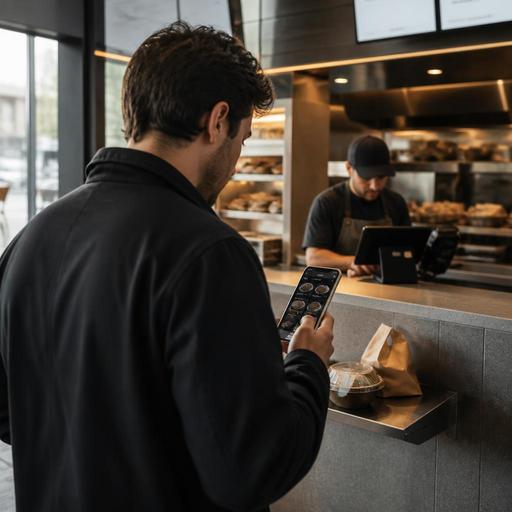
Menu Page SEO for U.S. Restaurants: Turn Local Search Into Orders
If you want more guests to move from Google search to checkout, menu page SEO for U.S. restaurants deserves more attention than another generic homepage update. Many operators spend time on social posts, delivery apps, and review responses, but the real conversion point is often the menu page itself. When a local guest searches for "best smash burger near me," "gluten-free brunch in Austin," or "late-night tacos downtown," your menu page should help them decide fast, trust the details, and place an order or visit without friction.
For a neighborhood pizzeria in Chicago, a fast-casual salad brand in Phoenix, or a food truck in Dallas posting a weekly pickup location, the menu page is not just a digital brochure. It is a sales tool. It should answer practical questions U.S. diners ask before ordering: What do you serve? How much is it? Can I order direct? Is pickup easy? Are there allergen notes? Is the location open now? Can I scan a QR code in-store and reorder later?
Start with search intent, not design trends
Restaurant operators often begin with visual layout, but the better starting point is local search intent. Think about the exact phrases your guests use. A diner in New Jersey may search for "all-day breakfast near me." A sports bar in Denver may want to appear for "game day wings takeout." A hotel restaurant near an airport may need visibility for "late-night room service menu" or "breakfast near terminal hotel."
Your menu page should reflect these real buying moments in plain language. That does not mean stuffing keywords. It means naming menu categories and item descriptions in a way guests actually understand. "Hand-breaded chicken tenders" is more useful than a branded internal name that means nothing to search visitors. "Family pasta trays" is clearer for takeout than a vague category called "gatherings."
- Use location context when it matters, especially for multi-location brands with different menus.
- Name categories clearly such as brunch, lunch specials, kids menu, happy hour, catering trays, or vegan bowls.
- Include high-intent item terms guests search for, like buffalo wings, fish tacos, breakfast burritos, or cold brew.
- Avoid image-only menus that search engines and screen readers cannot interpret well.
If you operate multiple stores, each location should have its own accurate menu page when offerings, hours, alcohol availability, or ordering methods differ. A suburban fast-casual location with curbside pickup should not send searchers to a generic brand menu that hides local ordering details.
Make the menu page easy to scan and easier to order
Search traffic does not convert because a page looks pretty. It converts because the next step is obvious. U.S. guests are often deciding quickly on mobile while comparing delivery apps, your direct ordering site, and a competitor down the street. The page should reduce hesitation.
For example, a barbecue restaurant in Kansas City might feature a lunch combo section, meat-by-the-pound section, family packs, and catering pans. If those are buried in a long PDF, visitors may bounce. If they are organized in a mobile-friendly page with direct buttons for takeout, delivery, and catering inquiry, the path is clearer.
Conversion elements that matter on U.S. menu pages
- Show prices clearly. Hidden prices create friction. If prices vary by location or marketplace, label that clearly.
- Separate direct ordering from third-party delivery links. Many guests will choose the simplest path. Make your preferred ordering channel easy to find.
- Display pickup options. Mention pickup shelf, curbside pickup instructions, or front counter pickup when relevant.
- Use strong item descriptions. Explain what makes the dish worth ordering, especially for signature items.
- Highlight modifiers carefully. Let guests understand add-ons, sides, spice level, protein choices, and combo upgrades without clutter.
- Keep sold-out items updated. Nothing hurts trust faster than ordering an unavailable item.
Operators using a POS, kitchen display system, and online ordering stack should connect menu updates across systems whenever possible. If your lobster roll sells out at a coastal shack in Maine or your soup of the day changes at a diner in Ohio, the website menu should not lag behind the in-store board and the takeout menu. Consistency reduces staff calls, comped items, and guest frustration.
Build trust with details guests actually need
Local search visitors often have one practical concern blocking the order. It might be portion size, dietary fit, pickup timing, or whether kids can find something familiar. The best menu pages answer these questions without forcing a phone call.
A cafe in Seattle can improve conversion by listing milk alternatives, pastry availability windows, and whether online ordering supports scheduled pickup before the commuter rush. A taco spot in Los Angeles can note which items travel well for takeout. A stadium concession operator can clarify grab-and-go bundles and express pickup lanes if those options exist in that venue.
Useful trust-building details include:
- Allergen and dietary notes presented carefully and consistently.
- Portion or format cues such as individual, shareable, family meal, or half tray.
- Photo support for top sellers without overwhelming the page.
- Alcohol ordering limitations explained operationally where relevant, with a reminder to follow local rules.
- Service method notes such as dine-in only, takeout available, delivery zone limits, or hotel room service hours.
If your business touches regulated topics, keep the page operational rather than legalistic. Chains subject to menu labeling rules, operators handling alcohol, and businesses managing service charges, tips, or taxes should verify current federal, state, and local requirements with qualified advisors or official guidance. The menu page should help the guest understand the buying process, not attempt to replace compliance review.
Do not overlook accessibility, mobile speed, and local accuracy
A surprising number of restaurant menu pages still fail on basic usability. Tiny text, hard-to-tap buttons, PDF uploads, and outdated hours can waste expensive search traffic. ADA-minded access is also a real operational issue. If a screen reader cannot interpret your menu structure, or color contrast makes pricing hard to read on mobile outdoors, some guests will simply leave. Operators should review accessibility expectations with qualified professionals and current official guidance, but from a workflow standpoint, readable HTML menus are usually easier to maintain and more usable than image-based files.
Also keep local business details aligned across your website, Google Business Profile, and ordering channels. If your brunch menu starts at 10 a.m. on the website but 11 a.m. on Google, staff will end up handling avoidable complaints. For a food truck, this may mean updating service areas and weekly stops. For an airport concession, it may mean showing terminal-specific hours. For a multi-unit brand, it means avoiding one-size-fits-all menu publishing.
A simple monthly menu page review
- Check that hours, phone, and address match your local listings.
- Confirm top-selling items are easy to find in under a few seconds.
- Test direct ordering, reservations, and pickup flows on mobile.
- Remove expired specials and seasonal items.
- Verify tax, service charge, and tip messaging is clear where shown, while confirming local requirements separately.
- Make sure QR menu links in-store still open the correct live page.
Use menu pages as part of the full guest journey
The highest-converting menu pages are connected to operations, not isolated from them. A guest might discover your ramen shop through local search, browse menu items on mobile, place a direct takeout order, pick it up from a shelf, and then scan a table QR code on a later dine-in visit. That only feels smooth when the menu page, ordering flow, POS, and kitchen workflows support each other.
For U.S. operators, this is especially important when balancing first-party orders against delivery marketplaces. Your menu page should not fight your operations. It should steer the guest toward the channel you can fulfill well, whether that is dine-in reservations for a downtown bistro, curbside pickup for a suburban family restaurant, or fast reorder for a lunch-focused QSR.
In practice, that means treating the menu page like a living revenue tool: update it often, write for real guest intent, structure it for mobile, and remove confusion at every step. Restomas helps operators bring menus, QR ordering, direct online ordering, and day-to-day updates into one cleaner workflow.
