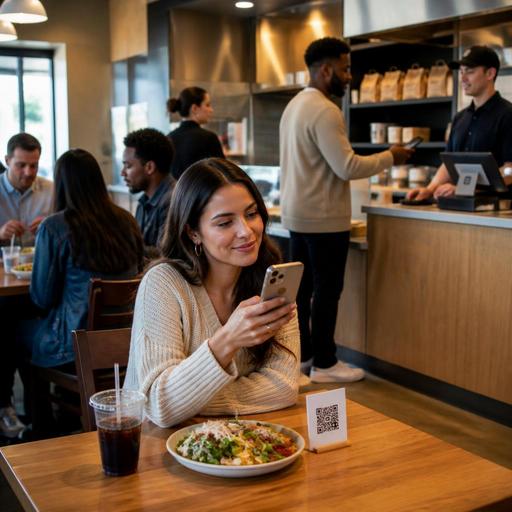
Mobile Wallet and QR Checkout Setup for Faster U.S. Restaurant Payments
Mobile wallet and QR checkout for restaurants can remove small points of friction that slow down service, create line backups, and leave money on the table. For U.S. operators, the goal is not to chase payment trends for their own sake. It is to make it easier for guests to close a check, leave a tip, reorder later, and move smoothly between dine-in, takeout, curbside pickup, and direct online ordering. Whether you run a neighborhood cafe, a fast-casual lunch spot, a sports bar, or a multi-location QSR brand, the payment experience should fit your service model and your existing POS stack.
In practice, that means thinking beyond the card terminal alone. A QR code on a table tent, a text-to-pay link for catering, a mobile wallet option at the counter, and a pickup shelf workflow for prepaid takeout can all work together. The best setup reduces handoffs, shortens the time between order completion and payment, and keeps reporting cleaner for managers. Operators should still confirm processor rules, local service charge practices, tax treatment, accessibility expectations, and any labor or tip reporting questions with qualified advisors and official guidance.
Where payment friction shows up in U.S. restaurant operations
Payment friction is usually not one big problem. It is a series of small delays that add up across a shift. A server waits to drop the check. A guest wants to split a tab four ways. A lunch customer at a fast-casual counter fumbles with a chip card while the line grows. A hotel restaurant guest asks whether they can pay from their room or by phone. A food truck customer walks away because the card reader lags and they do not carry cash.
Here are common U.S. restaurant friction points:
- Dine-in tables: guests wait too long to receive, review, and pay the check.
- Bars: open tabs create delays at closeout, especially during late-night rushes.
- Fast-casual and QSR: counter lines stall when payment choices are limited.
- Takeout and pickup shelves: staff spend too much time matching names, payment status, and bags.
- Curbside pickup: guests arrive before payment is confirmed or need to change the order from the car.
- Multi-location brands: wallet acceptance, tipping prompts, and checkout flow vary by store, confusing guests and staff.
For example, a suburban burger chain may find that Apple Pay or Google Pay at the counter speeds up weekday lunch, while QR checkout at tables helps the dinner shift turn booths faster. A coffee shop near a commuter rail station may care less about table-side payment and more about reducing queue time for morning regulars. A sports bar may want guests to open and close tabs quickly between quarters without chasing a server for the card reader.
Choosing the right mobile wallet and QR checkout flow
The best payment flow depends on how guests order. Start by mapping your service styles rather than asking which payment method sounds modern.
Counter service and fast-casual
For a salad shop, taco spot, or airport concession, mobile wallet acceptance at the POS is often the fastest win. Guests already expect tap-to-pay. If your terminal supports wallets but staff do not consistently prompt for them, training may matter as much as hardware. Keep the flow simple: order, confirm modifiers, display tip prompt where appropriate, and complete payment in a few taps.
Full-service dining
In a casual dining restaurant or diner, QR checkout works best when it complements service instead of replacing hospitality. The guest can scan, review items, split the check, add a tip, and pay when ready, while servers stay focused on upselling dessert, refills, and table care. This is especially useful during busy brunches, before theater rushes, or in hotel restaurants where guests may be in a hurry.
Takeout, curbside, and direct ordering
If you run direct online ordering, mobile wallets reduce abandoned carts because guests can check out quickly without typing card details. For curbside pickup, the order confirmation should clearly show whether the guest has already paid, where to park, and how to notify arrival. For pickup shelves, staff need a clear paid status in the POS or order management view so they are not stopping to ask for payment at handoff.
Bars and high-volume venues
At a neighborhood bar, stadium concession, or music venue, speed matters more than almost anything else. Tap-to-pay and stored wallet options can reduce congestion. If you use QR ordering in seat-side or table areas, make sure guests can easily start a tab or close one without confusion. Alcohol service rules, ID checks, and local requirements still need to be handled operationally and verified with current official guidance.
Operational details that make checkout feel easier
Technology alone will not fix a clunky payment experience. Operators should tighten the workflow around it.
- Connect payment status to the POS: Staff should see whether an order is open, paid, refunded, or waiting on a guest action. This matters for pickup shelves, curbside runners, and front counter teams.
- Align tipping prompts with service style: A full-service check, a cafe counter order, and a self-serve pickup order may need different prompts. Keep the experience clear for guests and workable for tip reporting and payroll processes. Operators should verify current federal, state, and local rules around tipped staff, tip pools, service charges, and reporting.
- Reduce manual check handling: QR checkout can cut down on printing, walking checks back and forth, and waiting for a card to return.
- Train staff on exception cases: Split checks, partial comps, voids, refunds, and offline payment fallback should be part of opening training, not a manager-only mystery.
- Make the flow ADA-minded: Not every guest wants or can use a phone camera to scan a code. Offer an accessible alternative, such as a handheld device, printed check, or staff-assisted payment path, and verify your approach against current accessibility guidance.
A practical example: a three-unit brunch concept can place QR table tents on two-tops and four-tops, but still let guests ask for a printed check. The server sees payment status in the POS, the kitchen display system is not affected, and the host can turn tables faster because there is less waiting at the end of the meal. Meanwhile, the same brand can keep mobile wallets active at the bakery counter for grab-and-go coffee and pastries.
How to roll this out without confusing staff or guests
Start small and measure operational outcomes rather than hype. Pick one service lane first: dine-in checkout, direct online ordering, or counter payment. Then standardize the flow before expanding to all locations.
- Audit your current stack: POS, payment processor, online ordering, kitchen display system, reservation flow, and reporting should work together.
- Pilot during a real rush period: Test Friday dinner, weekday lunch, or post-game traffic, not a slow shift.
- Script the guest explanation: Staff should know how to say, “You can pay here on the table QR or I can bring your check.”
- Watch guest behavior: See where people hesitate, ask questions, or abandon the flow.
- Standardize across locations: Chains and franchise groups should keep wallet acceptance, QR prompts, and payment screens consistent.
- Review reconciliation: Make sure sales tax, tips, discounts, refunds, and service charges are clearly separated in reporting. Tax and accounting treatment can vary, so confirm details with your accountant or official guidance.
For larger operators, consistency matters. A guest who uses QR checkout at one location of a fast-casual brand should not face a totally different payment journey at another. For hotel restaurants, the payment path should also fit room-charge procedures if offered. For food trucks, reliable mobile wallet acceptance can be more important than QR checkout because connectivity, queue length, and speed at the window drive the experience.
What a smoother payment experience can improve
When payment friction drops, service often feels better even if the menu and staffing stay the same. Guests leave faster when they want to, counter lines move with less stress, and staff spend less time on repetitive handoffs. Managers also gain cleaner visibility into paid versus unpaid orders, which helps with shift control and end-of-day reconciliation.
The strongest setups are the ones that match the operation: QR checkout for full-service dining, mobile wallets for counters and food trucks, integrated direct ordering for takeout, and clear pickup workflows for shelves and curbside. If you are reviewing your current stack, Restomas can help operators connect QR menus, ordering, and payment workflows into a more practical day-to-day system.
