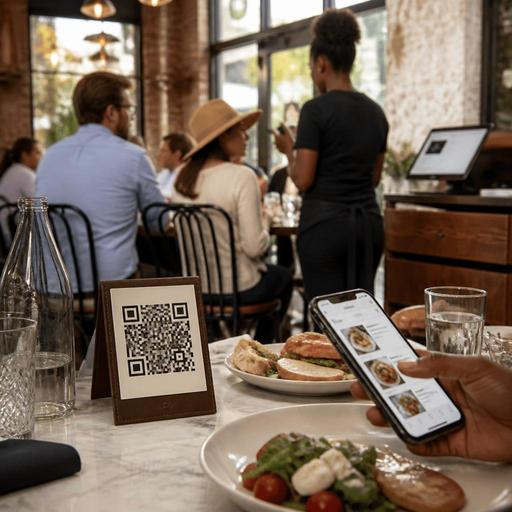
Multilingual QR Menus for U.S. Tourist Areas and Diverse Neighborhoods
Multilingual QR menus can help U.S. restaurants serve guests faster, reduce ordering friction, and improve the guest experience in tourist districts and diverse neighborhoods. For operators in places like Miami Beach, Anaheim near theme parks, Manhattan, Las Vegas, San Antonio, Honolulu, or Chicago neighborhoods with strong immigrant communities, the challenge is not just translation. It is making sure the digital menu supports real service: modifiers, allergy notes, tipping workflows, direct online ordering, pickup, and staff handoffs to the POS and kitchen display system.
If your restaurant serves a mix of local regulars, domestic travelers, and international visitors, a multilingual QR menu should work as an operations tool, not just a marketing add-on. A taco shop near the San Diego waterfront, a ramen spot in Seattle’s International District, a café in Queens, or a hotel restaurant in Orlando all need menus that are easy to scan, easy to understand, and easy for staff to support during a rush.
Start with the service problem, not the translation file
Before adding languages, map where guests get stuck. Are they asking servers to explain modifiers? Are takeout guests ordering the wrong combo? Are tourists abandoning the menu because they cannot tell whether service is dine-in, counter order, or QR pay at table? The best multilingual QR menu setup solves those moments first.
For example, a fast-casual bowl concept in downtown Los Angeles may need clear language around protein choice, spice level, add-ons, and whether utensils are included with takeout. A seafood restaurant near Fisherman’s Wharf may need plain descriptions for market-price items and preparation styles. A neighborhood bakery in Jersey City may need bilingual pastry names but English item names in the POS to keep production and reporting consistent.
Build the menu in a way that separates guest-facing language from back-of-house operational language. Guests can browse in Spanish, Chinese, French, or Portuguese, while the kitchen display system and tickets still print the standardized English item and modifier names your line cooks already recognize. That reduces confusion during peak periods.
Choose languages based on actual guest traffic
Do not guess. Use your reservation notes, delivery app reviews, server feedback, hotel concierge partnerships, and neighborhood patterns to decide which languages deserve priority. In many U.S. markets, Spanish is the first practical addition. In some districts, simplified Chinese, Korean, Japanese, Portuguese, French, or Arabic may make more operational sense depending on nearby tourism and local community demand.
Good language selection usually follows a simple order:
- Core local demand: languages commonly spoken by nearby residents and repeat guests.
- Tourist demand: languages tied to nearby attractions, airports, cruise ports, convention centers, and hotels.
- High-friction categories: menus with many modifiers, unfamiliar dishes, or allergy-sensitive items.
A food truck near a major university may only need English and Spanish. A hotel breakfast outlet near an airport may benefit from several language options because guests are tired, in a hurry, and more likely to rely on scanning. An airport concession or stadium venue may need concise multilingual category navigation because speed matters more than long storytelling.
Keep in mind that menu labeling, alcohol service messaging, and allergy communication can touch regulatory issues. Operators should verify current federal, state, city, airport, hotel, venue, or landlord requirements with qualified advisors or official guidance before relying on translated language for compliance-sensitive content.
Design the QR menu for clarity, accessibility, and faster ordering
Many operators make the mistake of translating too literally and then hiding the menu inside a cluttered mobile page. In practice, the best multilingual QR menus are short, visual in structure, and easy to navigate on a phone with one hand.
- Use simple category labels: breakfast, sandwiches, sides, kids, desserts, beer, wine, cocktails.
- Keep item descriptions short: list the main ingredients and the guest decision points.
- Standardize modifiers: size, doneness, spice level, add protein, dressing choice, no ice, extra sauce.
- Show sold-out items in real time: especially for bakeries, barbecue, seafood specials, and food trucks.
- Make dine-in, takeout, curbside pickup, and delivery paths clear: guests should know what happens after they tap order.
- Offer a non-QR path: a printed menu, staff-assisted ordering, or a counter tablet helps guests who do not want to scan.
This last point matters for accessibility and guest inclusion. ADA-related access needs vary by setting, and digital menus should not become a barrier for guests with low vision, limited dexterity, or limited comfort with smartphones. Operationally, that means keeping high contrast, readable type, logical navigation, and a staff backup process. Operators should confirm current accessibility expectations with qualified advisors and official guidance when needed.
A practical example: a brunch restaurant in New Orleans can place a QR code on each table, but hosts should still be ready with printed menus and a quick verbal explanation of how to start a tab, order another round, or request the check. Digital convenience should support hospitality, not replace it.
Connect multilingual menus to POS, tips, and fulfillment workflows
The menu language is only one layer. The bigger win comes when the multilingual QR menu connects to your operational stack. If your translated menu creates order volume but forces staff to re-enter tickets manually, the process will break during lunch or late-night rushes.
Look for a setup that keeps these workflows aligned:
- POS mapping: translated guest text should still route to the right item buttons, taxes, and modifier groups.
- Kitchen display routing: hot line, bar, dessert, and expo should receive the same standardized production language every time.
- Tip prompts: if guests pay by QR, the tipping flow should be easy to understand and appropriate for the service model.
- Check and tab handling: full-service restaurants need clean handoffs between QR browsing, server interaction, add-on orders, and final payment.
- Pickup and curbside instructions: direct online orders should clearly explain pickup shelf location, parking spot instructions, or handoff timing.
For U.S. operators, this is especially important when different revenue channels overlap. A neighborhood pizzeria in Brooklyn may have dine-in QR menus, direct takeout ordering, and delivery app traffic at the same time. A multilingual setup should help the guest choose the right path instead of sending every customer through the same screen.
Be careful with service charges, gratuities, and taxes in guest-facing language. The way a service charge differs from a tip, or how sales tax appears on a check, can vary by jurisdiction and service model. Keep the wording operationally clear and verify current requirements with your accountant, payroll provider, attorney, or official agency guidance.
Train staff to support the menu in real time
Even the best QR menu fails if the floor team treats it like a self-service wall. Your servers, cashiers, and hosts should know how to guide guests in a few seconds. That matters in dense tourist corridors where guests may be jet-lagged, unfamiliar with tipping customs, or trying to place a quick order before a show or game.
Give staff a short script
Try a simple approach: “You can scan here for English, Spanish, and two more languages. If you prefer, I can bring a printed menu. If you are ordering takeout, use the pickup option. If you are dining in, I can help you start a tab.” That script prevents confusion before it starts.
Review common mistranslations weekly
Ask staff which items still trigger questions. In a Texas barbecue restaurant, guests may misunderstand combo sizing or side choices. In a sushi bar, they may need clearer language around raw items or omakase-style selections. In a sports bar, wing sauce heat levels often need better explanation.
Use analytics to improve the menu
Track which languages are selected, where guests drop off, which items get modified most, and whether certain channels create more voids or remakes. If Spanish-language users frequently abandon at checkout, your payment flow may be unclear. If hotel guests browse breakfast but do not convert, your pickup or room-charge instructions may need work.
A multilingual QR menu should make service smoother for both guests and staff. When built around real U.S. restaurant workflows, it can reduce order errors, support direct ordering, and help operators serve mixed local and tourist traffic without slowing down the line. Restomas helps restaurants bring QR menus, ordering, and operational workflows into one connected system.
