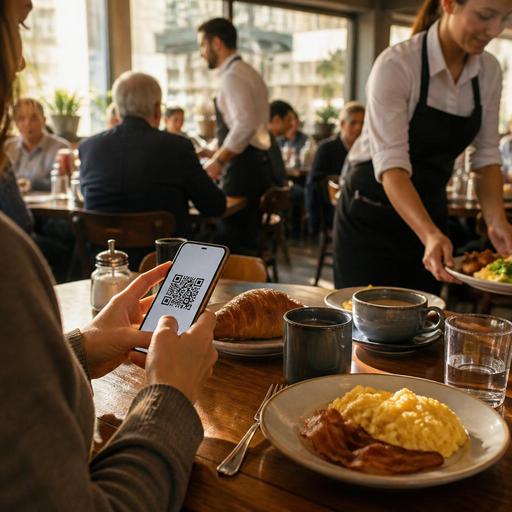
Optimizing QR Menus for Breakfast Rushes in Busy Restaurants
Why breakfast rushes need a different QR menu strategy
QR menu optimization for breakfast restaurants during peak hours is not just about putting a digital menu on the table. Breakfast service has its own pressure points: guests arrive in waves, many are time-sensitive, orders often include small but important modifications, and the same products are repeated at high volume. In this environment, a QR menu should help guests decide faster, reduce avoidable questions, and support the team without making hospitality feel mechanical.
A breakfast restaurant can look calm at 7:30 and become crowded by 8:00. Office workers want coffee and eggs quickly, families need clarity on combos and add-ons, and weekend guests may browse more slowly. A static digital menu rarely supports all three situations well. An optimized QR menu does. It presents the right items in the right order, highlights easy choices, and connects the front of house with kitchen reality.
The goal is simple: reduce friction between arrival and order. When guests can scan, understand, customize, and confirm quickly, staff spend less time repeating the same explanations and more time guiding exceptions, solving problems, and keeping tables moving smoothly.
Build the menu around breakfast decision speed
During breakfast peaks, guests do not read menus the same way they do at dinner. Many are looking for a familiar item, a quick set menu, or a clear drink pairing. That means the first mobile screen matters more than a long list of categories.
Start with high-demand paths
The top of the QR menu should reflect the most common breakfast journeys. Instead of leading with broad categories only, consider placing practical entry points first, such as house breakfast sets, coffee and pastry pairings, omelets, or grab-and-go choices. This shortens the time between scan and selection.
For example, a café that serves espresso drinks, simit, toast, eggs, and fresh juice can prioritize:
- Quick breakfast combos for commuters
- Egg dishes for seated guests
- Coffee and tea with clear size options
- Add-ons such as avocado, cheese, or extra bread
This structure helps guests self-sort without asking staff where to begin.
Use naming that reduces hesitation
Breakfast menus often suffer from vague labels like “special plate” or “morning set.” Those names may be familiar to regulars, but they slow down first-time visitors. Clear naming works better: “Two-Egg Breakfast with Toast,” “Turkish Breakfast for Two,” or “Flat White and Croissant Set.” The guest should understand the item before opening details.
Descriptions should answer the most common breakfast questions quickly: what is included, what bread is served, whether coffee is included, and what can be changed. If every second table asks whether jam, salad, or tea comes with the plate, the menu is not doing enough work.
Reduce bottlenecks caused by modifications and sold-out items
Breakfast service creates many small variations: scrambled instead of fried, no olives, extra honey, oat milk, no tomato, gluten-free bread if available. These requests are manageable when they are structured. They become disruptive when they are handled verbally at scale.
Turn common modifications into simple choices
A strong QR menu should present frequent options directly within the item flow. Instead of relying on open-text notes for everything, build clear selection points where possible. This improves order accuracy and reduces back-and-forth between service staff and kitchen.
Useful breakfast modification fields can include:
- Egg style
- Bread type
- Milk option for hot drinks
- Add protein or cheese
- Remove ingredients commonly declined
- Jam, butter, or sauce preferences
This does not mean every item needs endless customization. In fact, too many options can slow guests down. Focus on the changes your team already hears every day. The best optimization often comes from removing unnecessary choice while standardizing the choices that matter.
Update availability in real time
Breakfast peaks are unforgiving when a popular item runs out. If the last almond croissant is gone or the fresh orange juice batch is delayed, the menu should reflect that immediately. Otherwise, staff lose time apologizing, re-taking orders, and calming disappointed guests.
Real-time menu management is especially useful for bakeries, brunch cafés, and breakfast concepts with fresh limited-batch items. A digital system makes it easier to hide sold-out products, pause a category, or push attention toward alternatives without reprinting anything or asking the team to memorize constant changes.
Design for mobile scanning in real breakfast conditions
A breakfast QR menu is used in bright windows, crowded tables, and fast-moving service periods. Good optimization is not only about content. It is also about usability in the real environment of a restaurant.
Make the first interaction effortless
If the QR code is hard to find, the page loads slowly, or the menu starts with too much text, guests will call a server instead. Place the code where it is naturally visible, and ensure the landing page opens directly to the menu without extra friction. The fewer steps between scan and browsing, the better.
Menu pages should be easy to read on one hand-held phone at the table. Keep category labels short, use a clean item order, and avoid forcing guests to jump between too many screens. A parent ordering for children, or a commuter checking the menu with one hand while holding a bag, should still be able to complete the process comfortably.
Feature visuals selectively
Photos can help breakfast sales, but they should be used with discipline. A few strong images of signature platters, pastries, or coffee pairings can speed decision-making. Too many images can slow loading and create visual clutter. For peak-hour performance, highlight key sellers and combination items rather than every single side dish.
This is also where thoughtful menu storytelling matters. A house-made jam trio, village breakfast board, or specialty menemen can stand out with a concise description that gives it identity without adding complexity.
Support staff and kitchen flow, not just the guest screen
The best QR menus improve operations behind the scenes. Breakfast speed depends on whether the digital ordering experience matches kitchen capacity, station setup, and service rhythm.
Group items in ways the kitchen can execute
If the menu encourages too many cross-station customizations, the kitchen slows down. For example, a breakfast concept may offer eggs, bakery items, smoothies, and specialty coffee. If combinations are built without thinking about prep flow, ticket complexity rises during the rush.
Instead, align menu design with actual production. Promote combinations that are easy to fire together. Limit custom bundles that create confusion. If one station becomes the bottleneck every morning, review whether the QR menu is sending too much demand there at once.
Use digital menus to brief staff more clearly
When menus change frequently, staff need a single source of truth. A well-managed digital menu helps servers know what is available, what is paused, and which add-ons are active. That reduces inconsistent table explanations and keeps guest communication more confident.
For managers, this also creates a practical routine:
- Review top breakfast sellers before opening
- Confirm available stock and paused items
- Check combo pricing and modifier accuracy
- Make sure seasonal or limited items appear correctly
- Monitor guest questions and update unclear descriptions after service
Over time, this turns the QR menu into an operational tool rather than just a digital replacement for paper.
Use the breakfast QR menu as a marketing and retention touchpoint
Peak-hour optimization is not only about speed. It can also support repeat visits if done subtly. Breakfast guests often form strong habits, especially on weekdays. A QR menu can reinforce those habits by making favorite items easy to reorder and by presenting timely, relevant offers without interrupting service.
For example, a restaurant can feature a weekday breakfast set near the top in the morning, highlight an upgraded coffee option, or present a simple pastry add-on at the right moment. These are practical nudges, not aggressive upsells. They work best when they fit guest intent and operational capacity.
Social media also connects naturally here. If a venue is known for a signature breakfast board or a visually appealing pancake stack, the QR menu can reflect that positioning with strong item presentation and consistent naming. Guests who discovered the restaurant on Instagram should immediately recognize the items they came for when they scan the table code.
Platforms like Restomas are useful in this context because they allow restaurants to manage QR menus, update availability, organize items clearly, and support a smoother digital guest journey without adding manual friction to the team’s morning routine.
For breakfast restaurants, the best QR menu is the one that makes busy mornings feel more controlled for guests, staff, and the kitchen at the same time.
