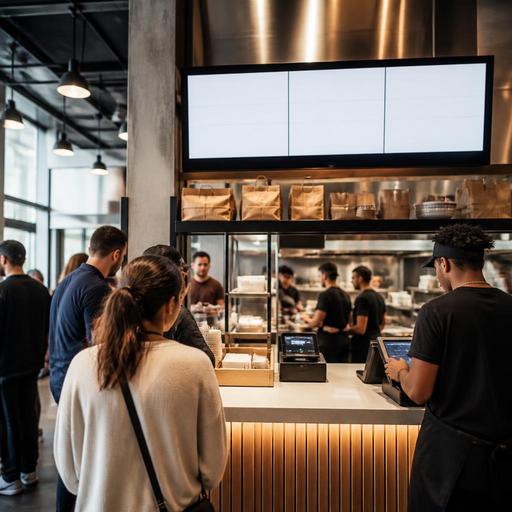
Order Status Screens for U.S. Counter-Service Restaurants
Order status screens for U.S. counter-service restaurants can do much more than display a ticket number. In busy fast-casual shops, food halls, coffee counters, stadium concessions, and hotel grab-and-go outlets, they help guests understand what happens after they pay, where to wait, and when to step up for pickup. When set up well, these screens reduce crowding at the handoff area, cut repetitive questions to cashiers, and support a smoother flow from POS to kitchen display system to pickup shelf.
For U.S. operators, the value is especially practical. Many counter-service brands now juggle in-person checks, kiosk orders, QR ordering, direct online ordering, and delivery apps at the same time. That creates a common problem: guests place an order quickly, but then wait in uncertainty. A visible, well-managed order status screen can turn that uncertainty into a clear workflow.
Why order status screens matter in real U.S. service environments
At a weekday lunch rush in a Chicago food hall, one burger stall may be processing walk-up orders, app pickups, and third-party delivery drivers all within a few square feet. Without a status screen, guests crowd the counter and ask, Is 214 ready yet? Drivers interrupt staff to check on pickup timing, and the expo person spends too much time answering instead of organizing handoff.
Now consider a suburban fast-casual bowl concept in Texas with a pickup shelf near the front door. A screen showing received, in progress, and ready for pickup can separate waiting from handoff. Guests stop clustering around the register, the cashier can keep the line moving, and the kitchen gets fewer verbal interruptions.
These benefits also apply in U.S. venues with tight space and high volume:
- Airport concessions where guests are watching the clock before boarding
- College food courts with heavy mobile ordering at lunch
- Hotel lobby cafes balancing room-charge orders, takeout, and dine-in tabs
- Sports venues where short service windows matter more than lengthy guest interaction
- Food trucks using a side pickup window and text-based order notifications
The operational goal is simple: make order progress visible enough that guests know what to do next without asking your staff every few minutes.
How to design a screen workflow that actually reduces friction
The most effective order status screens are not the ones with the most animation or the largest amount of information. They are the ones that match your service model. A neighborhood coffee shop with pastry warming needs a different setup than a food hall sushi stall or a fast-casual chicken brand with curbside pickup.
Start with clear order stages
Most counter-service operators do well with a small number of status labels. Too many stages confuse guests. In many U.S. environments, these are enough:
- Received for orders just sent from the POS, kiosk, or online channel
- Preparing for orders active in the kitchen display workflow
- Ready for orders available at the counter or pickup shelf
If you run separate flows for delivery apps, direct online ordering, and walk-in traffic, you may also need pickup-type labels behind the scenes, but the guest-facing screen should stay simple.
Use naming or numbering consistently
Some U.S. operators call orders by first name, some by ticket number, and some by a short alphanumeric code. The best choice depends on noise level, privacy preferences, and order volume. In a quieter cafe, first names may feel friendly. In a packed food hall or airport concession, order numbers are often easier to display and hear. Whatever you choose, keep it consistent across the POS receipt, text notification, and status screen.
If you use names, train staff on how to handle duplicates like two guests named Mike. If you use numbers, make sure they are short enough to be read quickly from a distance.
Separate pickup from production
One common mistake is placing the screen where only the staff can benefit from it. The guest should be able to see it from the waiting area without blocking the order line. In many fast-casual stores, the best setup is a screen near the pickup shelf or handoff counter, not above the register. That placement tells guests where to move after ordering.
For food halls, where space is limited, even a single well-angled display can reduce the cluster effect around the stall. For food trucks, a compact outdoor-facing screen near the pickup window can help during event rushes.
Operational setup: connect the screen to your POS and kitchen flow
An order status screen works best when it reflects real kitchen progress, not guesswork. If staff must manually update every stage while also cooking and bagging orders, the screen can become outdated and frustrate guests. The cleaner approach is to link status changes to the systems your team already uses, such as the POS, kitchen display system, or order management layer.
For example, a California fast-casual salad shop might route dine-in, takeout, and delivery orders through one order hub, then display only guest-relevant pickup orders on the front screen. A New York food hall operator with multiple concepts may need each stall to control its own ready state while a shared pickup runner watches the handoff area.
As you build the workflow, review these checkpoints:
- Map every order source: cashier, kiosk, QR menu, direct website, and delivery apps.
- Decide which orders should appear on the guest-facing screen and which should stay internal.
- Set the trigger for each status change, ideally within the POS or kitchen display workflow.
- Define who confirms ready before an order hits the pickup shelf.
- Create a backup process for internet outages, screen failures, or printer issues.
This is also where multi-location operators should standardize rules. If one store marks orders ready when they are plated and another only when they are bagged and checked, guest expectations become inconsistent. Chain operators and franchise teams benefit from one playbook for naming, timing, and handoff standards.
Guest experience details U.S. operators should not overlook
The screen itself is only part of the experience. The surrounding operational details matter just as much. If your ready orders sit on an unlabeled shelf, or if delivery drivers and in-store guests use the same pickup point without guidance, confusion will continue.
Think about the full guest journey after payment:
- Where does the guest stand without blocking new orders?
- How will they know whether to wait for their name, number, or a text alert?
- Is the pickup shelf organized for hot food, cold drinks, and sealed delivery bags?
- Can a guest with limited vision or mobility still complete the pickup process reasonably?
- Do staff know how to help if a guest cannot easily read the screen?
Accessibility matters here. Operators should think in ADA-minded terms when choosing screen height, visibility, audio backup, and staff assistance practices, and verify current requirements with qualified advisors or official guidance. The same operational mindset applies to payment, sales tax display, service charges, and tip prompts if those appear anywhere in the ordering flow. Keep the guest-facing process clear, and confirm compliance details based on your state, city, concept type, and technology stack.
For restaurants with tipped staff working hybrid service models, make sure the screen does not create confusion about where service begins and ends. If a guest orders at the counter but receives table delivery, your team should know who owns the handoff and how that fits your tipping and tip reporting workflow. Operators should review these setups with payroll, tax, and labor advisors as needed.
Best practices for rollout, training, and measurement
Do not install a screen and assume the problem is solved. Start with one location or one daypart and observe behavior. Watch whether guests still gather at the register, whether staff continue shouting names, and whether ready orders sit too long before pickup.
Train around scripts and exceptions
Staff should use the same short explanation every time: order here, watch the screen, then pick up at the shelf or counter. This matters in high-turnover counter-service environments. It also helps in bilingual neighborhoods where concise, repeated phrasing supports consistency.
Create exception rules for common U.S. scenarios, such as:
- Guest lost the receipt and does not remember the order number
- Delivery driver arrives before the bag is sealed
- Curbside pickup guest checks in but the order is still marked preparing
- Large family order is split between kitchen stations and not all items are ready together
Measure what changes
You do not need complicated analytics to evaluate success. Track practical signals: fewer status questions at the register, smoother lunch rush line movement, reduced handoff mistakes, and better organization around the pickup shelf. If your system supports it, compare order-ready timing and guest wait bottlenecks across locations.
Order status screens are most useful when they are part of a larger digital workflow, not a standalone monitor. When connected to POS, kitchen display, QR ordering, and pickup management, they help U.S. counter-service restaurants and food halls turn a noisy handoff moment into a more predictable operation. Restomas can support that kind of connected front-of-house and order management workflow as operators refine service across one store or many.
