Peak Weekend Waitlist Communication Tips for U.S. Restaurants
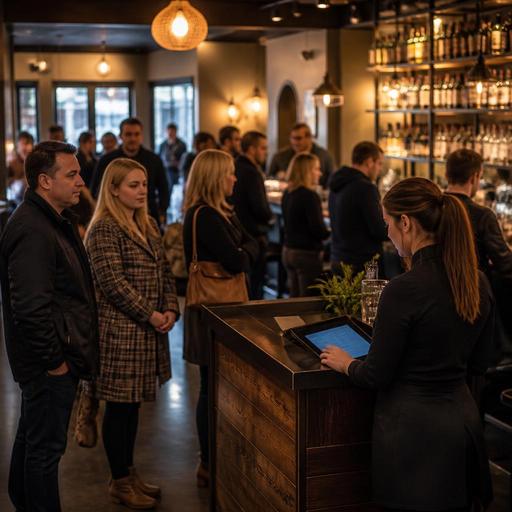
Waitlist communication for American restaurants during peak weekend service can make the difference between a packed dining room that still feels organized and a chaotic front door that costs you covers, staff energy, and guest trust. On Friday nights, Saturday brunch, game-day rushes, and holiday weekends, guests are not only judging the quoted wait time. They are judging how clearly your team explains the process, how often they get updates, and whether pickup traffic, bar tabs, and reservations are being handled without confusion.
For U.S. operators, this is not just a host-stand issue. Waitlist communication touches table turns, reservation pacing, curbside pickup congestion, POS notes, server sections, and even tip opportunities when guests feel looked after before they are seated. A neighborhood steakhouse, an all-day diner, a fast-casual concept with limited seating, and a hotel restaurant near a convention center will all need different playbooks, but the core principle is the same: guests tolerate waiting better when they understand what is happening.
Set expectations before guests join the waitlist
The worst waitlist problems often begin before the first name is added. If your host says, It should be about 20 minutes without checking table status, reservation arrivals, patio availability, or large-party bottlenecks, the team is already behind. During peak periods, operators should build a simple quoting standard that reflects real floor conditions instead of instinct alone.
For example, a suburban brunch restaurant may have many two-tops turning quickly but one six-top blocking a key section. An urban sports bar may have open bar seats but no standard dining tables because guests are camping through a televised game. A food hall stall with shared seating may not control tables directly, so the communication should focus on order readiness and seating limitations rather than promising a table at all.
- Quote a range, not a single number. Saying 25 to 35 minutes is usually more reliable than saying 30 minutes flat.
- Explain the reason for the wait in plain language. Guests respond better when they hear that several large parties were just seated or that patio tables depend on weather and turnover.
- Clarify the check-in process. Tell guests whether they will receive a text, need to stay nearby, or should return to the host stand at a certain point.
- Offer realistic alternatives. Bar seating, a first-available table instead of a preferred booth, or takeout can save the sale.
In the U.S., this matters especially in mixed-service operations where dine-in and takeout intersect. If a guest walks into a busy fast-casual brand with a pickup shelf near the entrance, they should immediately understand whether that crowd is waiting to be seated, waiting for takeout, or just collecting online orders. Good signage helps, but staff language matters more.
Use timed updates so guests do not feel forgotten
Many restaurants lose guests not because the wait is long, but because the wait feels invisible. A 35-minute delay with one clear update often feels better than a 20-minute delay with silence. Weekend service needs a repeatable communication rhythm, especially for hosts who are juggling reservations, walk-ins, phone calls, and delivery drivers at the same time.
A practical workflow is to send or give an update at predictable points. If your operation uses SMS or app-based waitlist tools, set the team expectation that quoted times are reviewed regularly rather than left untouched. If your system is manual, the host or floor manager should still own update intervals.
- At check-in: confirm party size, seating preferences, accessibility needs, and mobile number accuracy.
- Mid-wait: send a short update if the delay is extending or if seating may open sooner.
- Near-ready: notify guests that the table is being cleaned so they can return from the bar, sidewalk, or nearby shop.
- If delayed: explain why and offer options such as bar seating, patio, takeout, or the next available table type.
Consider a busy seafood restaurant on the Gulf Coast on a Saturday night. Guests may be strolling outside, families may split up, and cell service may be spotty in some areas. The host stand should have a backup process when texts are missed, such as verbal reminders about where to check back in. For ADA-minded access, make sure guests who cannot easily wait in a crowded entry area have a clear alternative process. Operators should verify current accessibility expectations with qualified advisors or official guidance when setting guest-facing workflows.
Coordinate the host stand with the floor, kitchen, and pickup traffic
Waitlist communication fails when the host stand is operating on old information. If the host thinks a four-top is about to open but the server has not dropped the check, or if a table is technically free but not reset, the quoted wait becomes fiction. Peak weekend service requires live coordination between front door and floor.
Start with table-status discipline. Servers should close checks promptly, bussers should mark reset progress clearly, and managers should watch bottlenecks by section instead of just total seat count. In full-service restaurants, the host needs to know not only what is open, but what can be seated without overwhelming one server station.
Now add off-premise pressure. A popular burger spot may have delivery app couriers clustering near the entrance, direct online ordering guests waiting by the pickup shelf, and curbside pickup calls coming in every few minutes. If the same employee is answering all those questions while quoting wait times, communication quality drops fast. Separate the guest flows when possible:
- Dine-in waitlist: one clear check-in point with current seating estimates.
- Takeout and direct online ordering: a distinct pickup shelf or counter area.
- Curbside pickup: a process that keeps drivers and guests from crowding the host stand.
- Delivery app drivers: a handoff spot that does not block incoming dine-in traffic.
This is especially important in airport concessions, hotel restaurants, and stadium venues, where surges can happen all at once and guests may be highly time-sensitive. A hotel lobby restaurant, for instance, may need to communicate differently with a convention attendee trying to make a session than with a local couple willing to wait at the bar.
Train staff on wording that protects trust and revenue
The phrases your team uses matter. Guests remember whether they felt managed or dismissed. A host who says, We are slammed communicates stress. A host who says, We have your party on the list and we are currently seating tables that checked in about 20 minutes ago communicates control.
Build a short script library for common situations:
- When the wait grows: Your original quote was 25 to 35 minutes, and we are running a little behind because several large parties are still finishing up. We can keep your place in line, or seat you sooner at the bar if that works.
- When guests are deciding to stay: If you would like, I can text you when we are close so you do not need to stand here.
- When part of the party is missing: We can hold the table briefly, but we want to seat you as soon as your full group arrives so service starts smoothly.
- When a preferred table is causing delay: A booth may take longer, but I can seat you earlier at the next available table.
These scripts help reduce conflict while preserving options. They also support better labor execution because managers spend less time stepping into preventable front-door friction. If your restaurant uses service charges, auto-gratuity for large parties, or different tipping workflows across dine-in and private dining, staff should explain those items only when relevant and in a consistent way. Operators should verify current state and local rules, payroll handling, and tip reporting requirements with qualified advisors.
Measure the waitlist like an operational system
If weekend waits happen every week, treat the waitlist as a measurable system rather than a recurring surprise. Review quoted wait times versus actual seating times, walkout rates, no-response rates on text alerts, and how often guests accept alternative seating. Multi-location brands can compare these patterns by store format, daypart, and neighborhood.
For example, a casual chain may learn that one location loses families after 15 minutes because the lobby is cramped, while another location keeps guests longer because the bar area absorbs overflow. A diner may find that Sunday after church creates a predictable rush that justifies a dedicated door person for 90 minutes. A food truck with outdoor communal seating may not run a formal waitlist, but it can still use QR ordering and pickup messaging to reduce crowding and set expectations on order readiness.
Technology helps when it supports the workflow instead of complicating it. Connected reservations, waitlist updates, QR menus, POS-linked table status, and kitchen display visibility can give operators a more accurate picture of what the front door should promise. The goal is not to automate hospitality. The goal is to give the team enough real-time information to communicate with confidence.
Peak weekend service will always be busy, but it does not have to feel disorganized. When guests know where they stand, when they will hear from you, and what their alternatives are, they are more likely to stay, spend, and come back. Restomas can help restaurants bring waitlist, reservations, ordering, and service communication into one cleaner operational flow.
