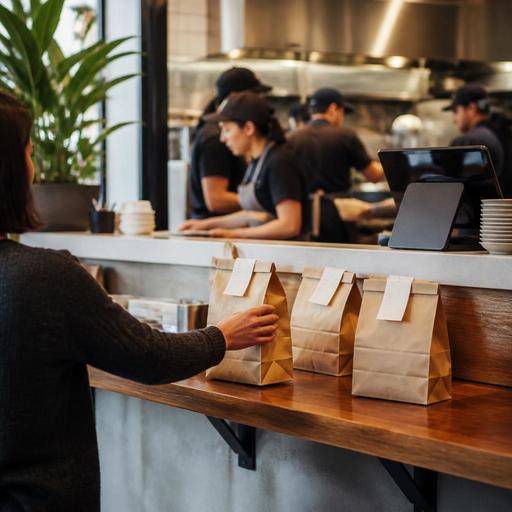
Pickup Shelf Best Practices for Fast-Casual Digital Orders
Why pickup shelf operations matter in U.S. fast-casual restaurants
Pickup shelf operations for fast-casual digital orders can either speed up off-premise sales or create daily friction at the front counter. In many U.S. fast-casual restaurants, digital orders now arrive from direct online ordering, delivery apps, QR reorders, and catering requests at the same time as walk-in traffic. If the pickup shelf is poorly organized, staff waste time hunting for bags, guests grab the wrong order, hot food sits too long, and the expo station backs up during lunch.
Think about a suburban salad chain with a heavy office lunch rush, a downtown burrito shop near apartment towers, or a college-town chicken concept handling both pickup shelf traffic and third-party delivery drivers. In each case, the shelf is not just a piece of furniture. It is a handoff system that connects the POS, kitchen display system, packaging line, guest messaging, and front-of-house flow.
The goal is simple: make pickup fast for the right guest without turning the entrance into a free-for-all. That requires operational discipline, not just more shelving.
Design the pickup shelf around traffic flow, not just storage
Many operators place a shelf wherever there is empty wall space. That often creates congestion. A better approach is to map the path of three groups: in-store guests placing orders, guests arriving for takeout, and delivery drivers waiting on app orders. If those three groups collide at the same counter, your team will spend the shift answering the same question: Is my order ready yet?
For a U.S. fast-casual layout, place the pickup shelf where guests can reach it easily but where staff can still monitor it. Near the entrance works for some brands, but not if it encourages theft or blocks dine-in traffic. Near the expo line works if the handoff point is visible and clearly staged. In smaller footprints, a controlled pickup zone with one shelf for completed orders and one counter for staff-assisted handoff can work better than fully open access.
Practical layout choices that help
- Separate channels visually: one zone for direct pickup, one area for delivery drivers, and one waiting spot for guests whose orders are not ready.
- Stage by readiness: use distinct shelf positions for hot food, cold drinks, and add-on items so bags are not missing bottled beverages or desserts.
- Protect the guest path: keep the pickup shelf away from the register line so takeout guests do not block people ordering in person.
- Support ADA-minded access: make sure the pickup area is reachable and usable for guests with mobility needs, and verify your layout against current local and federal accessibility guidance.
If your concept runs curbside pickup, the shelf should support that workflow too. Staff should be able to grab staged orders quickly without digging through mixed bags. If you use numbered parking spots, verify local property rules and keep your guest messaging clear.
Build a staging workflow that reduces missing items and remake costs
The biggest pickup shelf problems usually start before the bag hits the shelf. A rushed handoff from kitchen to expo leads to missing sauces, forgotten drinks, and bags placed out too early. That hurts speed and guest trust.
Create a staging sequence that matches how your team actually works during peak periods. For example, a five-unit Mediterranean fast-casual brand might route all digital orders to a kitchen display system, fire hot items by promised time, hold cold items nearby, and only bag the order when all components are present. A sandwich shop near a hospital may need separate staging for scheduled pickup orders so the shelf is not filled with bags 20 minutes early.
A simple pickup shelf workflow
- Order enters from direct ordering site, app marketplace, or call-in channel through the POS stack.
- Kitchen display system sequences production by promised time and channel priority.
- Expo verifies modifiers, utensils, drinks, and sealed packaging.
- Order is marked ready only when complete, not when the first item is finished.
- Guest receives ready notification with pickup instructions.
- Bag moves to the correct shelf zone or to a staff-controlled handoff point.
- Team clears unclaimed orders based on an internal hold-time policy.
For temperature-sensitive items, avoid putting everything on one open shelf. A poke bowl shop may need refrigerated holding for bottled drinks and chilled desserts, while a wing concept may need a hot holding area for short periods. Food safety procedures vary by product and local requirements, so operators should confirm current standards with official guidance and qualified food-safety advisors.
Use digital order timing and messaging to prevent shelf chaos
Restaurants often blame the shelf when the real issue is bad timing data. If your online ordering system promises pickup in 12 minutes during a 30-ticket lunch wave, guests arrive early, crowd the entrance, and pressure staff for status updates. The fix is not just training. It is more accurate pacing across channels.
Your direct online ordering, delivery app integrations, and POS should work from the same reality. If the grill station is backed up, prep times should adjust. If a large office order is due at 12:15, your system should not flood the line with small orders that are promised for the same minute.
Guest communication matters just as much. Ready notifications should tell guests exactly what to do: enter through the main door, check the pickup shelf, ask staff if the order includes age-restricted beverages, or wait for curbside text confirmation. For delivery drivers, clear app pickup notes reduce crowding and repeated questions at the register.
For multi-location brands, standardize the message templates but allow store-level differences. A mall location may need instructions about parking and entrance doors, while an airport concession may require tighter pickup timing and more controlled handoff because access patterns differ from a street-side restaurant.
Control shrink, theft, and guest confusion without hurting speed
Open pickup shelves are convenient, but they can create shrink from mistaken pickups or intentional theft. Many U.S. operators have seen a guest grab the wrong bag because the name looked similar or because multiple orders were stacked together. The answer is not always to eliminate self-service pickup. Instead, match the level of control to the risk.
A neighborhood burger shop with steady regulars may do well with an open shelf and staff sightlines. A busy urban fast-casual store with heavy app volume may need partial controls such as placing only first names or initials outward, keeping high-value orders behind the counter, or requiring staff-assisted handoff during rush periods. If you collect customer data, payment details, or order identifiers through digital systems, handle them in line with your current privacy and security practices and confirm technical standards with your providers.
Ways to tighten control
- Use shelf zones by time or channel: guests find orders faster and grab fewer wrong bags.
- Limit what is visible: avoid exposing unnecessary guest information on outward-facing labels.
- Hold large or high-ticket orders behind the counter: especially family meals, catering trays, and alcohol-related items where local rules may apply.
- Assign one peak-hour handoff role: a staff member can greet, verify, and keep the shelf organized during lunch and dinner rushes.
- Review disputed pickups weekly: look for patterns by daypart, channel, and location.
If your restaurant adds service charges for certain order types or accepts tips on digital pickup orders, make sure the guest sees clear checkout information and that staff understand the difference between tips, service charges, and sales tax presentation. Rules can vary by state and local jurisdiction, so verify details with qualified payroll, tax, and legal advisors.
Train every shift to run the shelf the same way
The best pickup shelf setup fails if each shift handles it differently. Write a short playbook for opening, peak periods, and close. Include who stocks bags and condiments, who checks the pickup shelf every few minutes, how long completed orders stay out, and when staff move from open shelf to controlled handoff.
For example, a Texas taco chain may assign the cashier to monitor the shelf from 11:30 a.m. to 1:30 p.m., while a hotel fast-casual outlet may rely on a runner because front-desk traffic overlaps with takeout. A food hall stall might need a tighter script because multiple brands share the same guest pickup area.
Track a few simple metrics at the store level: remakes from missing items, average ready-to-picked-up time, unclaimed orders, and guest complaints about pickup confusion. You do not need complicated analytics to spot whether the shelf is helping or hurting throughput.
Pickup shelves work best when they are connected to the rest of the operation: digital ordering, kitchen pacing, packaging checks, and real-time order status. Restomas helps restaurants tie those pieces together so pickup runs cleaner across one location or many.
