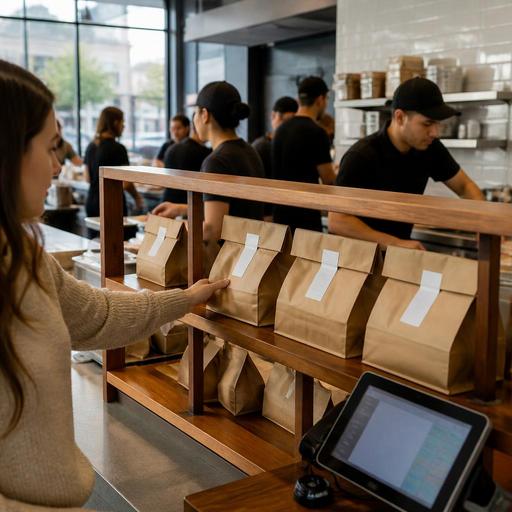
Pickup Shelf Best Practices for U.S. Fast-Casual Digital Orders
Pickup shelf operations for fast-casual digital orders can either speed up service or create a mess at the front counter. For U.S. fast-casual restaurants, the pickup shelf is no longer a side detail. It is part of the guest experience, the off-premise workflow, and the store’s daily labor plan. Whether you run a burrito shop in Austin, a salad concept in Chicago, a chicken tender brand in Atlanta, or a multi-unit sandwich chain with heavy lunch traffic, a poorly managed shelf can lead to missing bags, crowded lobbies, remake costs, and frustrated guests.
The good news is that pickup shelf performance usually improves when operators treat it as an operational station, not just a piece of furniture. That means clear order routing from online ordering and delivery apps, smart bagging rules, accurate production timing on the kitchen display system, and a handoff process that fits your store layout.
Start with the right pickup shelf job definition
Many stores place a shelf near the entrance and assume the process will take care of itself. In practice, someone owns that station even if the role is shared. During a weekday lunch rush, the pickup shelf touches order assembly, guest communication, delivery driver handoff, remake prevention, and lobby flow.
Think about a fast-casual bowl shop near a downtown office tower. Between 11:30 a.m. and 1:30 p.m., dine-in guests, app pickups, third-party delivery drivers, and curbside customers may all arrive within minutes of each other. If nobody is assigned to watch completed orders, bags can be grabbed early, drinks can be forgotten, and drivers can interrupt the expo line asking for missing checks. A better setup gives one team member ownership of the handoff zone during peak periods, even if that person also supports takeout assembly.
- Define who stages completed orders before they hit the shelf.
- Set rules for what belongs on the shelf and what requires staff handoff.
- Decide who answers driver questions so the line does not keep stopping.
- Assign peak-period coverage for lunch, dinner, and major game or event surges.
For example, a suburban Mediterranean fast-casual location may allow prepaid app orders onto an open shelf but keep large family bundles, alcohol orders, or catering trays behind the counter for controlled release. If you serve alcohol, verify your current state and local rules for pickup and age-verification workflows with official guidance and qualified advisors.
Match shelf design to your order mix and lobby traffic
The best pickup shelf is the one that fits the way your guests actually move through the store. A narrow urban storefront in Manhattan will need a different setup than a highway-adjacent burger shop in Texas with strong curbside pickup. Do not copy another concept’s shelf design without looking at your own bottlenecks.
For a typical U.S. fast-casual store, focus on three zones: guest arrival, order staging, and problem resolution. Guests should be able to enter, find the pickup area quickly, and leave without crossing the order line. Delivery drivers should have a clear waiting spot that does not block dine-in traffic or cashiers. If an order is delayed or missing an item, there should be a nearby staff touchpoint rather than a crowd forming around the shelf.
Layout details that help in real stores
- Place the shelf close to the entrance but not directly in the swing path of the front door.
- Keep hot and cold items separated when possible to protect food quality.
- Use a nearby counter for final checks so bags are sealed and complete before staging.
- Leave room for delivery drivers to wait without leaning over guest orders.
- Build a backup spot for overflow during Friday nights, office lunch peaks, or big local events.
A wing shop near a college campus, for instance, may need extra shelving and a runner during game nights because digital demand spikes in short waves. A hotel fast-casual outlet may prioritize a staff-assisted pickup area because lobby guests, conference attendees, and delivery drivers all share the same entrance. Airport concessions and stadium venues may need even tighter control because of crowd density and security constraints.
If you use QR ordering, make sure pickup instructions are easy to read on mobile and available in a format guests can access. Operators should review ADA-minded access in their ordering flow, pickup communication, and in-store navigation, and verify current requirements with qualified advisors or official guidance.
Time orders to the shelf instead of parking them too early
One of the biggest pickup shelf mistakes is finishing orders too early. A bag sitting for ten or fifteen minutes can hurt fries, sandwiches, and fried chicken, even if the kitchen made the order correctly. The shelf should be the final step before guest arrival, not long-term storage.
This is where POS integrations, direct online ordering, delivery marketplace timing, and the kitchen display system need to work together. If your digital channels promise a 12:15 p.m. pickup, the kitchen should not fire the order at 12:00 unless the item mix requires it. A good production setup staggers prep so the order is bagged close to the actual handoff window.
- Review promise times by channel. Direct web orders, app orders, and delivery apps often behave differently.
- Set item-level prep assumptions. Salads, burgers, soups, and fountain drinks do not all finish at the same pace.
- Use the kitchen display system to pace firing. Avoid printing everything too early just to clear the queue.
- Stage only complete orders. Partial orders create confusion and invite mistakes.
- Audit remake reasons weekly. Look for early staging, missing sides, unlabeled drinks, or driver pickup confusion.
A Phoenix taco chain with a strong direct ordering channel may decide that lunch pickup orders should enter production based on promised handoff time, while a busy delivery-app stream gets a separate pacing rule. A food truck using digital ordering for office parks may keep all orders staff-controlled rather than shelf-based if the pickup window is too small for self-serve handoff.
Reduce theft, mistakes, and lobby confusion without slowing service
Open pickup shelves are convenient, but they can also create loss. Some stores experience accidental grabs by guests with similar names. Others deal with delivery drivers taking the wrong bag or people walking out with unpaid items if the shelf sits too close to the entrance. The fix is not always to remove self-serve pickup. Often, it is to tighten the handoff logic.
Use simple operating rules. Large orders, high-value orders, and orders with specialty drinks or desserts may need staff release. Orders with easy-to-mix-up packaging should have a clearer staging pattern. Drinks should be matched to the bag before release, especially when the store is busy and multiple tabs are being called at once.
- Separate guest pickup from driver pickup when volume is high.
- Keep order names consistent across channels so staff can verify quickly.
- Use bag sealing and item check routines before shelf placement.
- Move exception orders behind the counter instead of crowding the shelf.
- Train staff on calm recovery steps when an order is missing or taken by mistake.
For stores with service charges, tipped staff handoff support, or mixed cashier and expo duties, make sure your internal workflow is clear so team members know who owns guest recovery and where any adjustments belong in the POS. Sales tax treatment, service charges, tip handling, and tip reporting rules can vary by state and situation, so operators should confirm current requirements with their accountant, payroll provider, POS partner, and official guidance.
Build a repeatable pickup shelf system across locations
If you operate multiple units, pickup shelf success should not depend on one strong general manager. Standardize the playbook. Define shelf placement principles, bagging steps, naming rules, expo checks, and driver handoff procedures. Then allow each store to adapt the last ten percent for its footprint, neighborhood demand, and labor pattern.
A 12-unit fast-casual brand might create one standard for suburban stores with curbside pickup, another for urban lunch-heavy stores, and another for nontraditional locations such as hotel restaurants or airport-adjacent food halls. The point is consistency in the guest experience and visibility in operations. Operators should be able to see digital order volume, pickup timing, handoff issues, and remake trends by location.
Review these questions in your weekly ops meeting:
- How long are completed digital orders sitting before pickup?
- Which channel creates the most shelf congestion?
- Are drivers interrupting the make line or cashier station?
- Which items are most likely to be forgotten at handoff?
- Does labor scheduling match digital pickup peaks?
When pickup shelf operations are tied into your POS, kitchen display workflows, direct ordering, and order management tools, the front of house becomes easier to control. That is especially important for fast-casual brands balancing dine-in, takeout, delivery apps, pickup shelves, and curbside pickup at the same time.
Restomas helps operators organize digital ordering, kitchen workflows, and pickup-friendly service steps in a way that supports cleaner fast-casual execution.
