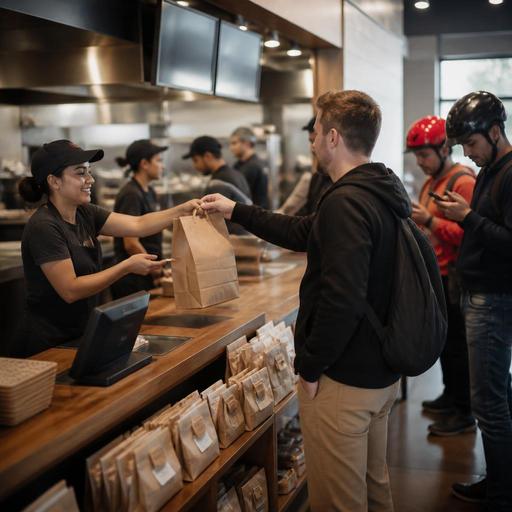
Pickup Shelf Setup for Fast-Casual Digital Orders in the U.S.
For U.S. operators, pickup shelf setup for fast-casual digital orders is no longer a side detail. It directly affects speed of service, order accuracy, labor flow, guest satisfaction, and even how your brand feels during a busy lunch rush. Whether you run a burrito shop in Denver, a salad concept in Chicago, a sandwich chain in Atlanta, or a chicken bowl brand with multiple suburban locations, the pickup shelf has become part of the front line. The challenge is simple: guests want quick grab-and-go convenience, but operators need control over handoff timing, theft risk, packaging quality, and kitchen pacing.
In many American fast-casual restaurants, digital orders now come from direct online ordering, branded apps, QR ordering, and third-party delivery apps at the same time. If those channels all feed into the same pickup area without clear rules, the shelf turns into a bottleneck. Bags pile up, drivers crowd the host stand, dine-in guests feel ignored, and staff waste time answering the same question: Is my order ready?
Design the pickup shelf around traffic, not just storage
A good pickup shelf is not just a rack near the door. It is part of a guest-flow system. Start by watching your lunch and dinner rush in real conditions. Where do guests enter? Where do delivery drivers wait? Where do cashiers hand off takeout checks? Where do dine-in guests line up for refills or to ask questions? In a typical U.S. fast-casual setting, the pickup shelf works best when it is easy to find from the entrance but does not block the ordering line.
For example, a suburban Mediterranean fast-casual restaurant might place the shelf between the front door and the beverage station, only to discover that waiting drivers block soda refills and slow dine-in traffic. A better setup may be a shelf along a side wall with a clear pickup zone and a separate waiting spot for app drivers. In a downtown lunch concept with heavy office takeout, shelves near the entrance may work well because guests want fast in-and-out access.
- Keep the shelf visible from the entrance so guests do not interrupt the cashier just to locate it.
- Separate pickup from order placement so the register line and pickup crowd do not merge.
- Create a driver waiting zone if delivery app volume is high.
- Leave room for ADA-minded access so the path to pickup is navigable and not narrowed by bags, stanchions, or merch displays.
If you use QR ordering for dine-in or direct web ordering, make sure guests receive clear pickup instructions in the confirmation flow. Operationally, that matters as much as the physical shelf itself.
Sort orders by promise time, channel, and handoff risk
The biggest pickup shelf mistake is treating all digital orders the same. They are not. A direct pickup order from a repeat office customer behaves differently from a delivery app order assigned to a driver, and both behave differently from a large catering-style lunch order. Your shelf workflow should reflect that.
At minimum, organize orders by ready time and handoff method. Some stores use alphabetical shelving, but that often breaks down when there are multiple guests with similar names, modified orders, or family bundles. A more reliable approach is to stage orders in the kitchen or expo area until they are fully complete, then move them to a pickup shelf section based on immediate handoff.
- Kitchen finishes the order and confirms all items, utensils, sauces, and drinks if included.
- Expo or pack station checks the ticket against the digital order details.
- Order moves to the correct zone: guest self-pickup, staff-assisted handoff, or delivery driver handoff.
- Status updates in the system so the guest or driver receives a ready notification at the right moment.
This matters for hot and cold food quality. A Nashville hot chicken sandwich and fries should not sit beside a melted milkshake for ten extra minutes because both happened to be “digital orders.” Use separate staging for temperature-sensitive items when possible. If your POS, kitchen display system, and online ordering stack are connected, route orders with meaningful labels so the front counter team can instantly see whether the bag belongs on open shelving or should stay behind the counter.
Reduce theft, wrong pickups, and remake costs
Open pickup shelves are convenient, but they can create shrink and remake headaches. In many U.S. urban locations, especially near campuses, transit hubs, airport concessions, or dense downtown corridors, restaurants have learned that a fully open shelf is not always the best answer. The right model depends on your risk level and staff capacity.
Consider three common operating models:
- Open shelf: fastest for guests, but highest risk for mistaken or unauthorized pickups.
- Semi-controlled shelf: guests can see orders, but staff verify names or order numbers before handoff.
- Back-counter storage: best for higher-risk environments, larger checks, alcohol-inclusive orders where allowed, or high-remake items.
A college-town poke shop may accept some open-shelf risk because speed matters most. A fast-casual wing concept in a busy entertainment district may move high-value orders behind the counter after repeated losses. A hotel lobby restaurant serving both travelers and local takeout may need a staff-assisted handoff because traffic patterns are less predictable.
To cut mistakes, keep guest-facing identifiers simple and operationally safe. Many restaurants use first names and last initials, or order numbers, rather than exposing too much information. If you handle payment, tips, service charges, or receipts through digital channels, make sure the handoff process is clear for staff and guests. Operators should also verify any state or local rules affecting receipts, alcohol handoff, taxes, accessibility, employment practices, or payment workflows with qualified advisors or official guidance.
Train the front line for exceptions, not just normal pickups
The real stress test is not the smooth order. It is the exception: missing drinks, a driver arriving early, a guest claiming the wrong bag was taken, curbside pickup at the same time as a dine-in rush, or a large family order that does not fit on the shelf. Your standard operating procedure should focus on those edge cases.
For example, a Phoenix bowl concept may use a pickup shelf for standard takeout but hold fountain drinks and frozen beverages until the guest arrives. A New Jersey burger fast-casual brand may stage curbside pickup separately so runners are not searching the shelf while cars stack outside. A multi-location sandwich group may require every store to use the same bag labeling logic, shelf zones, and remake escalation process so training stays consistent.
Front-of-house training points to document
- When to place an order on the shelf versus hold it behind the counter
- How to handle early-arriving delivery drivers
- What to say when a guest cannot find an order
- Who approves remakes and how they are logged
- How to manage pickup shelf cleanup during rushes
- How curbside pickup, pickup shelves, and dine-in service stay separated
Labor scheduling matters here too. If digital order volume spikes from 11:30 a.m. to 1:30 p.m., assign a dedicated expo or handoff role instead of expecting the cashier to manage the register, phone, walk-in guests, and shelf questions all at once. That is often where service breaks down.
Use digital systems to make the shelf easier to run
The best pickup shelf operations are supported by clean digital workflows. That means your online ordering, POS, kitchen display system, and order status updates should work together. If they do not, staff end up manually translating tickets, shouting names, or guessing whether a driver has arrived.
Strong digital workflows can help you:
- Throttle pickup times when the kitchen is overloaded
- Separate direct orders from marketplace orders for clearer handoff rules
- Trigger ready notifications only when bags are actually staged
- Track remake patterns by daypart, channel, or location
- Standardize shelf operations across multiple stores
For chains and multi-unit operators, consistency matters. A guest who orders from your Dallas location and your Houston location should not face two completely different pickup experiences. The same is true for food halls, stadium venues, airport concessions, and hotel fast-casual outlets where pickup rules must fit the venue while still matching brand standards. If your concept is subject to menu labeling or other federal, state, or local requirements, keep the shelf discussion focused on execution and verify current obligations through official guidance and qualified advisors.
The goal is simple: the shelf should reduce friction, not create more of it. When pickup timing, packaging, notifications, and handoff rules are aligned, digital orders feel faster without making the front counter feel chaotic. Restomas helps operators connect ordering, POS, kitchen workflows, and pickup experiences in a way that is easier to manage across busy U.S. restaurant operations.
