QR Menus for U.S. Coffee Shops: Speed Up Ordering Without Slowing the Line
QR menus for U.S. coffee shops work best when they reduce decision time before the guest reaches the register. If the code creates extra steps at the counter, it can actually slow the morning rush. For coffee shop operators in the United States, the goal is not to replace the human flow of a busy cafe. It is to help guests choose faster, customize clearly, and move from menu browsing to payment with less friction.
Think about a neighborhood coffee shop in Seattle with commuters ordering drip coffee, oat milk lattes, and breakfast sandwiches between 7:00 and 9:00 a.m. The line problem usually is not just payment. It is hesitation at the menu board, questions about sizes, confusion on add-ons, and last-second food decisions. A well-planned QR menu can handle those moments before the guest reaches the cashier, while your POS, baristas, and kitchen display system keep the line moving.
Use QR menus before the register, not instead of the line
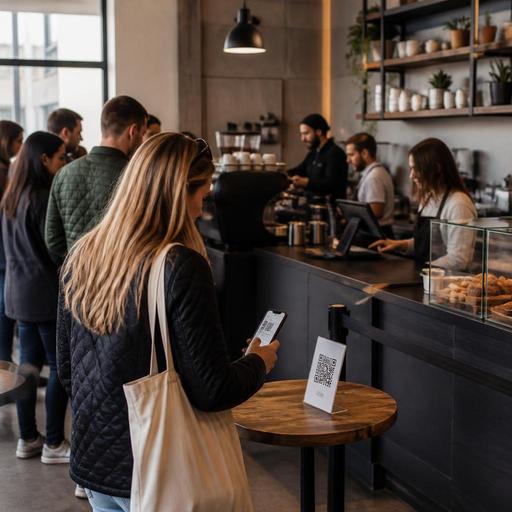
The most effective setup places QR menus where guests wait, not only where they pay. In a U.S. coffee shop, that can mean a code at the front door, on the queue rail, on a sidewalk A-frame area you control, on table tents, and near the pickup shelf. The guest scans while waiting, sees drink sizes, milk options, syrups, bakery items, and limited-time specials, and arrives at the register ready to order.
For example, a Boston cafe with a narrow entry line can place one QR code at the door and another halfway down the queue. The first screen should answer the most common questions fast:
- Hot and iced drink categories
- Sizes and basic pricing structure
- Milk choices and espresso add-ons
- Pastries and breakfast items still available
- Estimated prep expectations for made-to-order food
This approach matters because guests often hold up the line while asking what comes in a seasonal latte or whether the kitchen still has bacon egg sandwiches. If the QR menu shows availability and clear modifiers, the cashier can confirm instead of explaining from scratch.
That does not mean every guest will want to scan. Some customers will still prefer to read a printed board, ask a barista, or order by habit. Keep the main menu visible and easy to understand. QR menus should support the line, not become the only path.
Design the mobile menu for coffee shop speed
Many operators make the mistake of putting their full desktop menu into a phone screen. That is where line speed suffers. A coffee shop QR menu should be built for short sessions, one-handed use, and fast choices.
Prioritize the first screen
The first screen should feature the categories guests buy most during rush periods: brewed coffee, espresso drinks, cold coffee, tea, breakfast, and bakery. If your shop has a strong lunch business, show that later in the day rather than leading with wraps and salads at 7:30 a.m.
Limit modifier overload
Too many customization choices can freeze the guest. Keep the workflow logical: size first, hot or iced if relevant, milk, then flavor add-ons. If a drink does not work well with a modifier, do not force staff to correct it later. Cleaner modifier logic reduces remakes and register conversations.
Show what is out now
If the blueberry muffins sold out at 8:15 a.m., remove or mark them immediately. Real-time menu updates are especially useful in independent cafes, food truck coffee concepts, hotel lobby coffee bars, and airport coffee counters where stock changes quickly. When guests see live availability, they do not reach the register expecting items your team cannot serve.
Make ADA-minded access part of the setup
Operators should think about readable contrast, simple navigation, and whether guests can access menu information without being forced into a smartphone-only experience. Keep a visible standard menu and train staff to assist guests who prefer verbal ordering. Accessibility expectations can vary by situation, so review current guidance with qualified advisors when needed.
Connect QR menus to ordering, tipping, and pickup workflows
QR menus create the most value when they fit the rest of the operation. In a U.S. coffee shop, that means thinking through the handoff from browsing to ordering, payment, and pickup.
One strong model is scan, decide, order at register. This works well for high-volume cafes where baristas want to keep drink production centralized and where many guests still tip at the counter. The QR menu speeds decisions, but the POS remains the main transaction point.
Another model is scan, order, pay, pickup. This can work for suburban cafes, college-area coffee shops, and fast-casual bakery cafes with enough production capacity and a clear pickup shelf. In that setup, make sure tickets route correctly to the POS and kitchen display system so baristas are not juggling a separate tablet while handling in-person guests.
Whichever model you use, test these operational details:
- How the guest identifies their order at pickup
- Whether hot and food items print or display in the right prep stations
- How modifiers appear to baristas during rushes
- How tipping prompts appear for counter service and digital orders
- How receipts are delivered for guests who need them
Tipping workflows deserve extra attention. In the U.S., guests are used to seeing tip prompts at the register, on handheld payment screens, or in online checkout. If you add QR ordering, make sure your digital flow matches your service model and reporting process. Operators should also verify current federal, state, and local rules around tip handling, tip reporting, service charges, and payroll treatment with qualified advisors or official guidance.
Use QR menus to reduce bottlenecks beyond the counter
The line is only one bottleneck. Coffee shops also lose time at the handoff area, the condiment station, and the pastry case.
For example, a Chicago cafe with a strong takeout business can use QR menus to separate guest intent. A commuter who wants to skip the line can order ahead from the sidewalk and head straight to the pickup shelf. A guest dining in can scan at the table, review the menu, and then order at the counter without holding up the next person. A hotel coffee bar can let guests scan in the lobby, place a quick breakfast order, and pick it up before heading to the elevator.
QR menus also help when paired with:
- Direct online ordering for regulars who want to reorder favorites without third-party delivery app fees
- Curbside pickup for suburban coffee shops with busy parking lots
- Delivery app menu alignment so pricing, item names, and availability are consistent across channels
- Pickup shelf organization with clear staff workflow for drinks, food, and app orders
If you operate multiple locations, standardize the core mobile menu structure but allow store-level changes for inventory, local bakery items, or different breakfast hours. A downtown commuter cafe and a university-area cafe may need different featured items even if they share the same POS stack.
How to roll out QR menus without confusing regulars
Start with one service goal. Do not launch QR menus just because other cafes are doing it. Pick the exact problem you want to solve: fewer register questions, faster breakfast turns, better modifier accuracy, more direct digital orders, or easier menu updates across locations.
Then roll out in stages:
- Begin with a view-only QR menu in the queue
- Track the most common guest questions that remain
- Simplify categories and modifiers based on real behavior
- Add ordering only after the menu browsing experience is working
- Train cashiers and baristas on how to guide guests in one sentence
A simple staff script helps: You can scan here to see sizes, milk options, and today’s food before you reach the register. That keeps the message focused on speed rather than technology.
Also watch your physical setup. If guests stop in the middle of the line to scan, you may need signage placement changes or a second code earlier in the queue. If baristas are answering phone calls about online orders while building drinks, tighten the order routing process. If your cafe collects sales tax differently across item types or channels, confirm your POS and menu settings are configured correctly and verify local requirements with your accountant or tax advisor.
When QR menus are planned around real U.S. coffee shop traffic, they do not slow the line. They shorten decision time, improve order accuracy, and support smoother counter, pickup, and direct-order workflows. Restomas helps coffee shop operators connect digital menus, ordering, POS workflows, and pickup experiences in a way that fits daily service.
