QR Ordering in U.S. Sports Bars: Tabs, Seat Numbers, and Server Handoffs
QR ordering in U.S. sports bars works best when it supports the way bars already run during a packed game, not when it tries to replace every part of service. Guests may start with a server, scan from a bar top, order another round from a patio table, or add food from a seat near a TV wall. The operational challenge is simple: keep tabs accurate, connect orders to the right seat or section, and make sure staff know when to step in. For U.S. operators, that also means thinking through tipped service, POS routing, sales tax handling, direct ordering versus delivery apps, and an ADA-minded guest experience. The goal is not just speed. The goal is fewer mistakes on busy nights and a smoother handoff between guest, server, bartender, and kitchen.
Build QR ordering around the way sports bars actually serve
A neighborhood sports bar in Chicago, a hotel bar near an airport, and a stadium-adjacent wing spot in Dallas all have one thing in common: service changes by time of day and by game intensity. Before kickoff, guests may want to open a tab quickly. At halftime, they want another beer and extra ranch without waiting for a server to circle back. Late in the game, they may want to split checks or cash out fast to beat the traffic.
That means your QR setup should match real service zones:
- Bar top seats: ideal for rapid reorder flows and easy bartender visibility.
- Dining tables: best for mixed food and drink orders with clear seat mapping.
- Patio sections: useful when server coverage is thinner and guests stay longer.
- Private party areas: better with controlled permissions, preset menus, or manager review.
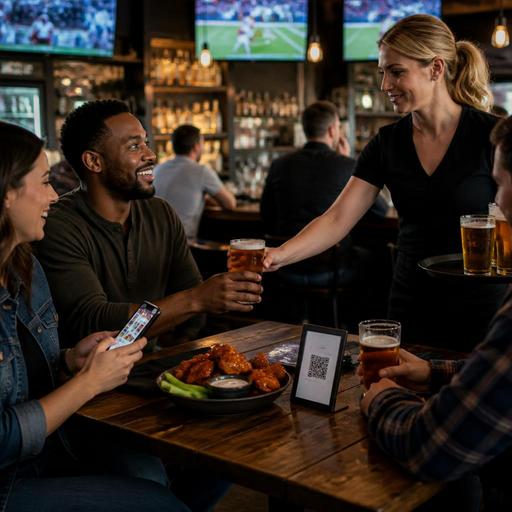
In many U.S. sports bars, the strongest approach is hybrid service. A host or server greets the table, explains how to scan, and opens the interaction. After that, guests can reorder through QR for speed, while staff stay responsible for hospitality, ID checks where applicable, problem resolution, and upselling. This handoff matters because fully self-directed ordering can feel efficient but disconnected if nobody owns the guest experience.
Set up tabs and seat numbers so orders land in the right place
The biggest failure point in QR ordering is not the code itself. It is location accuracy. If your POS and floor map do not clearly connect a scan to a table, seat, or section, you create comped items, confused runners, and frustrated guests.
Start with a practical structure:
- Assign every table or bar position a unique location ID. Avoid vague labels like “Patio 1” if you have multiple two-tops in the same area.
- Use seat numbers where service style requires precision. This matters for larger parties ordering wings, burgers, and multiple rounds under one tab.
- Decide whether the guest opens a new tab or joins an existing one. In a U.S. bar, both workflows may be needed depending on whether a server has already started service.
- Route the order to the right production point. Beer to the bar printer or display, food to the kitchen display system, desserts to expo if needed.
- Show staff a clear source tag. For example, “Table 42 Seat 3 QR reorder” is more actionable than “online order received.”
Consider a Saturday college football rush at a sports bar in Columbus. A six-top opens with a server, but during the second quarter two guests scan and add another appetizer and a pitcher. If the QR order joins the existing tab and preserves seat references, the kitchen and bar can fulfill it without the server manually re-entering anything. If it opens a duplicate tab with no seat detail, checkout becomes messy fast.
Operators should also define rules for moving guests. In sports bars, parties often drift from a dining table to the bar or patio. Managers need a workflow for transferring open checks, updating table status, and preventing duplicate service. The technology should support that movement instead of locking the guest into one static location.
Design a clean server handoff instead of removing the server
QR ordering should reduce friction, not create a turf battle between digital ordering and floor staff. In U.S. tipped environments, staff buy-in improves when the handoff is clear. Servers and bartenders need to know when they still own the table, how tips are attributed inside the POS workflow, and when a manager should step in. Because tip handling, tip reporting, and service charge treatment can vary by setup and jurisdiction, operators should confirm current requirements with their POS provider, payroll partner, and qualified advisors.
A workable handoff model often looks like this:
- Step 1: Staff greet and explain the ordering options.
- Step 2: Guest scans and orders another round or food item.
- Step 3: The order appears in the POS and kitchen display system with the assigned section and staff owner.
- Step 4: Server or runner delivers, checks satisfaction, and offers another add-on.
- Step 5: Guest closes the tab by phone or with staff, based on house policy.
This is especially useful in a Phoenix sports bar with a large patio, where one server may cover a wide area during playoff games. Guests can reorder through QR instead of waiting, but the server still remains visible and in control of service recovery. If a drink is delayed, a human can fix it. If a guest has a dietary question, someone can answer it. If a group wants separate checks, staff can guide the best path before the end-of-night rush.
For alcohol service, keep the workflow operationally sound. Many bars use QR for convenience while keeping staff responsible for age-verification and beverage delivery controls. Local and state alcohol rules differ, so operators should verify what is allowed in their market and train staff accordingly.
Plan for checkout, tips, taxes, and accessibility from day one
Game-day speed means little if the payment experience creates confusion. Guests in U.S. sports bars expect simple tipping screens, fast receipts, and a clear final total. Your QR flow should make it obvious whether the guest is adding a tip, paying sales tax, or seeing any service charge or automatic gratuity policy where permitted. Because tax and fee rules vary by state and city, and because service charges are not the same as tips, operators should review current guidance with qualified tax and legal advisors before launch.
Operationally, focus on clarity:
- Keep the tip prompt simple. Do not bury checkout under too many screens.
- Match menu prices and modifiers to the POS. Guests should not see one amount on the QR menu and another on the final check.
- Offer digital receipts, but make staff able to help. Some guests still want a printed receipt or verbal walkthrough.
- Support accessibility. Keep menus readable on mobile, use logical categories, and provide staff assistance for guests who do not want or cannot use QR ordering.
ADA-minded access is not just a compliance topic. It is good service. A sports bar in Tampa may have older regulars, tourists, and guests with different comfort levels on mobile ordering. Keep paper menus or staff-assisted ordering available, and verify accessibility expectations with official guidance and qualified advisors when reviewing your digital guest journey.
Game-day checklist for sports bars, hotel bars, and venue operators
Before rolling out QR ordering, test the workflow in a real rush environment. A calm Tuesday lunch will not expose the same issues as Sunday NFL service or a UFC pay-per-view crowd.
What to test before launch
- Section mapping: Can staff instantly tell where a QR order came from?
- Tab logic: Can a guest join an open tab without creating duplicates?
- Seat accuracy: Do large parties stay organized when multiple people order from one table?
- Kitchen and bar routing: Are drinks and food going to the correct production stations?
- Pickup and runner flow: Who delivers what, and how are delays flagged?
- Connectivity: Does the guest Wi-Fi or mobile signal hold up in every section?
- Checkout: Can guests close quickly without backing up staff at shift change?
For multi-location operators, standardize the core workflow but allow for local differences. A fast-casual sports concept with pickup shelves may use QR mainly for dine-in reorders, while a hotel sports bar may need room-charge coordination, and an airport concession may prioritize speed and seat identification over long tabs. The playbook should be consistent, but the floor logic should fit the venue.
When QR ordering is mapped to real seats, tied cleanly into the POS, and supported by a clear server handoff, it can help U.S. sports bars move faster without losing hospitality. Restomas can support that kind of connected workflow with QR menus, order management, POS integrations, and service visibility built for busy food-service operations.
