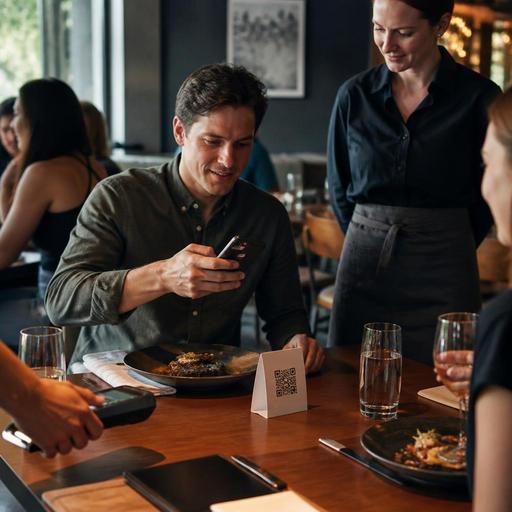
QR Payment Setup for U.S. Restaurants: Checks, Tabs, Tips, and Receipts
QR payment setup for U.S. restaurants is no longer just a tech project. It affects how guests close a check, how servers manage open tabs, how tips are presented, how receipts are delivered, and how your POS records the transaction. For operators in the United States, the best setup is the one that fits actual floor traffic: a neighborhood bar with tabs, a fast-casual pickup counter, a brunch diner with split checks, or a hotel outlet serving both room guests and walk-ins.
If you are evaluating QR pay-at-table or mobile payment links, the goal should be operational clarity, not novelty. Guests should understand what they are paying, staff should know when a table is truly closed, and managers should be able to reconcile payments, tips, voids, and service charges without creating end-of-shift confusion. That means planning the workflow before you print table tents or launch a payment page.
Start with the payment moments in your service model
QR payment works differently depending on how guests order and how your team manages the check. A full-service restaurant with coursed dining has different needs than a food truck or airport concession stand. Before choosing settings, map the exact points where payment happens.
- Full-service dining room: Guests may review the check at the table, split items, add tip, and request a receipt without waiting for a handheld or paper check presenter.
- Bar tabs: Guests may open a tab with a card, order multiple rounds, and close out later from a QR link or with a bartender.
- Fast-casual and QSR: Payment may happen before production, often alongside direct online ordering, kiosk ordering, or counter service.
- Takeout and pickup shelf flow: Guests may prepay online, pay from a QR code at pickup, or resolve missing items with staff before closing the sale.
- Curbside pickup: Payment should be completed before handoff whenever possible so runners are not troubleshooting cards in the parking lot.
A Chicago burger bar might want guests to scan and close tabs quickly during a rush so bartenders can focus on pours. A suburban Texas brunch spot may need QR payment mainly to speed up table turns after coffee refills and split checks. A hotel restaurant in Orlando may want one workflow for breakfast buffet checks and another for evening bar tabs. The right configuration starts with those real use cases.
Design the check and tab flow so staff know what is happening
The most common QR payment mistake is assuming that a guest payment screen automatically solves service friction. In reality, the important question is what happens in the POS and on the floor after the guest scans.
For seated checks
Make sure the guest can clearly see open items, modifiers, tax, fees if used, and tip entry before final submission. If your concept often handles split checks, decide whether guests can split by seat, amount, or item. A family diner in Ohio may need simple equal splits, while a downtown steakhouse may need more detailed item-level splitting for business meals.
Servers also need a visible signal that the table has paid. That signal may be a POS status update, a kitchen display or service screen notification, or a host stand view that shows closed tables. Without that, staff may still walk over with a paper check presenter, which defeats the convenience of QR payment.
For bar tabs
Open tabs require extra discipline. Decide whether the QR flow is only for closing an existing tab or also for opening one. Many operators prefer staff-assisted tab opening and guest-directed tab closing because it reduces confusion around card authorization and identity checks. In a busy Nashville sports bar, for example, bartenders may swipe or preauthorize a card to open the tab, then let guests scan later to review charges, tip, and close out without waiting to flag someone down.
Whatever model you use, train staff on exceptions: disputed items, duplicate tabs, expired authorizations, and guests who leave without fully completing the mobile flow.
Handle tips, receipts, and records with U.S. workflows in mind
In the United States, tip presentation is not a minor detail. It affects guest trust, staff earnings, and end-of-day reporting. Your QR payment flow should make tip entry simple, visible, and optional in the right places, while matching how your business classifies tips and charges in the POS.
For example, a server-led full-service restaurant may want tip suggestions after tax or before tax depending on house policy and local practice. A fast-casual cafe may still present a gratuity option for counter service, but it should feel appropriate to the concept. If you use service charges for large parties, private dining, or certain venue formats, make sure the guest can distinguish that charge from an optional tip. Operators should verify the current treatment of tips, service charges, and reporting obligations with their accountant, payroll provider, POS partner, and official guidance in their state or city.
Receipts matter too. Some guests want email or SMS receipts, while others still ask for printed copies. Keep both options available when possible. In a U.S. airport concession, travelers may need a digital receipt immediately for expense reporting. In a neighborhood restaurant, some older guests may prefer a printed receipt even if they paid by phone. Build a fallback process so staff can reprint or resend receipts without manager intervention.
You should also confirm how refunds, partial comps, voids, and adjusted tips appear in your reporting. If a guest pays through QR and later disputes a charge, your team should be able to trace the order, timestamp, device flow, and final receipt quickly.
Do not overlook accessibility, compliance touchpoints, and guest choice
QR payment should be an option, not a barrier. Some guests will not want to scan, some may have difficulty using a phone at the table, and some may simply prefer to hand a card to a server. Keep an alternative path available. That is both good hospitality and good operations.
For ADA-minded access, think practically: adequate lighting at the table, readable contrast on mobile pages, clear button labels, screen-reader-friendly layouts if supported by your vendor, and a non-QR payment route for guests who need assistance. If your dining room is loud or dim, test the full flow in real service conditions, not just at a desk.
There are also regulatory touchpoints around receipts, taxes, gratuities, alcohol service, and chain menu disclosures depending on your format. A multi-location restaurant group may need different receipt details or fee disclosures in different jurisdictions. A chain subject to FDA menu labeling rules may need consistency between digital ordering displays and in-store presentation. None of this should be treated casually, but it should also not stop progress. Build the workflow, then verify current federal, state, and local requirements with qualified advisors and official guidance.
Launch with a floor test, not just a software test
Before rolling out QR payment across every location, run a controlled pilot in one store or one daypart. The purpose is to catch service issues early.
- Test with real checks: Include modifiers, discounts, split checks, bar tabs, and large-party scenarios.
- Watch guest behavior: Do guests understand when to scan, how to tip, and how to finish the transaction?
- Track staff confusion: Note when servers duplicate work, reopen closed checks, or miss payment confirmations.
- Review reporting: Confirm that sales tax, tips, service charges, and payment method totals land correctly in the POS and daily reports.
- Keep a fallback ready: Paper checks, card-present payment, and manager override steps should remain available during rollout.
A Phoenix fast-casual restaurant might pilot QR payment for dine-in guests only, while keeping counter ordering unchanged. A New York bar might start with weekday tab closeout before using it on packed weekend nights. A food hall stall in Seattle may use QR receipts and direct online reorder prompts but keep the main payment at the counter. Small tests make it easier to refine signage, training, and POS mapping before the system reaches peak traffic.
The strongest QR payment programs are the ones guests barely notice because everything feels easy: the check is accurate, the tip flow is clear, the receipt arrives fast, and staff always know the table status. Restomas helps operators connect QR menus, ordering, payment flow, and service visibility in a way that supports everyday restaurant operations.
