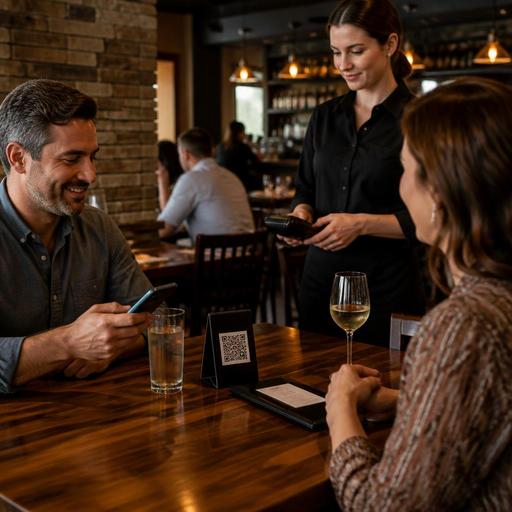
QR Payment Workflows for U.S. Restaurants: Checks, Tabs, Tips, and Receipts
QR payment workflows for U.S. restaurants can speed up checkout, reduce line buildup, and give guests more control, but only if the setup matches how American restaurants actually run checks, tabs, tips, and receipts. A neighborhood diner, a sports bar, a fast-casual counter, and a hotel restaurant all use payment differently. If your QR flow ignores split checks, open tabs, tipping prompts, pickup shelves, or receipt delivery, it can create more friction than it removes.
For U.S. operators, the goal is not just to add a QR code to the table. The goal is to fit QR payment into the real service model: servers dropping checks at a full-service restaurant, bartenders managing open tabs, guests scanning to reorder from the patio, or takeout customers paying before grabbing a bag from the pickup shelf. That means connecting the guest-facing experience to your POS, kitchen display system, order management, and staff workflow.
Start with the service model, not the payment feature
Before choosing a QR payment setup, map how payment happens in your operation today. A brunch spot in Chicago may need table-side scan and pay after the server closes out the meal. A food truck in Austin may need guests to scan, order, and pay before the kitchen even starts the ticket. A sports bar in Denver may want guests to open a tab, add another round, and close out without waiting for a card to be returned.
Ask a few practical questions:
- Do guests usually pay at the table, at the host stand, at the counter, or in advance online?
- Do you allow split checks, item-level splits, or one guest paying the whole tab?
- Do bartenders and servers manage open tabs during service?
- Do guests need printed receipts, texted receipts, emailed receipts, or all three?
- How often do guests add tips on dine-in, takeout, and bar checks?
- Does the POS sync payment status in real time so staff do not chase already-paid tables?
These questions matter because the right workflow for a fast-casual salad chain is different from the right workflow for a steakhouse with heavy wine service. In a full-service dining room, staff need to know whether a table has paid, whether the check is still open, and whether a guest is waiting on a receipt. In a QSR or cafe, the bigger issue may be speed at the counter and reducing the lunch rush line.
Build QR payment around checks, tabs, and split-payment reality
In U.S. restaurants, payment gets messy fast when multiple guests share a table. If your QR payment option only works for a single full-balance payment, guests may still flag down a server for help. That defeats the point.
Checks and split payments
For full-service restaurants, test whether guests can do the payment actions they already expect:
- Pay the full check in one step
- Split evenly across two or more cards
- Pay by selected items when one guest had cocktails and another had only an entree
- Add a tip before finalizing the payment
- Receive a digital receipt without creating confusion for the server
For example, a busy family restaurant in suburban Atlanta may see four-person tables asking for separate checks during weekend dinner. If the QR flow cannot support that cleanly, staff will end up reworking the check in the POS anyway. The smoother approach is to let the guest scan, see the open items clearly, and complete a simple split flow that mirrors what your staff can already do on the terminal.
Tabs at bars and patios
Bars, breweries, and patio-heavy restaurants should pay special attention to tab behavior. An open tab is not just a payment issue; it is a service and risk-control issue. Guests may order in rounds, move seats, or switch from the bar to a table. If QR payment is part of the setup, make sure staff can see whether the tab is still open, whether a guest has already authorized payment, and whether additional items can be added without confusion.
A neighborhood bar in Nashville might let guests scan to view the tab and close out when ready, while bartenders still keep control over age-restricted beverage service and item delivery. Operators should verify alcohol-service workflows against current state and local rules and internal policies, especially when digital ordering or payment is involved.
Get tipping and receipt workflows right before rollout
Tipping is one of the biggest reasons QR payment can either feel smooth or awkward in the U.S. If the tip prompt is confusing, too aggressive, or disconnected from service style, guests notice immediately. The prompt should fit the context: dine-in with server service, takeout pickup, bar service, or counter ordering.
Operationally, managers should confirm that tip entry flows match POS reporting and payroll processes. This is especially important where tipped staff, pooled tips, declared tips, service charges, and digital payment records all intersect. The software setup should support clear reporting, but operators should verify current federal, state, and local requirements with payroll, tax, and legal advisors or official guidance.
Receipt delivery also deserves more attention than many operators give it. Some guests want a text receipt, others prefer email, and some still need a printed copy. A hotel restaurant serving business travelers may get frequent receipt requests for expense reporting. An airport concession may need a very fast digital receipt option because guests are rushing to the gate. A diner with an older customer base may still want printers available even if most tables use digital payment.
Before launch, test these receipt questions:
- Can the guest get a receipt without downloading an app?
- Can staff reprint a receipt quickly if needed?
- Does the receipt clearly reflect sales tax, discounts, tips, and any service charge?
- Can the guest access the receipt after leaving?
Because receipt, tax, and charge disclosures can vary by state or city and by service model, operators should confirm local requirements with qualified advisors and current official resources.
Make the guest experience accessible and staff-proof
QR payment should be an option, not a barrier. In U.S. restaurants, ADA-minded access and practical hospitality both matter. Not every guest wants to scan a code, has a charged phone, or is comfortable navigating a digital checkout page in a dim bar or crowded cafe.
That means keeping backup paths available:
- Traditional card-present payment with a server or counter cashier
- Printed checks on request
- Readable on-screen layouts with clear item names and totals
- Simple guest instructions from staff without making the table feel forced into a digital flow
A senior-heavy breakfast restaurant in Florida may choose QR payment as a convenience feature rather than the default. A fast-casual location near a university may make QR the easiest path but still keep staffed checkout ready. Accessibility expectations can involve federal, state, or local considerations, so it is smart to review your digital guest journey with qualified advisors and current guidance where needed.
Staff training is just as important. Hosts, servers, bartenders, and cashiers should know how to explain the flow in one sentence, troubleshoot common issues, and recognize when to step in. If a guest scans, pays, and stays seated, your floor team needs an obvious signal in the POS or table management view that the check is closed. Otherwise, staff may waste time revisiting already-paid tables or, worse, assume a guest walked out without paying.
Roll out by use case: dine-in, takeout, and multi-location operations
The best QR payment rollout is usually phased. Start with one use case, train around it, then expand.
Dine-in
Begin with a few sections or dayparts. Watch how often guests use scan-and-pay, how often they ask for help, and whether servers trust the payment status in the POS.
Takeout and pickup shelves
For takeout, QR payment can reduce front-counter interruptions. A guest who ordered direct online may scan to confirm, tip, and retrieve the order from the pickup shelf or check in for curbside pickup. This works best when the order management system, payment status, and handoff workflow all stay in sync.
Multi-location brands
For franchises and multi-unit groups, standardize the basics: tip prompts, receipt options, refund handling, and staff language. But leave room for local differences. A downtown lunch spot may need speed and self-service. A suburban full-service location may need stronger support for split checks and family dining. Chains subject to FDA menu labeling or other location-based rules should make sure digital ordering and payment displays align with current requirements, then verify details with official guidance and advisors.
When QR payments connect cleanly with your POS stack, direct online ordering, kitchen workflows, and reporting, they become more than a novelty. They help reduce checkout friction, support staff during busy shifts, and give guests a payment experience that fits how U.S. restaurants really operate. Restomas can help operators bring those guest-facing and back-of-house workflows together in a practical way.
