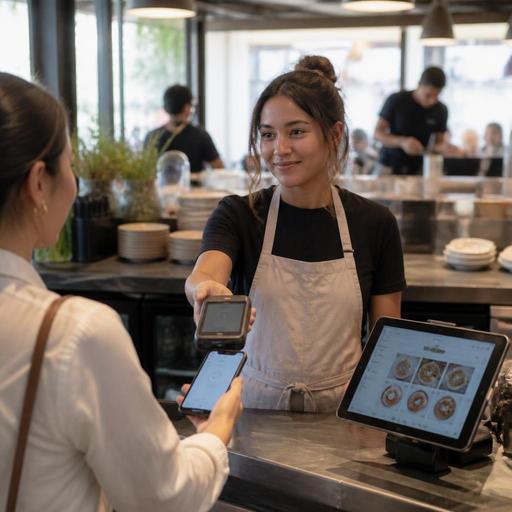
Restaurant E-Receipts and Digital Invoicing Automation Guide
For many operators, restaurant e-receipts and digital invoicing automation sounds like a back-office upgrade. In practice, it touches checkout speed, guest communication, reporting accuracy, refund handling, and the daily workload on managers. A modern restaurant does not need to automate everything at once, but it should identify the receipt and invoicing steps that repeatedly create delays, manual corrections, or inconsistent records. That is where automation delivers the most practical value.
Whether you run a cafe with quick counter service, a full-service restaurant with table turnover pressure, or a multi-unit food business with centralized administration, the goal is the same: reduce manual handoffs while keeping the guest experience smooth and your records organized. Digital receipts, invoice workflows, POS-connected order data, and structured reporting can work together as one operational system rather than separate tasks handled by different people.
Start with the moments where paperwork slows service
The most useful automation decisions begin at the service points where staff lose time. In some restaurants, this happens at the register when guests ask for a receipt after payment is already completed. In others, it happens later when corporate guests request invoice details by phone, or when managers manually match orders to payment records at the end of the day.
Map the full journey from order creation to final document delivery. For example, a quick-service cafe may take the order at the counter, process card payment, and offer an e-receipt by SMS or email before the guest steps away. A casual dining restaurant may present the bill at the table, split payments, then send a digital receipt once the transaction closes. A catering-focused business may issue a pro forma document, update the final invoice after service, and forward it to accounting.
In each model, automation should remove repeated manual actions such as:
- retyping guest contact details for receipt delivery
- manually selecting tax or company fields for common invoice types
- searching old transactions to resend receipts
- reconciling payment records with separate order notes
- correcting mismatched totals caused by discounts, voids, or split checks
If a staff member performs the same clerical task dozens of times a week, it is a strong candidate for automation.
What restaurants should automate first
Not every document process deserves the same priority. The best first automations are the ones that affect both guest-facing service and internal control. A practical rollout usually starts with four areas.
1. Receipt delivery at checkout
Offer digital receipt delivery directly in the payment flow. This can happen by QR confirmation screen, SMS, email, or a guest profile linked to the order. The key is to avoid making the cashier stop and ask several follow-up questions. If the guest can choose receipt format quickly, the line moves faster and staff avoid rework later.
For example, a lunch spot serving office workers can let guests receive receipts by email immediately after payment. A table-service venue can attach the receipt to the reservation or order record so the guest can request it again without calling the restaurant days later.
2. Invoice data capture for business customers
Restaurants that serve companies, events, or frequent group bookings often lose time because invoice details arrive late or in incomplete form. Automate the collection of billing name, tax information, company address, and contact person at the earliest useful point, such as during reservation confirmation, pre-order forms, or event booking intake.
This reduces the common problem where service is complete but the manager still has to chase the client for invoice data. It also helps standardize records across shifts and locations.
3. Resend, refund, and correction workflows
Guests do not only need receipts at the point of sale. They may request them later for expense claims, returns, or accounting. Staff should be able to retrieve and resend documents without digging through paper records or messaging a manager. Likewise, when a refund or correction happens, the updated document trail should be linked to the original order automatically.
This is especially useful in businesses with delivery, takeaway, and mixed payment methods, where post-sale questions are common.
4. Accounting handoff and daily reporting
One of the biggest operational gains comes from reducing the gap between front-of-house transactions and back-office reporting. When invoices and receipts are generated from the same order and payment data used by the POS, there is less room for discrepancy. End-of-day reporting becomes easier when discounts, taxes, payment types, cancellations, and document status are all connected.
For restaurant groups, standardizing this handoff across locations matters even more. A shared process helps head office review cleaner records without asking each site to explain local workarounds.
Build workflows around real restaurant scenarios
Automation works best when it reflects the way the restaurant actually operates. A fine dining venue with reservations, deposits, and wine-heavy checks has different needs from a bakery with fast morning queues. Instead of asking what features exist in theory, ask what sequence happens in real life.
Consider these examples:
- Counter-service cafe: The guest orders, pays by card, and wants a receipt for work expenses. The ideal workflow sends the e-receipt instantly and stores it under the transaction for easy resend.
- Family restaurant: A table splits the bill across several cards, one guest needs an invoice, and another wants only a receipt. The system should connect both outputs to the same order without forcing staff to rebuild the check.
- Corporate lunch venue: An office manager books for a team and needs invoicing details included correctly every time. Capturing company data before service prevents last-minute confusion.
- Multi-unit brand: Headquarters wants consistent reporting across branches. Digital invoicing rules and receipt formats should be standardized while still allowing each location to operate quickly.
These scenarios show why receipt and invoicing automation should not sit in isolation. It should connect with order management, payment status, reservation data, and staff permissions.
Staff controls matter as much as guest convenience
Many receipt problems are not technology problems alone. They are process and permission problems. If too many employees can edit invoice fields freely, mistakes become hard to trace. If too few can correct errors, service stalls while everyone waits for a manager.
Create clear rules for who can do what:
- cashiers can send or resend standard receipts
- supervisors can approve corrections or void-related document changes
- managers can edit billing profiles for recurring business clients
- accounting or admin roles can access reporting exports and document history
Training should cover more than button clicks. Staff need to know when to ask for billing details, how to explain digital receipt options to guests, and what to do when a customer requests a correction after leaving. Short scripts help. For example, a cashier can ask, Would you like your receipt by email or as a printed copy? A reservation agent can ask, Should we prepare this booking under a company billing name?
Good automation supports staff judgment rather than replacing it. When the workflow is clear, teams spend less time improvising and more time serving guests.
Choose systems that connect instead of creating another silo
The biggest mistake is adding a digital receipt tool that does not connect with the restaurant’s existing operations. If receipt delivery, invoicing, reservations, order flow, and reporting all live in separate places, staff will still rely on manual checks and side notes.
Look for systems that can support a connected workflow between menu ordering, POS data, payment events, reservation records, and guest communication. This is where restaurant digitization becomes practical. A platform such as Restomas can support that broader structure by linking digital menus, order management, reservations, and operational data, making receipt and invoicing workflows easier to organize within the wider service process.
Before implementation, restaurant owners should ask:
- At what point do we collect guest or company billing details?
- Can staff resend documents without manager intervention?
- Are refunds and corrections linked to original transactions?
- Does accounting receive consistent records from every channel?
- Will this workflow still function during peak hours?
The best automation is not the most complex setup. It is the one that removes friction from everyday work, protects record accuracy, and keeps the guest experience simple. If your team still spends too much time chasing receipts, rebuilding invoices, or matching disconnected records, that is a sign the process should be redesigned, not just digitized on the surface.
Restomas can help restaurants connect digital ordering, service workflows, and operational records in a more organized way.
