Restaurant E-Receipts and Digital Invoicing: What to Automate First
Restaurant e-receipts and digital invoicing are no longer just back-office upgrades. They directly affect service speed, billing accuracy, staff workload, and the guest experience at the table, counter, and pickup point. For restaurant owners and operators, the real question is not whether to digitize receipts and invoices, but what to automate first so the change actually improves daily operations instead of adding one more system to manage.
In practical terms, automation works best when it removes repetitive steps: entering the same order data twice, correcting receipt mistakes after payment, chasing invoice details for company customers, or manually matching transactions at the end of the shift. A well-structured setup connects ordering, payment records, and invoice creation into one clean flow.
Why e-receipts and digital invoicing matter in restaurant operations
Receipts and invoices sit at the intersection of finance, operations, and hospitality. When these processes stay manual, small errors spread quickly. A wrong item name on a receipt can trigger a refund discussion. A missed invoice request from a business lunch guest can slow down the queue. A cashier who has to retype customer details during a busy period becomes a bottleneck.
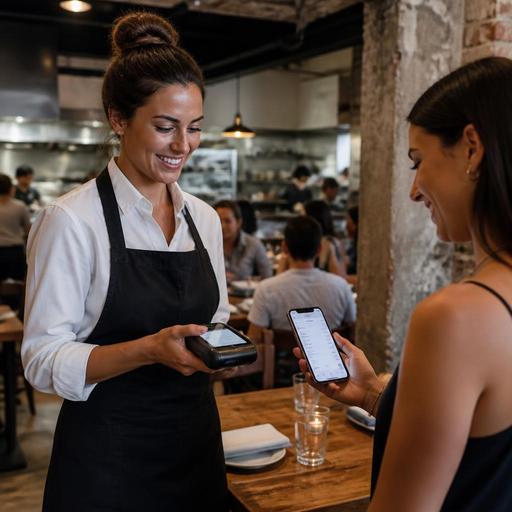
Digital workflows help restaurants standardize what leaves the system after each sale. For example, a quick-service restaurant can automatically send an e-receipt by SMS or email after a self-service or QR-based payment. A full-service restaurant can let guests request a digital receipt without waiting for a printed copy. A cafe serving freelancers and nearby offices can save invoice profiles for repeat company customers, making weekday lunch transactions smoother.
There is also a management advantage. Digital records are easier to search, review, and reconcile. If a guest calls later asking for a copy of a receipt, staff should not need to dig through drawers or shift folders. If a manager wants to review voids, discounts, or split bills, the trail should already exist in the system.
What restaurants should automate first
The best starting point is not every accounting process at once. It is the set of tasks that happen frequently, create friction, and follow a repeatable pattern. Most restaurants should begin with the following areas:
- Automatic e-receipt delivery after payment: Give guests the option to receive receipts digitally through email, SMS, or a guest-accessible order page.
- Invoice creation from order data: Use the same item, tax, and transaction details already captured during ordering and payment instead of re-entering them manually.
- Stored billing profiles for repeat customers: Helpful for office lunch clients, catering buyers, and regular corporate guests who request invoices often.
- End-of-day transaction matching: Sync order totals, payment methods, discounts, and invoice records so managers can review exceptions faster.
- Refund and cancellation documentation: When an item is voided or a payment is reversed, the related record should update automatically and remain traceable.
These automations solve operational pain first. They reduce duplicate work, shorten handoff time between floor staff and cashiers, and make reporting cleaner.
Where manual billing creates avoidable problems
Many restaurants still rely on partial digitalization: orders may be digital, but receipt handling and invoicing remain manual. That creates gaps. A server may close a table in the POS, then walk to another station to ask for an invoice. A cashier may type company details from a photo sent over messaging. A manager may export sales data and separately check which payments require tax-compliant follow-up.
These gaps become more visible in common scenarios:
Busy lunch service
Guests in a hurry often ask for the bill at the same time. If staff must ask whether they want print or digital, collect contact details manually, and issue a separate invoice request afterward, table turnover slows down.
Split payments
When a group divides the bill by seat, item, or amount, manual receipt handling increases the chance of mismatched totals. Automated receipt generation tied to each completed payment makes the final record clearer.
Delivery and pickup orders
Off-premise orders often involve less direct staff interaction, which makes digital receipts especially useful. Guests should not need to call the restaurant later just to request proof of purchase.
Corporate and catering orders
Invoice accuracy matters more when the buyer is a business. If billing names, addresses, or tax details are entered manually each time, mistakes become likely and correction requests consume admin time.
In each case, the problem is not simply paper versus digital. It is whether the data moves once through a connected process or gets recreated at multiple points.
How to build a practical automation workflow
Restaurant owners do not need to redesign everything overnight. A staged approach is more reliable and easier for staff to adopt.
- Map the current billing journey. Identify how an order becomes a payment, how a receipt is issued, when an invoice is requested, and who handles exceptions.
- Choose the highest-friction moments. Focus first on rush-hour billing delays, repeated invoice requests, and end-of-day reconciliation problems.
- Connect front-of-house and back-office data. Order details, modifiers, discounts, payment methods, and customer billing information should feed the same record.
- Set clear guest options. For example: printed receipt, e-receipt, or invoice request. Keep the choices simple so staff can explain them quickly.
- Train staff on exceptions. Automation reduces routine work, but teams still need a process for refunds, corrections, duplicate payments, and guest follow-up.
- Review outputs weekly. Check whether receipt delivery is working, whether invoice fields are accurate, and where staff still fall back to manual steps.
A restaurant using digital menus and integrated order management already has a strong base for this. If guests order through QR menus, place takeaway orders online, or pay through connected systems, much of the necessary transaction data is already available. The next step is making sure receipt and invoice workflows use that data automatically rather than forcing staff to recreate it.
What good automation looks like for guests and staff
For guests, good automation feels simple. They pay, get their receipt in the format they prefer, and can request an invoice without confusion. They do not need to repeat details to multiple staff members. They do not need to wait at the counter while someone re-enters information from scratch.
For staff, good automation removes low-value tasks. Servers spend less time handling paperwork and more time turning tables smoothly. Cashiers resolve fewer receipt disputes. Managers spend less time tracing missing records and more time reviewing operational patterns.
Consider a neighborhood cafe with strong morning takeaway volume. If digital receipts are linked automatically to mobile orders, staff can keep the line moving while still giving guests a clean purchase record. Or think about a casual dining restaurant with many business lunches. If repeat company invoice details are stored securely and attached at checkout, the team avoids the same manual billing conversation every day.
The goal is not to make hospitality feel mechanical. It is to remove administrative friction from moments that should feel fast and clear.
Implementation checklist for restaurant owners
- Audit where receipt and invoice data is entered more than once.
- Identify which service channels need digital receipt options: dine-in, takeaway, delivery, kiosk, or QR ordering.
- Standardize item names, taxes, modifiers, and discount labels so receipts stay consistent.
- Create a repeatable process for corporate invoice requests and saved billing profiles.
- Make refund, void, and cancellation records visible to managers.
- Train staff to explain digital receipt options in one short sentence.
- Review whether your POS, ordering, and reservation-related workflows can share guest and transaction data cleanly.
Restaurants that automate these basics usually gain more than convenience. They create cleaner records, reduce service friction, and build a more reliable operation across dine-in and off-premise channels. Platforms like Restomas can support that shift by connecting digital menus, order flows, and operational systems in a way that makes billing automation easier to manage as the business grows.
