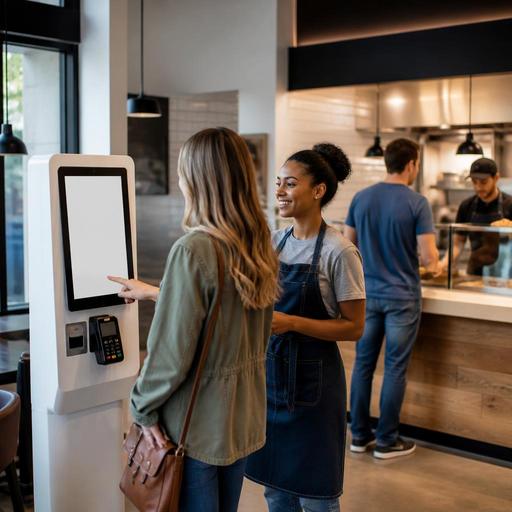
Self-Service Kiosks in Restaurants: Practical Wins and Hidden Costs
Self-service kiosks in restaurants can improve ordering speed, reduce repetitive front-counter work, and make menus easier to browse. But they are not a universal fix. In some concepts, kiosks lift throughput and help guests customize with confidence. In others, they slow the line, confuse visitors, or weaken the hospitality that makes a restaurant memorable. The practical question is not whether kiosks are good or bad. It is where they fit, how they affect operations, and what support systems need to be in place for them to deliver real value.
For restaurant owners and operators, the best decisions usually come from looking beyond the hardware. A kiosk changes menu presentation, order flow, staff roles, payment behavior, and guest expectations. It can also expose weaknesses in item naming, modifier logic, kitchen communication, and peak-hour staffing. When viewed as part of a larger digital operating system rather than a standalone screen, kiosks become much easier to evaluate and manage.
Where self-service kiosks help most
Kiosks tend to work best in environments where speed, consistency, and order volume matter more than extended table-side interaction. Quick-service restaurants, fast-casual brands, food courts, travel hubs, and high-traffic lunch concepts often benefit because guests already expect a more transactional ordering process.
A well-designed kiosk can help in several concrete ways. First, it gives guests time to browse without pressure. Someone choosing a combo meal, comparing sides, or checking add-ons may feel more comfortable exploring on a screen than making a rushed decision while others wait behind them. Second, kiosks can reduce verbal order errors. If a guest selects no onions, extra sauce, or a gluten-aware option directly, there is less chance of mishearing at the counter. Third, kiosks can present modifiers and add-ons more consistently than busy staff members who may skip suggestions during rush periods.
Consider a burger restaurant with a heavy lunch rush. At the counter, staff may focus on moving the line quickly and avoid asking every upsell question. On a kiosk, the restaurant can present fries, drinks, extra cheese, and dessert in a predictable sequence. The guest remains in control, but the menu architecture does more of the selling work. The same applies in a cafe where guests can easily add an extra espresso shot, alternative milk, or a pastry without slowing down the cashier.
Kiosks can also help multilingual locations or tourist-heavy areas. Clear item photos, structured categories, and simple modifier paths reduce confusion when language or accent differences might otherwise create friction. In these cases, the kiosk is not replacing service. It is making ordering more accessible.
Where kiosks hurt the guest experience
Kiosks become a problem when restaurants install them without thinking about guest intent. Not every customer wants a screen, and not every meal occasion should feel automated. Full-service restaurants, chef-driven concepts, date-night venues, and places built around personal recommendations may lose more than they gain if the ordering journey becomes too self-directed.
There are also specific situations where kiosks create operational and guest-experience problems:
- Complex menus with too many decision points: If the guest must navigate many sizes, cooking preferences, sides, sauces, substitutions, and dietary notes, the kiosk can become tiring rather than helpful.
- Older or less tech-comfortable guests: Some customers prefer speaking with a person, especially when they have questions or special requests.
- Peak traffic with too few support staff: A kiosk line can become just as slow as a cashier line if guests need help and no one is available.
- Hospitality-led concepts: If discovery, storytelling, and personalized guidance are central to the brand, a screen can flatten the experience.
- Poor menu structure: Confusing categories, unclear item names, or messy modifier logic make kiosks frustrating very quickly.
Imagine a brunch restaurant with many build-your-own options, seasonal specials, and frequent ingredient substitutions. If the digital flow is not tightly organized, guests may take too long to complete orders, ask staff for constant assistance, or miss important details. In that case, the kiosk does not simplify service. It simply moves confusion from the counter to the screen.
There is also a human factor. Some guests want reassurance, especially when ordering for children, allergies, or dietary preferences. A friendly employee can read uncertainty and guide the sale. A kiosk cannot do that unless the workflow is exceptionally clear and supported by nearby staff.
The operational questions owners should ask first
Before investing in kiosks, operators should examine the real bottleneck. Is the problem long ordering times, payment delays, poor menu visibility, labor pressure, or kitchen congestion? A kiosk may solve one issue while making another worse.
Start with these practical questions:
- Where does service slow down today? If the kitchen is already the bottleneck, faster ordering may only create a larger production backlog.
- Which menu items are easy to order digitally? Core items with straightforward modifiers usually perform best.
- How often does the menu change? Frequent updates require strong menu management discipline across every channel.
- Who will help guests at the kiosk? Self-service still needs human support, especially during early adoption.
- How will orders reach the kitchen? Clean integration with POS and kitchen workflows matters more than the screen itself.
- What happens when an item sells out? Availability must update quickly to avoid disappointment and remakes.
These questions point to a larger truth: kiosks are only as effective as the systems behind them. If your menu data is inconsistent, your modifiers are poorly organized, or your front-of-house and kitchen are disconnected, a kiosk will expose those weaknesses immediately.
How to implement kiosks without hurting service
The strongest kiosk rollouts are usually simple, staged, and operationally grounded. Owners do not need to digitize everything at once. They need a clear use case and a menu flow that matches guest behavior.
Keep the menu path short
Put top-selling categories first, reduce unnecessary taps, and make customization easy to understand. Group modifiers logically. Use plain item names. If a guest cannot complete a standard order quickly, the design needs work.
Offer choice, not forced automation
Many restaurants get better results when kiosks are an option rather than the only path. Let guests choose between kiosk, QR menu ordering, or staff-assisted ordering depending on the concept. This preserves accessibility while still shifting volume away from the counter.
Assign a floor guide during busy periods
A team member near the kiosks can welcome guests, answer questions, direct traffic, and prevent hesitation from turning into line buildup. This role is especially important in the first weeks after launch.
Connect kiosks to live menu management
When prices, item availability, modifiers, and descriptions are managed centrally, the kiosk becomes much easier to trust. This is where restaurant digitization matters. If your dine-in menu, QR menu, ordering channels, and kitchen communication all draw from the same menu structure, updates are faster and errors are less likely.
Measure behavior, not just sales
Watch where guests pause, abandon orders, ask for help, or choose staff instead of kiosk. Those signals often reveal design issues, unclear menu language, or concept mismatch.
A balanced digital strategy works better than kiosk-only thinking
For many restaurants, the smartest path is not to treat kiosks as the center of the guest journey. Instead, place them inside a broader service model that includes digital menus, staff-assisted ordering, and smooth kitchen coordination. A kiosk may be ideal for quick repeat orders, while a QR menu works better at tables and staff remain essential for hospitality, exceptions, and recovery moments.
This balanced approach is often more durable because restaurants rarely serve only one type of guest. A lunch regular in a hurry behaves differently from a first-time visitor, a family with children, or a tourist with dietary questions. Good operations create multiple paths to the same accurate menu and ordering system.
That is also why menu management deserves more attention than the kiosk device itself. If item descriptions are clear, modifiers are structured properly, and availability is updated in real time, every digital touchpoint improves. If not, every touchpoint spreads the same confusion. Platforms like Restomas can support this foundation by helping restaurants organize digital menus, streamline ordering flows, and keep service channels aligned without making the experience feel overly technical.
Self-service kiosks can absolutely help restaurants, but only in the right context. They work best when they reduce friction, not when they replace thoughtful hospitality with unnecessary steps. Owners who define the job clearly, simplify the menu journey, and support the technology with strong operational systems are far more likely to see real gains.
If you are evaluating kiosks, Restomas can help you connect menu management and digital ordering into a smoother day-to-day restaurant workflow.
