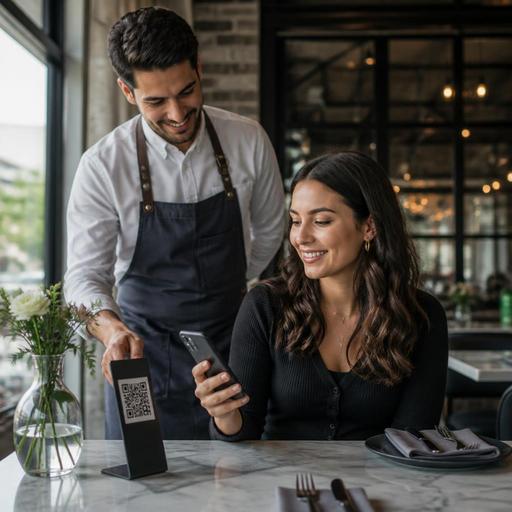
Should Table-Side QR Ordering Replace Waiters or Strengthen Service?
Table-side QR ordering can improve speed, accuracy, and guest control, but the real question is not whether it should replace servers entirely. For most restaurants, table-side QR ordering works best as a support tool that removes low-value friction while keeping hospitality, problem-solving, and upselling in human hands. Owners who treat QR ordering as a labor-cutting shortcut often create new service problems. Owners who use it to support staff usually build a smoother guest experience and a more resilient operation.
Why the best restaurants use QR ordering selectively
Guests do not all want the same kind of service. A quick lunch customer may want to sit down, scan, customize, and pay without waiting. A family with children may prefer to browse at their own pace but still ask a server for guidance. A date-night table may want recommendations, pacing, and a more personal interaction. This is why table-side QR ordering should be designed around service style, not just technology.
In a fast-casual burger restaurant, QR ordering can reduce lines and let guests reorder drinks or desserts without leaving the table. In a busy cafe, it can help solo guests place simple orders during peak periods while staff focus on drink production and table resets. In a full-service restaurant, QR ordering may be most useful for browsing the menu, handling repeat beverage orders, splitting checks, or paying quickly at the end.
The practical lesson is simple: not every step of service needs the same level of human involvement. The strongest model is often hybrid service, where guests can self-serve routine actions while staff stay visible and available for welcome, recommendations, allergy questions, and issue resolution.
What waiters still do better than any QR flow
Technology can present choices, but it cannot fully replace the judgment of a skilled server. A good waiter reads the table, notices hesitation, adjusts tone, manages timing, and recovers problems before they escalate. That matters especially in restaurants where experience is part of the product.
Consider a few examples. A server can notice that a guest ordering spicy food looks uncertain and suggest a milder option. A server can explain the difference between two cuts of steak in a way that makes the decision easier. A server can pace appetizers because the kitchen is temporarily backed up, or recommend a bottle that fits both the meal and the budget. These are not small details. They shape guest satisfaction and check quality.
Table-side QR ordering also struggles when the menu needs explanation. Tasting menus, regional specialties, chef-driven seasonal items, wine pairings, and allergy-sensitive dishes often need active conversation. If your concept depends on storytelling, trust-building, or guided upselling, removing too much human contact can flatten the experience.
That does not mean QR has no place in service-heavy concepts. It means the digital flow should support the team instead of replacing the parts of service that create loyalty.
Where QR ordering creates real operational gains
Restaurant owners should evaluate QR ordering based on specific operational outcomes, not trends. The most useful benefits usually appear in repeatable, high-frequency tasks.
- Faster order capture: Guests can place straightforward orders as soon as they are ready instead of waiting for a staff pass-by.
- Fewer entry mistakes: Modifier selections go directly into the order flow, reducing handwriting issues or verbal miscommunication.
- Better peak-hour control: Staff can focus on food running, table care, and exception handling rather than repeatedly taking simple orders.
- More flexible menu management: Sold-out items, daily specials, or limited ingredients can be updated digitally without reprinting menus.
- Smoother payment: Guests who are in a hurry can pay when ready, which can reduce end-of-meal bottlenecks.
Imagine a brunch restaurant with heavy weekend traffic. Without QR support, staff may spend too much time repeating standard menu explanations, taking coffee refills, and processing payments. With a well-structured digital menu, guests can reorder drinks, review add-ons, and pay independently, while servers focus on table turns, dietary questions, and hospitality. The result is not “fewer humans” as a principle. The result is better use of human attention.
This is also where platform capabilities matter. If your QR menu, ordering flow, order routing, and item availability are disconnected, staff may end up doing double work. A system that connects menu updates, table ordering, and operational visibility is more useful than a QR code that only displays a static PDF.
How to decide whether your restaurant should lean human, digital, or hybrid
Before rollout, owners should define the role of QR ordering by service model. A practical way to do this is to review each stage of the guest journey and decide which steps should be guest-led, staff-led, or flexible.
- Map the service sequence. Break down arrival, seating, menu browsing, first order, modifications, follow-up orders, payment, and feedback.
- Mark friction points. Identify where guests wait unnecessarily or where staff repeatedly handle simple tasks.
- Protect high-value interactions. Keep human involvement where it drives trust, upselling, or emotional connection.
- Digitize repetitive actions. Let QR handle reorder, simple customization, bill splitting, and quick payment where appropriate.
- Create a fallback path. Always make it easy to order through a staff member without embarrassment or delay.
For example, a neighborhood pizzeria might let guests scan to browse and order extra drinks, but still have staff take the first order for larger parties. A cocktail bar might use QR for payment and late-night snack orders, while bartenders continue to guide drink selection. A hotel restaurant might offer QR ordering for breakfast rush and room service overflow, while preserving traditional service at dinner.
The key is not to force every guest into one behavior. Give options, then train staff to notice which option each table prefers.
Common mistakes that make QR ordering feel cold or confusing
Many poor results come from execution problems rather than from the idea itself. If guests feel abandoned, the issue is usually not the QR code alone. It is the absence of service design.
1. Treating QR as an excuse to disappear
Guests still want acknowledgment. A quick welcome, a clear explanation, and visible staff presence make a major difference. “You can order here whenever you’re ready, and I’m happy to help with recommendations” feels very different from silence.
2. Building a weak digital menu
If item names are vague, modifiers are unclear, photos are inconsistent, or sold-out items remain visible, guests lose confidence. Digital convenience depends on menu clarity.
3. Forgetting less tech-comfortable guests
Some guests prefer traditional ordering, have limited battery, or simply do not want to scan. Offer a graceful alternative without making them feel like a problem.
4. Ignoring staff training
Servers need to know how the system works, how orders route, how to step in smoothly, and how to recover mistakes. If the team sees QR as competition, adoption will suffer. If they see it as support, service becomes more consistent.
5. Measuring only labor savings
Look at guest feedback, ticket accuracy, speed of service, table turn rhythm, and manager intervention frequency. Cutting one labor task is not helpful if it creates confusion elsewhere.
A practical rollout plan for restaurant owners
If you want table-side QR ordering to succeed, start small and learn fast. Pilot it in one daypart, one section, or one order type before expanding. Lunch, happy hour, and beverage reorder flows are often easier starting points than a complex dinner service.
Review your menu before launch. Simplify categories, improve item descriptions, clean up modifier logic, and remove any choices that create avoidable confusion. Then brief the team on positioning: QR is there to give guests flexibility, not to remove hospitality.
During the pilot, ask managers to observe three things closely: where guests hesitate, when staff must intervene, and which tables still prefer traditional ordering. Those observations will tell you whether the digital flow is helping the operation or just shifting work around.
Over time, the goal should be a service model where guests feel in control and staff feel more effective. That is the strongest case for table-side QR ordering. It should not turn your dining room into a vending machine. It should remove delays, keep menus current, and free your team to do the human work that matters most.
Restaurants using connected tools for QR menus, live menu updates, and order management often find it easier to build that balance, and Restomas is designed to support exactly that kind of practical digital workflow.
