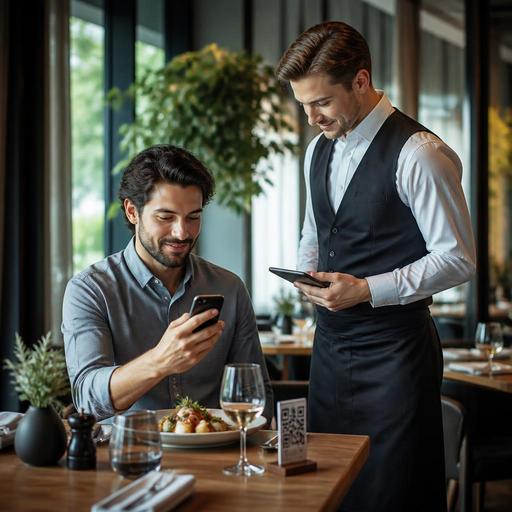
Should Table-Side QR Ordering Replace Waiters or Support Service?
Table-side QR ordering is often framed as a simple choice: replace waiters or keep traditional service. In practice, most restaurants benefit more when QR ordering works as a support tool rather than a full substitute for staff. The real question is not whether guests can scan and order, but how the system changes service speed, upselling, kitchen flow, and the overall dining experience. For restaurant owners, the best decision usually depends on service style, menu complexity, guest expectations, and how well digital ordering connects with daily operations.
Why the debate is too simple for real restaurant operations
Many operators first look at QR ordering as a labor decision. If guests can browse the menu, customize items, and send orders directly from the table, it seems reasonable to expect fewer front-of-house tasks. That can be true in certain formats, especially fast casual, cafés, food halls, and high-volume venues where speed matters more than personalized table service.
But full-service restaurants usually do more than transmit orders. Servers guide guests through the menu, explain ingredients, recommend pairings, manage timing between courses, spot confusion, and recover problems before they escalate. A QR code can collect an order efficiently, but it cannot read a hesitant guest, reassure someone with dietary concerns, or notice that a table wants a slower pace.
This is why the better operational question is: which parts of service should be digitized, and which parts still create value through human interaction? In many cases, restaurants get stronger results when they remove repetitive friction from service while keeping staff visible and available.
Where table-side QR ordering works best as a support tool
QR ordering is especially useful when it reduces waiting without making the restaurant feel unattended. Good use cases usually share one feature: the technology handles routine steps, while staff focus on hospitality and problem-solving.
- Busy lunch service: Guests can order quickly during short meal breaks, while staff spend less time taking basic orders and more time managing turn times and accuracy.
- Cafés and casual dining: Guests often prefer speed and convenience, especially for repeat orders, add-ons, and simple modifications.
- Large terraces or multi-zone venues: QR ordering helps cover service gaps in areas where staff response times can be uneven.
- Tourist-heavy locations: Digital menus can present multiple languages, item photos, and allergen details more clearly than verbal explanations alone.
- Peak periods: When the dining room is full, QR ordering can prevent the common bottleneck of guests waiting just to place the first round.
In these settings, the goal is not to hide staff. It is to free them from repetitive order-taking so they can greet tables faster, answer better questions, and monitor the room more actively.
When replacing waiters creates more problems than it solves
There are also situations where aggressive self-ordering can damage the guest experience. Restaurants should be careful about removing human service if the concept depends on guidance, storytelling, or emotional connection.
For example, a chef-led restaurant with seasonal dishes may need staff to explain ingredients, sourcing, or preparation style. A steakhouse may rely on servers to guide cut selection and cooking preferences. A family-style restaurant may need active support for shared ordering, pacing, and special requests. In these environments, a QR system can still help, but it should not become the only service channel.
There are practical risks as well:
- Order confusion: Guests may misunderstand portion sizes, side options, or combo structures if menu design is weak.
- Lower perceived hospitality: Some guests interpret scan-only service as neglect, especially in full-service formats.
- Weaker upselling: If the digital flow is poorly structured, staff may lose natural opportunities to recommend starters, drinks, or desserts.
- Kitchen pressure: Direct ordering can create sudden ticket spikes unless pacing rules and prep visibility are built into the workflow.
- Accessibility gaps: Not every guest wants to scan, use a phone battery, or navigate a digital interface at the table.
If owners adopt QR ordering mainly to reduce headcount, they may miss the larger operational design issue. Technology does not automatically simplify service. It changes where complexity appears.
How to implement QR ordering without hurting hospitality
The strongest approach is hybrid service. Guests should be able to order digitally when they want speed, while staff remain ready to guide, confirm, and assist. This gives the restaurant flexibility across different guest types and dayparts.
1. Decide what the guest should do alone
Start by mapping the guest journey. Should guests use QR for browsing only, for first-round drinks, for reorders, or for full meal ordering? A lunch-focused bistro may allow complete self-ordering, while a dinner concept may use QR mainly for menu browsing, allergen information, and extra beverage rounds.
2. Simplify the menu structure
Digital ordering only works when menu logic is clear. Categories, modifiers, add-ons, and optional notes should be easy to understand. If guests regularly need staff to explain how to build a dish, the digital flow is not ready. Clear item names, short descriptions, and sensible modifier groups reduce mistakes before they reach the kitchen.
3. Train staff for a new role, not a smaller role
When QR ordering is introduced, servers should not become passive. Their role shifts toward greeting, menu guidance, allergy support, timing control, and guest recovery. Staff should know when to step in, how to spot hesitation, and how to monitor tables that have scanned but not ordered.
4. Protect kitchen flow
Direct table-side ordering can send many tickets at once. Restaurants need rules for firing items, course pacing, and modifier handling. If the QR system connects with order management or POS workflows, operators can reduce duplicate entry and keep front-of-house and kitchen teams aligned.
5. Keep a non-digital option available
Some guests will always prefer to speak with a person. That is not resistance to innovation; it is a valid service preference. Restaurants that offer both options usually avoid friction and appear more guest-centered.
Concrete actions for restaurant owners evaluating table-side QR ordering
If you are considering table-side QR ordering, avoid treating it as a trend decision. Test it against real service goals.
- Identify your bottleneck: Is the problem slow order capture, menu confusion, upselling inconsistency, or staff overload during peaks?
- Choose one service window first: Pilot QR ordering during lunch, terrace service, or weekdays before rolling it out everywhere.
- Measure operational signals: Watch ticket accuracy, time to first order, staff movement, guest questions, and table turnover patterns.
- Review menu friction points: Find which items generate the most clarification requests and improve those digital descriptions first.
- Design staff touchpoints intentionally: Decide when servers greet, check back, course-correct, and present payment options.
- Use guest feedback carefully: Ask whether the QR flow felt convenient, confusing, too impersonal, or just right for the concept.
A practical example is a busy neighborhood restaurant that struggles with lunch queues and delayed drink reorders. Instead of moving all service to phones, it can let guests scan to place first-round lunch orders and repeat beverages, while staff continue to welcome tables, answer questions, and manage special requests. Another example is a tourist café where multilingual QR menus reduce confusion, but a floor team still helps guests choose portion sizes and local specialties.
In both cases, the digital tool improves speed and clarity without removing the human layer that protects satisfaction.
The best answer is usually service design, not staff replacement
For most restaurants, table-side QR ordering is not a true replacement for waiters. It is a support system that can remove friction, improve menu access, and help teams handle volume more consistently. The restaurants that succeed with it are usually not the ones chasing staff reduction alone. They are the ones redesigning service so technology handles repetitive actions and people handle trust, timing, and hospitality.
That is why implementation matters more than ideology. A well-structured QR menu, clear modifier logic, smooth order management, and visible staff support can make table-side ordering feel modern and helpful. A poorly planned rollout can make the same tool feel cold and confusing.
Restaurants using platforms like Restomas can approach this more practically by connecting QR menus, ordering flow, and operational management in one system, making it easier to support guests without adding unnecessary complexity.
